Semrush is one of the leading all-in-one tools for SEO and marketing.
Constantly increasing prices and an overloaded interface force specialists to optimize budgets and reconsider their approach to choosing a tool.
In this article, we will review the market for marketing SEO tools and analyze the strengths and weaknesses of Semrush and consider alternatives for solving the main tasks in SEO and marketing: keyword research, backlink analysis, rank tracking, and other tasks.
- List of Necessary Tools for Internet Marketing
- Semrush pricing
- About Semrush
- Why then are specialists looking for alternatives?
- Which main modules will we review
- Keyword Research Tools
- All-in-One Platforms with Keyword Research Modules
- Backlink Analysis
- Content Ideas & Optimization
- Site Audit
- Competitive Analysis
- Rank Tracking
- How to Build an Effective Tool Ecosystem?
List of Necessary Tools for Internet Marketing
To speed up the workflow and avoid overpaying for certain features, you need to divide all services into specific tasks and select the optimal service for each specialized task.
Necessary list of tools:
- Keyword Research: KeywordStat / Semrush
- Backlink Analysis: Majestic SEO and Ahrefs / SE Ranking / Semrush
- Content Ideas & Optimization: Wrytix / Surfer
- Site Performance: Screaming Frog / Netpeak Spider
- Competitive Analysis & Traffic: Similarweb / Semrush
Semrush pricing
The pricing plans for classic SEO consist of three main plans: Pro, Guru, and Business.
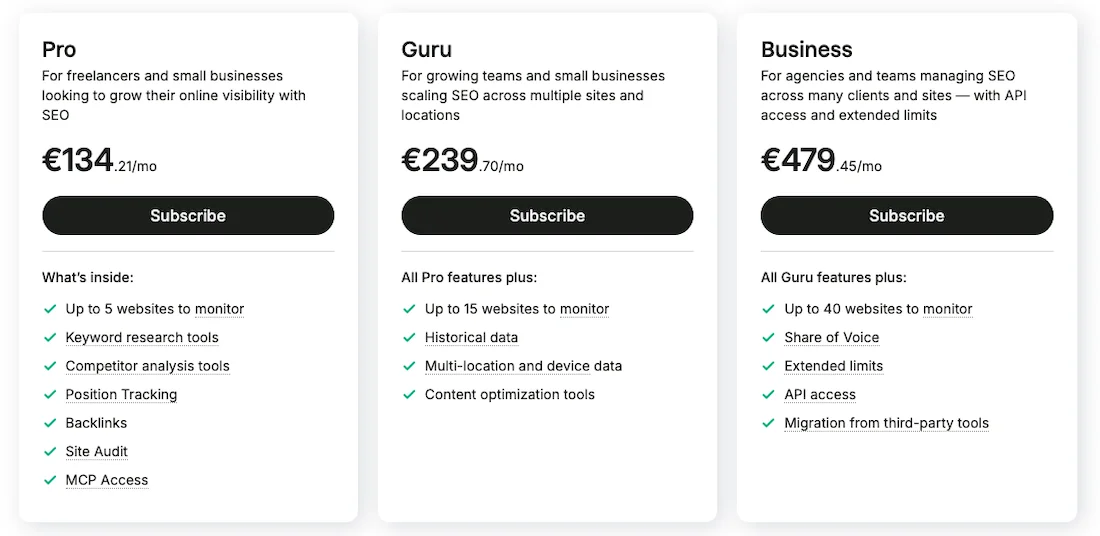
The Pro plan is a solution for small companies and freelancers who work on small projects. The plan provides a basic set of tools: keyword research, competitor analysis, position tracking, backlink auditing, and a project limit that allows monitoring up to five websites.
The Guru plan is for small teams and agencies and includes the capabilities of the previous plan, with the limit expanded to 15 websites. The main advantage of this plan is access to historical data, a content optimization tool, and Semrush’s position tracking capabilities with division by specific locations and device types.
The Business plan is aimed at large agencies and large teams. The plan allows you to manage up to 40 projects. In addition to expanded limits for all types of reports, access to the Share of Voice metric and API integration for automated reporting is provided, and Semrush offers a free data migration service from third-party SEO services.
Semrush can be supplemented with additional modules, additional users can be paid for, and Semrush has a special plan for enterprises.
About Semrush
The Semrush platform is deservedly considered one of the leaders and the main product in the industry, one of the main products in the internet marketing industry.
Semrush was originally built around search advertising analysis and competitive intelligence and eventually evolved into a huge ecosystem. Semrush has a very large database, billions of keywords, deep search results history across dozens of countries, a tool for basic filtering and grouping of semantics — Keyword Magic Tool, and one of the best interfaces on the market.
A traffic analytics module for evaluating the traffic of other websites based on panel data. And Semrush has very good data for backlink analysis.
Why then are specialists looking for alternatives?
First of all, it is the cost, pricing plans are constantly increasing and sometimes become unaffordable for small teams. Not all specialists use the full functionality of Semrush, and therefore sometimes it is necessary to solve a specific task.
Semrush is moving towards developing a universal tool for the marketing director. Because of this, the interface has become very cumbersome.
If, for example, you go to the keyword module, you are offered a tab for an SEO manager and advertising analysis. For a classic SEO specialist, most of the functions remain unused, and the cost is already included in the pricing plan.
Which main modules will we review
Let’s start with Keyword Research. It is located in the SEO tab, where there are Keyword Overview, Keyword Magic Tool, and Keyword Strategy Builder.
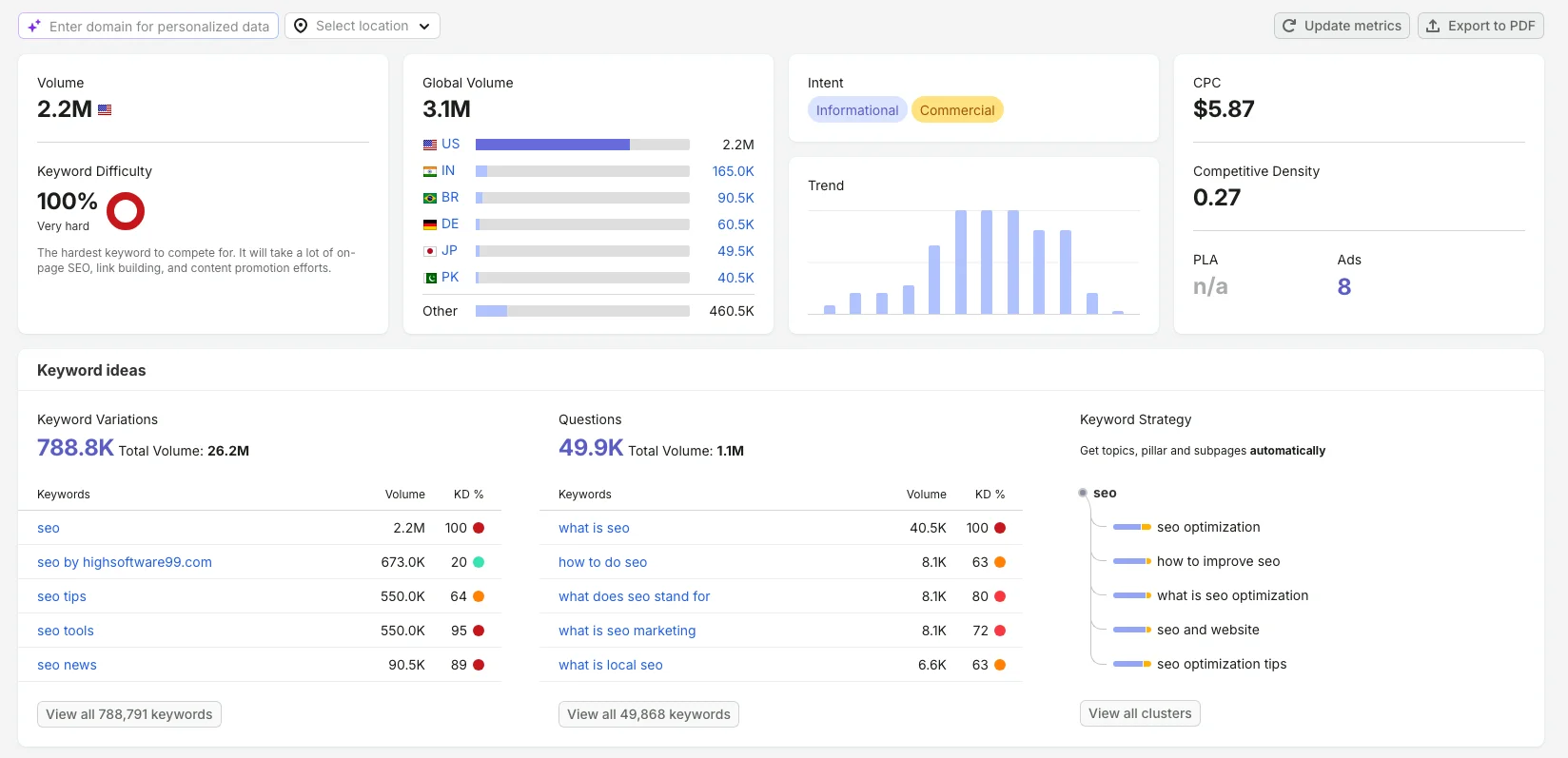
This Semrush tool is made at a high level. You get a convenient dashboard with metrics: search volume, keyword difficulty, global volume, intent, CPC, trend, competitiveness density. A folder with thematic groups for filtering is automatically created for you.
Keyword Ideas are divided into keyword variations, questions, and keyword strategy.
The SERP Feature column shows the presence of special Google elements: FAQ, videos, images for each keyword.
In my opinion, the Keyword Overview module is very convenient in Semrush. But if you need a specialized tool for working with keywords, fast, without overpaying for excessive functionality, then you should consider the following alternatives.
Keyword Research Tools
KeywordStat
KeywordStat was originally created for fast keyword collection, automatic cleaning, and keyword clustering without overloaded charts.
KeywordStat Pricing
The service costs $9 per month when purchased annually, with a 25% discount. There is a free plan that allows you to perform two analyses per day and five analyses per day after creating an account.
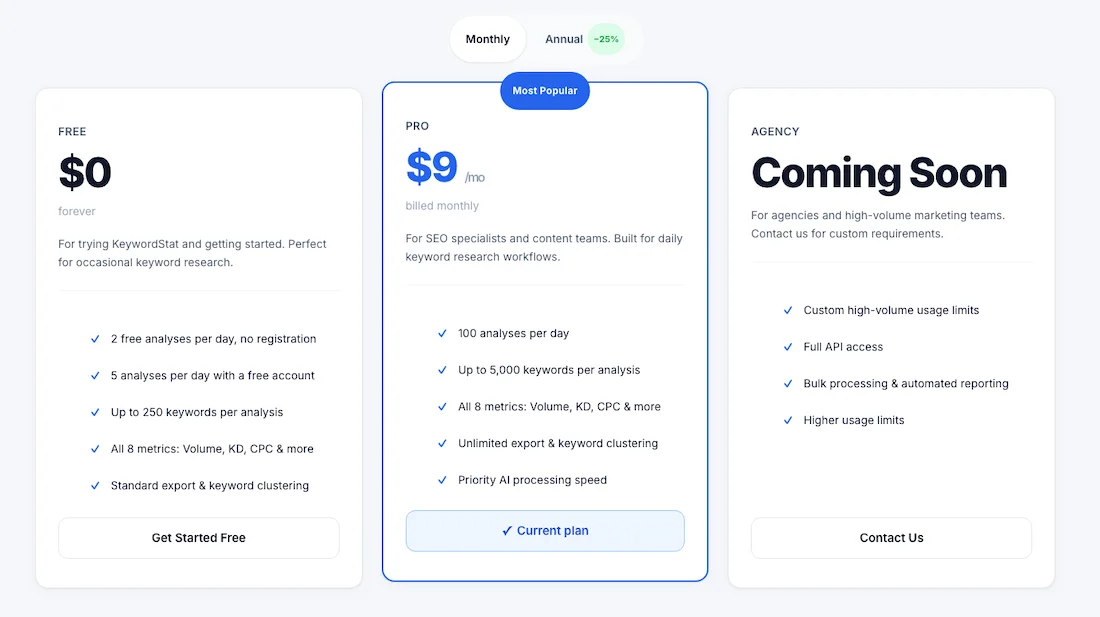
KeywordStat provides all key analytics in one click. You simply enter a keyword or analyze a domain URL and get all the data in one click. This includes search volume, keyword difficulty, traffic potential, global volume, intent, CPC, commercial value, and trend.
KeywordStat has a useful AI Insight feature. This is an interesting feature of the service — a short AI-generated text summary is provided for each keyword. The neural network explains the specifics of this keyword in detail, intent, provides recommendations on which page needs to be created: block, listing, landing page, and makes a final conclusion on whether this keyword is worth processing.
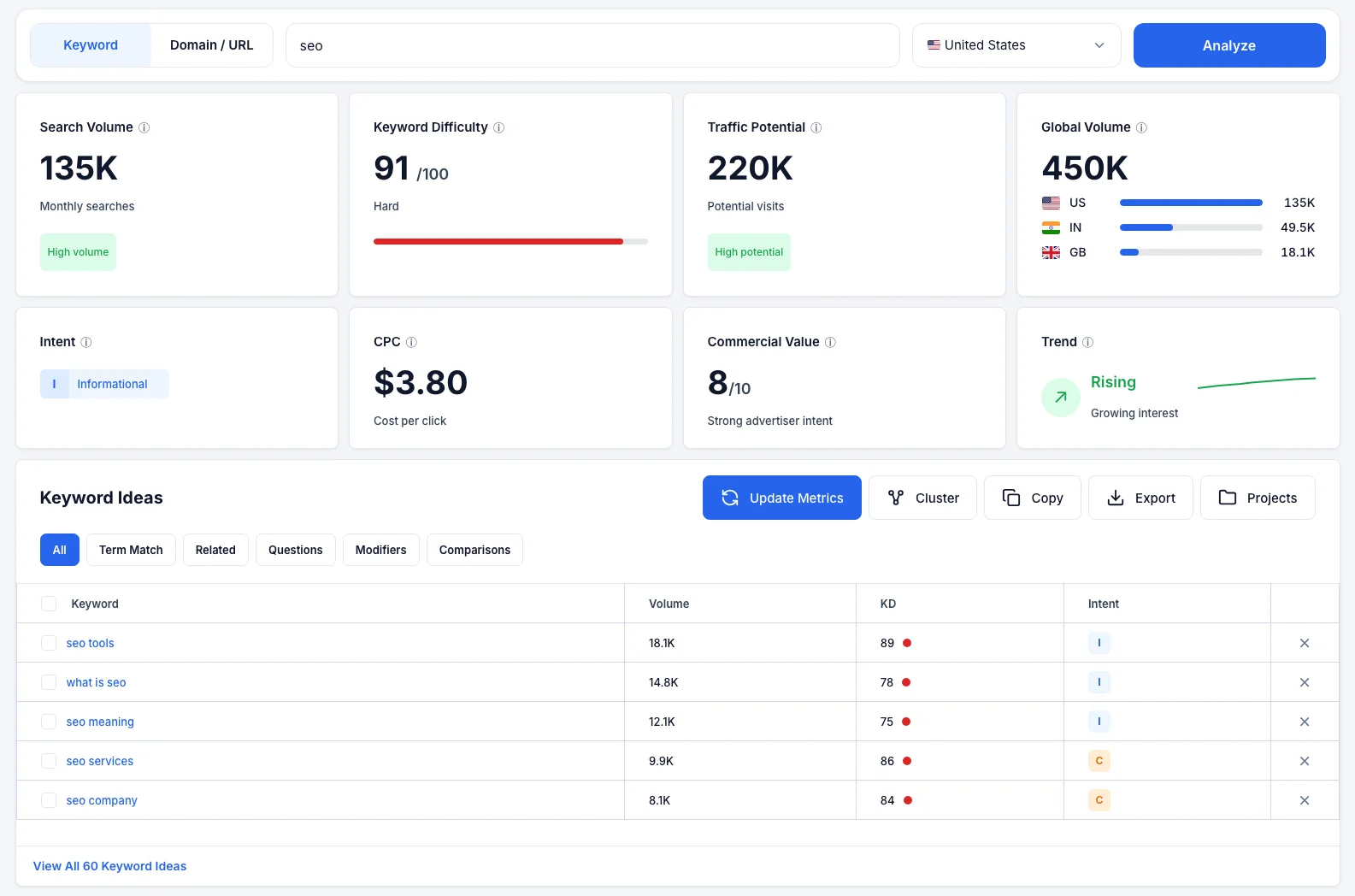
Idea Generation
The system divides ideas into the following tabs: Term Match, Related, Questions, Modifiers, Comparisons. It automatically cleans keywords from branded noise, outdated data such as the year, incorrect keyboard layouts, and provides you with ready-to-use semantics that you can cluster, copy, or export in one click.
Clustering
The clustering tool works automatically in KeywordStat. There are soft and hard clustering options, and you get a list of keywords and a list of pages that you need to create. It should be noted that the search volume data may not match the data in Semrush.
Domain / URL Analysis
KeywordStat has a domain or URL analysis function. As a result of the analysis, you get data on primary keywords and secondary keywords. Keywords are divided into likely rank 4 and opportunities. There is a Content Gaps function here for finding missed keywords.
KWFinder by Mangools
The popular KWFinder tool has long been valued on the market due to one of the most accurate algorithms for calculating keyword difficulty.
KWFinder Pricing
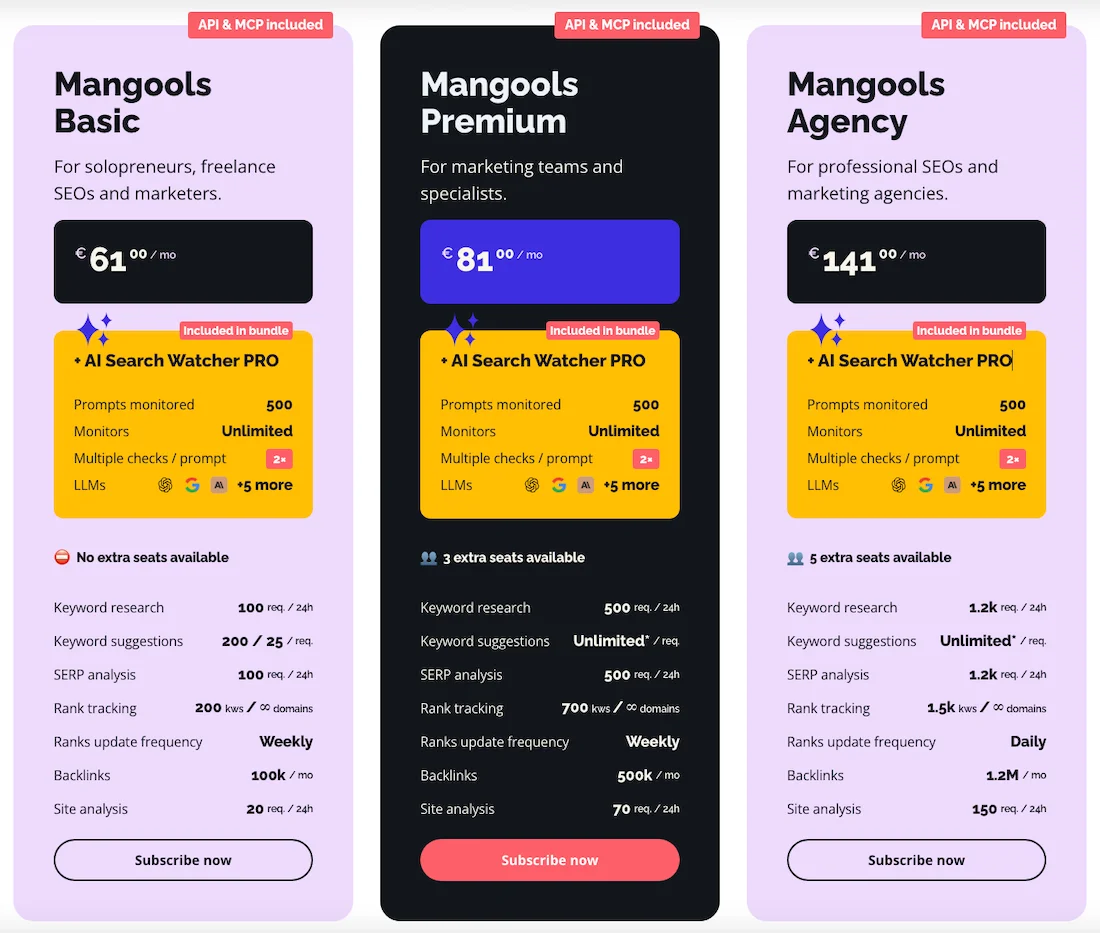
The cost of using Mangools starts at €61 per month, with a 35% discount when purchased annually.
Functionality
There are Search by Keyword and Search by Domain. The interface is divided in half: on the left you see a list of keywords with metrics, on the right a dashboard with Keyword Difficulty and a search volume chart, followed by SERP Overview — this is the top 10 search results with authority metrics such as Domain Authority, Page Authority, and Majestic Trust Flow.
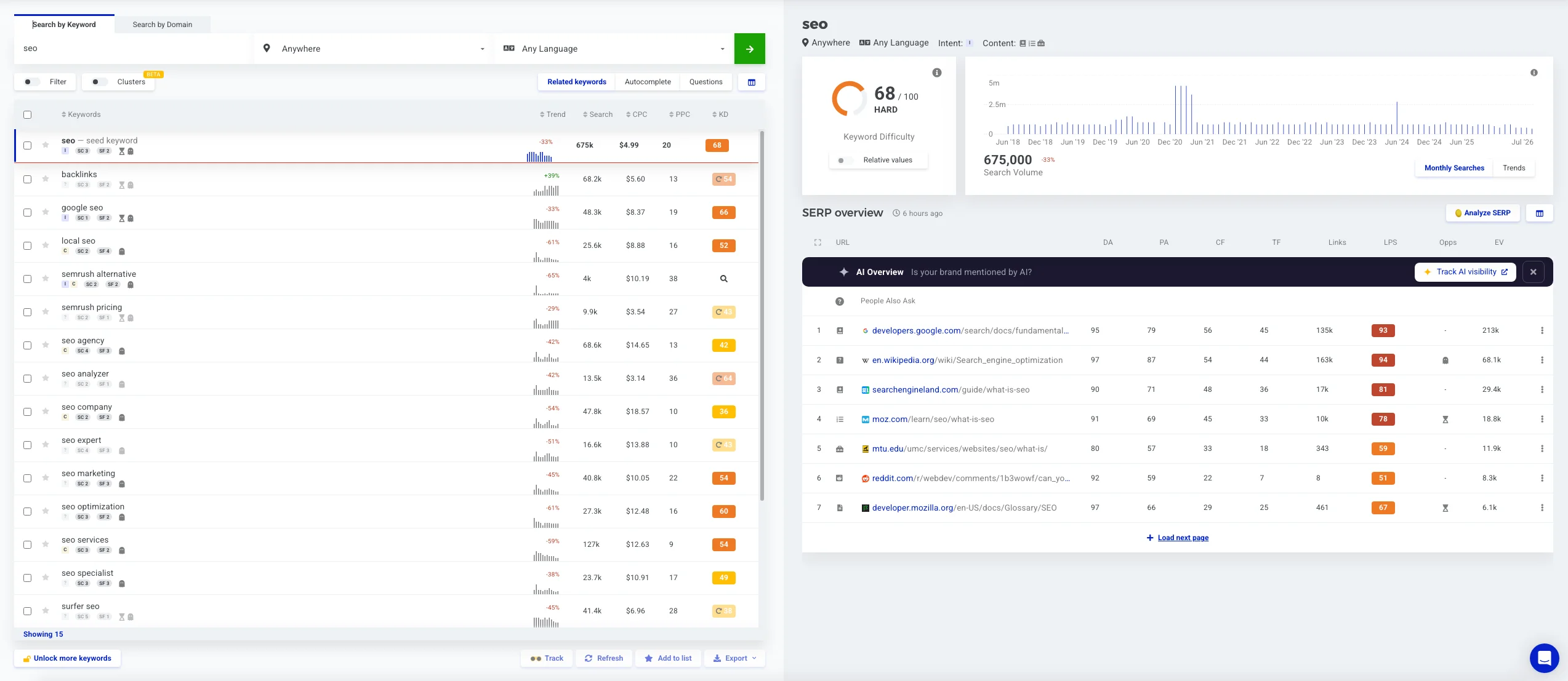
This eliminates the need to open new tabs to evaluate competitors in the top results. The service allows you to parse search results with accuracy down to a specific city, which is very important for local businesses. The database is updated less frequently than Semrush, which means the service may not always accurately display search volume for hot trends. The basic plan has limits on the number of words in one report, but the service is still worthy.
Clustering
Clustering is located next to the filtering and allows you to group keywords right here during keyword research.
KeywordTool.io
A specialized and fast keyword parser that collects data directly from search suggestions.
KeywordTool Pricing
The cost of using KeywordTool Pro starts at $88 per month, with a 20 percent discount when purchased annually.

Functionality
In this service, instead of focusing on Google, as with Semrush and other services, there is a line of tabs for popular search engines and social networks: Google, YouTube, Amazon, eBay, App Store, Play Store, Instagram, TikTok, Reddit, Pinterest, and others.
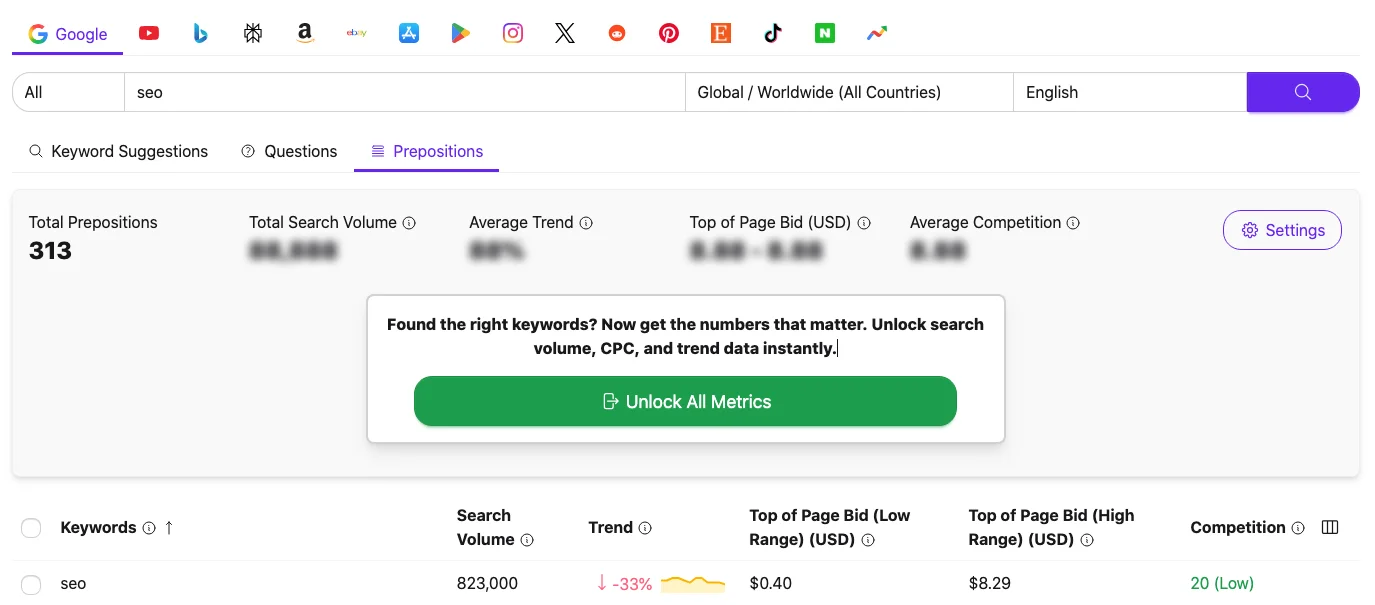
KeywordTool is great at finding low-volume long-tail keywords that have not yet made it into the historical databases of large SEO services. This makes it a very useful tool for e-commerce, which you can use in the Amazon and eBay tabs, and for content creators in the YouTube and TikTok tabs.
KeywordTool has no historical database. Search volume metrics are pulled directly from Google Keyword Planner, so there will often be empty cells for unpopular niches. The tool does not analyze domains and does not perform clustering.
All-in-One Platforms with Keyword Research Modules
Ahrefs
Ahrefs is a direct competitor to Semrush, historically a web crawler that has grown its Keyword Explorer module very significantly, yes, one of the strongest tools on the market.
Ahrefs Pricing
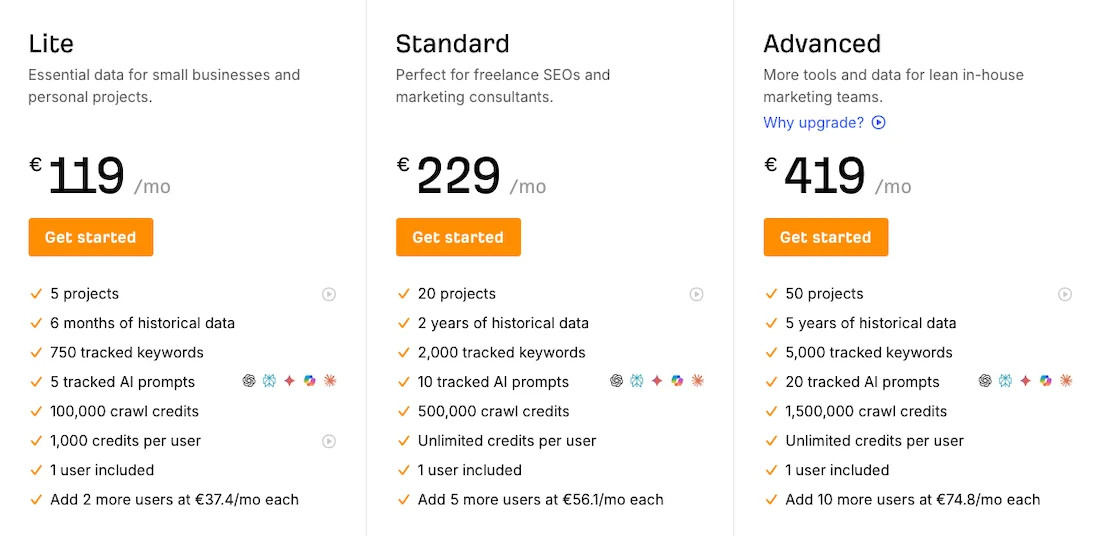
The cost of using Ahrefs starts at €119 per month, with a 17 percent discount when purchased annually, and there are also other plans, and the pricing plan may depend on your geo.
Functionality
Ahrefs has a very large database for the US and European countries. The keyword analysis dashboard is very visual, contains keyword difficulty, search volume, shows growth, forecast, shows clicks, CPC, CPS, division by mobile and desktop, traffic potential, parent topic, global search volume, keyword ideas are divided into term match, questions, also rank for, also talked about.
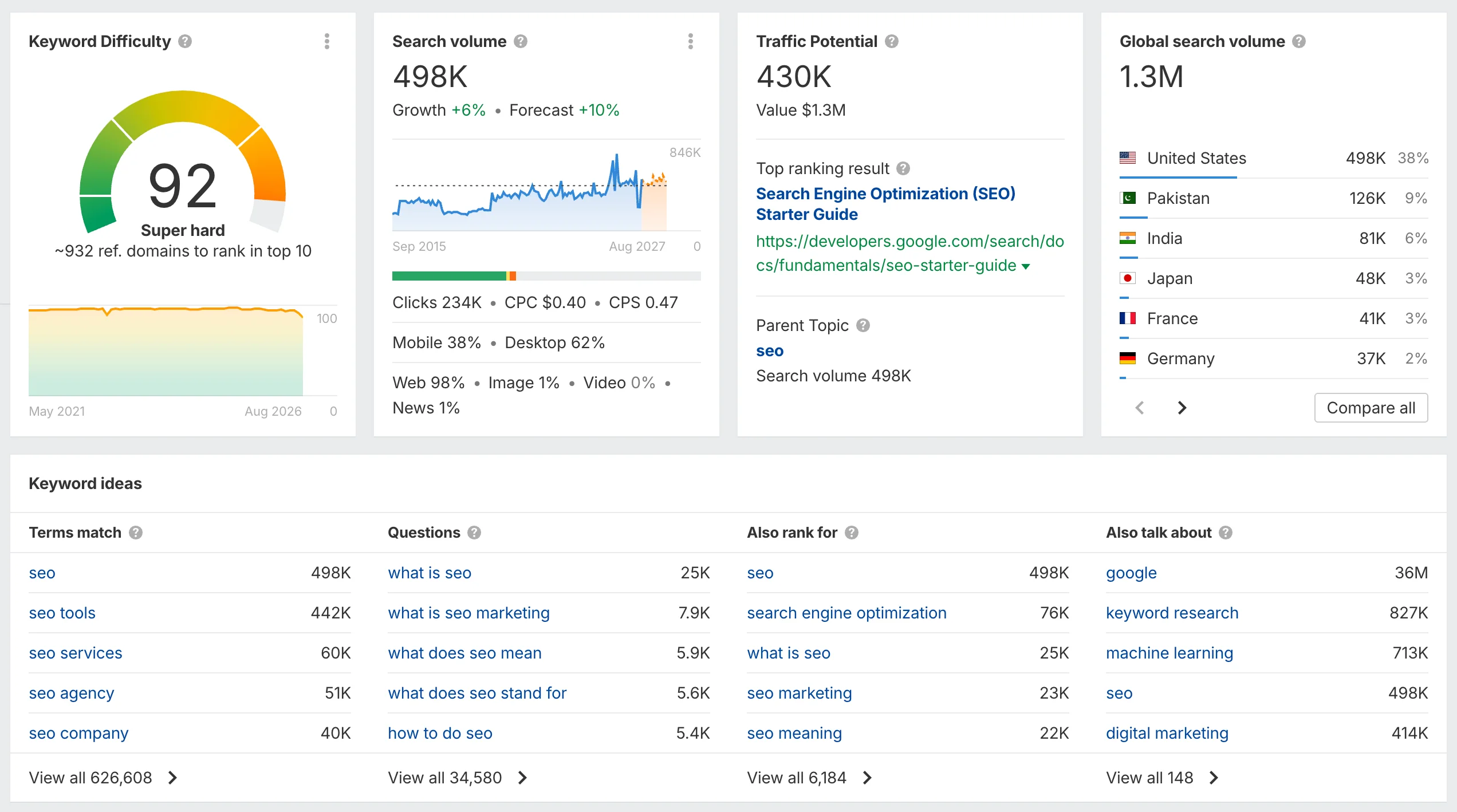
When analyzing keyword ideas, there are additional modules: matching terms, related terms, search suggestions, global terms. The main disadvantage SEO specialists point out is the credit policy, which has made Ahrefs extremely expensive, as well as the keyword difficulty calculation algorithm, which is mainly tied to the backlink mass of competitors, and sometimes does not match the actual difficulty of the query.
Serpstat
Serpstat is a large multifunctional tool that was originally a serious competitor to Semrush. It initially developed as a service for analyzing competitors in search results, but over time accumulated a large amount of data and became a full-fledged marketing tool.
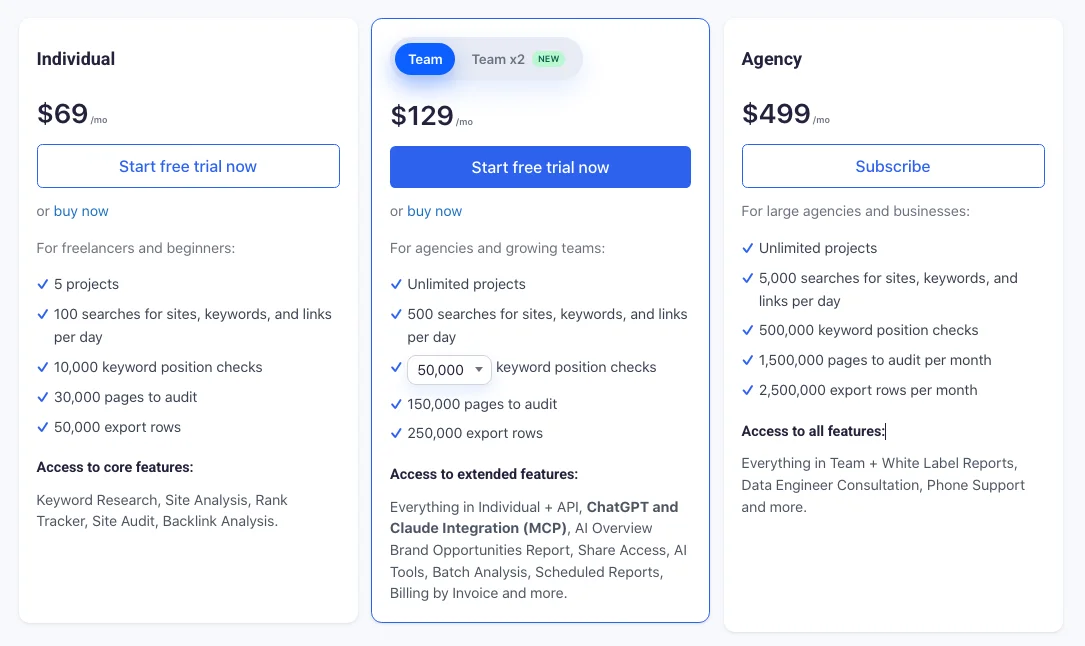
Serpstat Pricing
The cost of using Serpstat starts at $69 per month. There is a 27% discount when purchased annually. There are plans for agencies, API access, and LLM Brand Monitor.
Functionality
Serpstat is very well suited for local promotion.
The keyword analysis dashboard consists of Difficulty, Search Volume, CPC, Global Volume, Keyword Ideas, Related Keywords, Questions, and there is also SERP Overview and Ranking Dynamics.
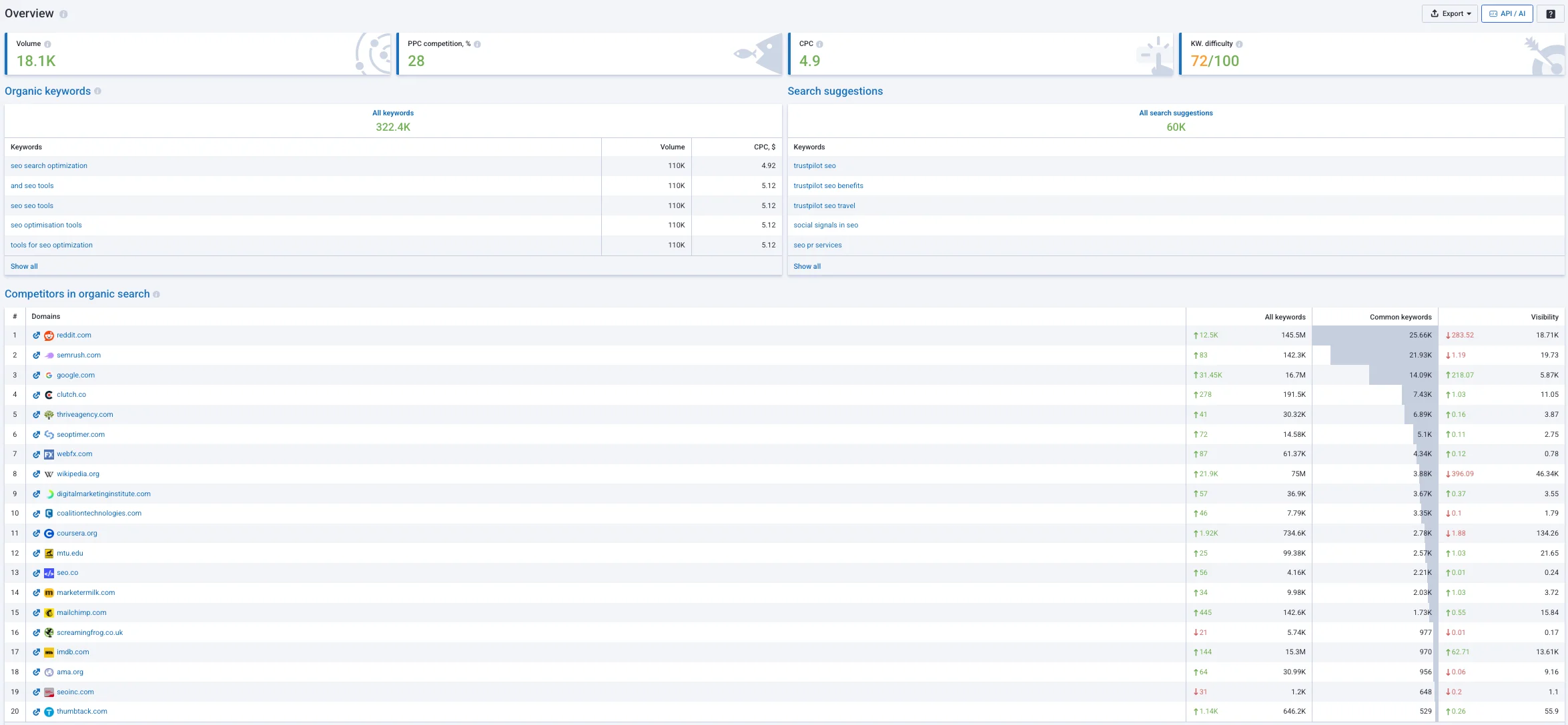
The keyword analysis module allows you to check search volume and search results with accuracy down to the region. In addition, there is a clustering tool. You have to pay extra for it, but it is priced separately. But the Keyword Grouping Tool is very useful: it groups semantics based on the overlap of the top 10 SERP results, with a very clean and pleasant interface.
Ubersuggest (Neil Patel)
This is also a mass-market SEO tool that is very popular among small businesses and solo webmasters.
Ubersuggest Pricing
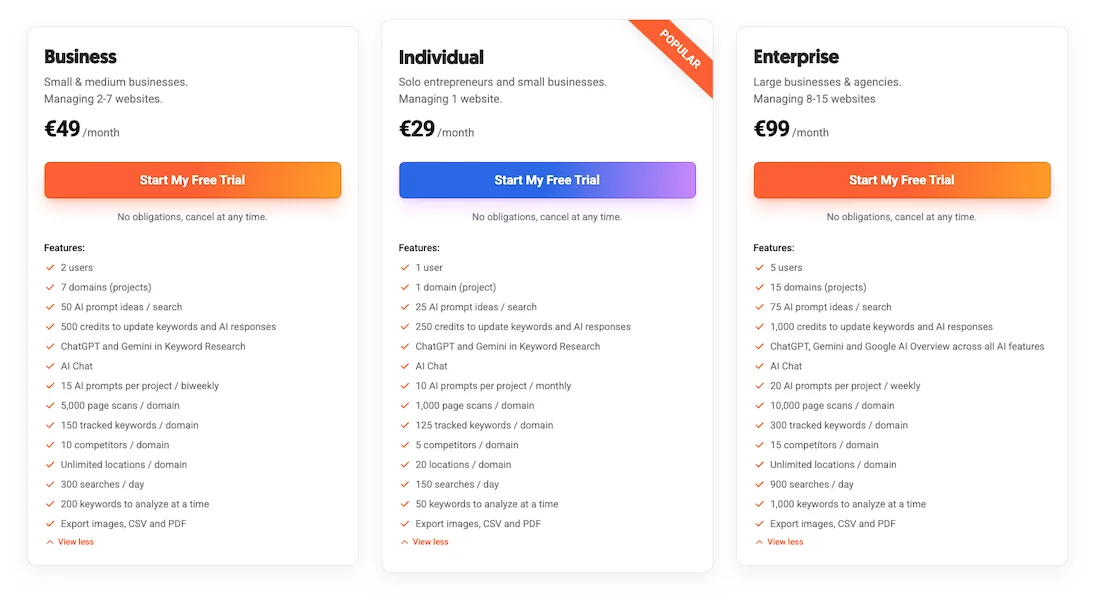
The cost of using Ubersuggest is low, starting at €29 per month. There is a discount when purchased annually, and there are several lifetime options, with the entry-level one starting at €290 and the maximum being €990. The aggressively low subscription price and availability of a lifetime plan are among the main advantages of Ubersuggest because it pays for itself in just a few months.
Functionality
The Research Topics module contains ID Word, Review, Bulk Analysis, Keyword IDs, Import IDs, Keyword List. Keyword collection is simple and shows us intent, volume, CPC, paid difficulty, and SEO difficulty. Ubersuggest offers ready-made content ideas that can even be used by beginner marketers.
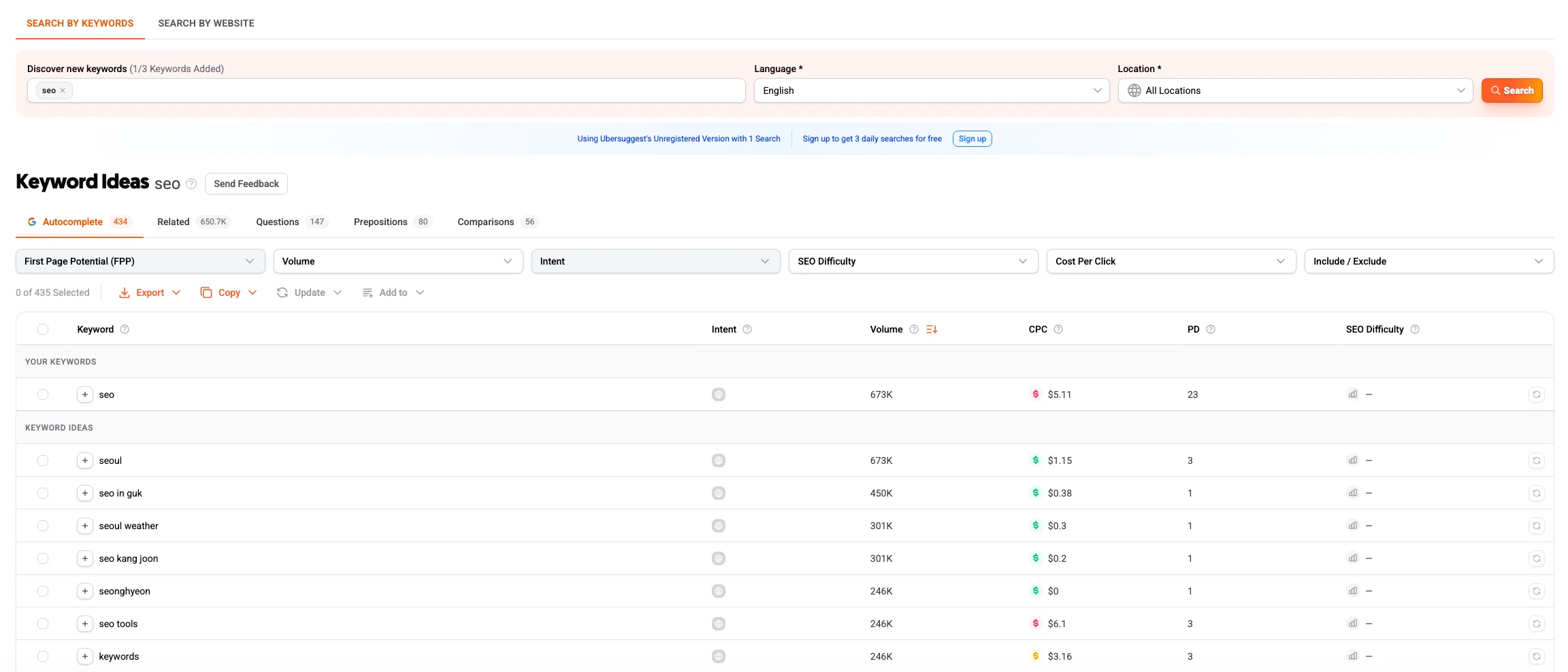
In terms of data, it falls behind giants such as Semrush and Ahrefs in volume and speed. Search volume and keyword difficulty data in narrow niches or local markets have a significant margin of error, as the tool largely uses historical Google Keyword Planner data.
But the tool is still popular among marketers and is actively developing in line with modern AI trends.
Comparison Table: Keyword Research
| Comparison Parameter | Semrush | Ahrefs | KeywordStat | KWFinder | SE Ranking |
|---|---|---|---|---|---|
| Database Completeness | Maximum (one of the largest databases on the market) | Maximum (global leader, huge databases for US/EU/Global) | Medium (focused on popular and cleaned semantics) | Medium, with limits on the number of queries per day | High (well adapted to local geos) |
| Data Accuracy | High (accurate algorithms for calculating search volume and difficulty) | High (but may underestimate traffic in rare/local geos) | Medium (focuses on intent and ready-made evaluation rather than dry numbers) | Medium (database is updated less frequently than major competitors) | High (good accuracy for local regions) |
| Ease of Collection | Below average (interface is overloaded with related modules) | Average (requires switching between different reports and tabs) | High (all key data and AI tips on one screen) | High (convenient split screen with list and SERP) | Average (requires navigation between tools) |
| Filters and Sorting | Advanced (very deep filtering system in Keyword Magic Tool) | Advanced (flexible include/exclude conditions, SERP features) | Advanced (quick filters by intent, KD, Volume, and keyword types) | Limited (cannot set complex phrase exclusions) | Good (standard SEO filters by parameters) |
| Clustering | Available (Keyword Manager / Keyword Strategy module) | Basic (grouping by Parent Topic and Terms) | Available (built-in automatic AI clustering) | Available | Available (quality algorithm, but charged separately) |
| Learning Curve | High (large number of tabs and marketing options) | High (requires time to learn the report logic) | Low (minimal learning curve, intuitive dashboard) | Low (simple and clear interface) | Medium (classic SEO platform interface) |
| Price Segment | High / Premium (high starting price) | High / Premium (strict credit deduction for every action) | Affordable (transparent pricing without hidden overcharges) | Affordable (but with limitations on export volume) | Balanced (flexible pricing structure) |
Backlink Analysis
The backlink crawler in Semrush has undergone a very extensive modernization recently, and the service has significantly increased the speed of discovering new backlinks and the quality.
The Link Building module consists of Backlinks, Referring Domains, and Backlink Audit. When analyzing a website, we can see Referring Domains, Backlinks, Monthly Visits, Organic Traffic, and Outbound Domains.
The main module, the main dashboard of the module, calculates its own Authority Score metric and distributes links by type: text, image, form, frame.
Semrush has a convenient Backlink Gap feature — a tool for quickly comparing your website with competitors, allowing you to export in one click donors that link to competitors but do not yet link to you.
The service uses the Authority Score indicator. There are other metrics — Authority Score Trend, Network Graph, and graphs for referring domains and backlinks.
New and lost referring domains, new and lost backlinks, Category of Referring Domains, Top Anchors, Referring Domain by Authority Score, Backlink Types, Link Attributes, TLD Distribution, Top Countries, Link Profile Distribution, Similar Profiles, and Top Pages for the given Domain are conveniently displayed.
The Link Building Tool is a built-in CRM system that allows you not only to analyze links and launch campaigns, but also to launch cold outreach to the website owner directly from the Semrush service.
Network Graph helps visualize a website’s links and helps identify hidden relationships between competitors.
There is its own algorithm for calculating the Toxic Score metric. This tool very often marks high-quality topical local domains as dangerous, spam links, so the specialist needs to manually check this toxic list. The cost of a plan with deep analysis will be high, so if you need a good deep database, a clean link graph, or automation for monitoring already purchased links, then you can consider the following alternatives.
Ahrefs
The historical benchmark and main technological competitor to Semrush in the field of backlink analysis. Ahrefs’ bot database remains the largest on the market, it detects mentions and links where other crawlers simply do not notice them.
There is a filter by types: dofollow, nofollow, anchor, traffic, donors. Among the disadvantages, it can be noted that Ahrefs collects too much junk: scraper sites, automated directories. Ahrefs has a filter that allows you to view non-spam links, but this requires additional specialist time.
Majestic SEO
A professional tool for backlink analysis that is completely focused on mathematical analysis of the link graph. There are no trendy marketing modules here, which makes the subscription much cheaper than popular SEO all-in-one tools.
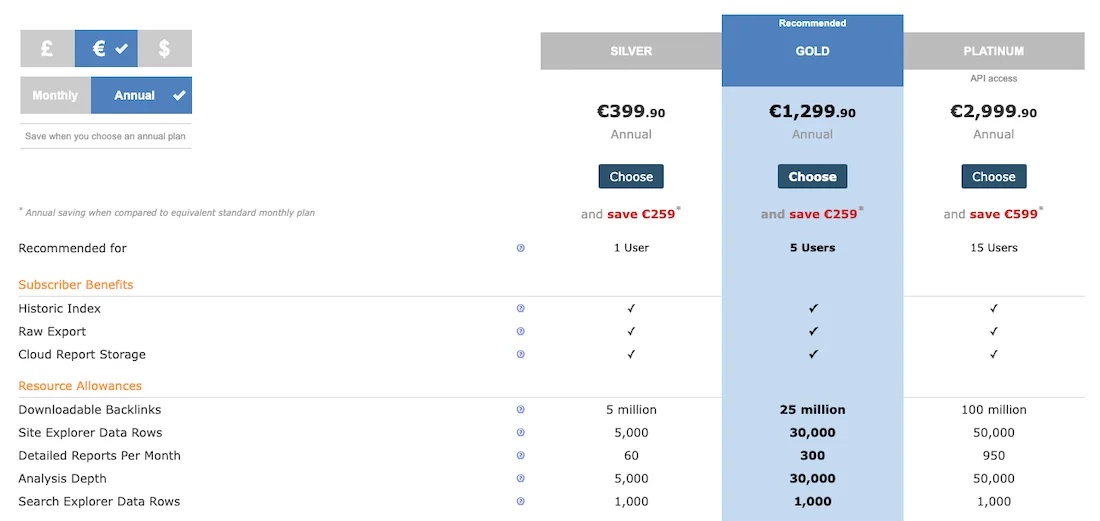
Majestic Pricing
The cost of using Majestic starts at €39.99 per month. When purchasing the service annually — from €399.90.
Functionality
The legendary Trust Flow and Citation Flow metrics are available, which are very often necessary for analyzing expired domains and drop domains. The Bulk Backlink Checker tool is very useful for bulk domain checking before purchasing. The interface and design of the service are already morally outdated, and it will take time to get used to them. But the main thing here is not the visual aspect, but the quality of the data.
SE Ranking
It is considered a balanced, cost-effective alternative to Semrush. It is adapted to the needs of both small webmasters and agencies. SE Ranking calculates its own Domain Trust authority parameters.
A very useful Backlink Monitor module, where you can upload a list of all purchased or acquired links to the system. SE Ranking will automatically check them in the background: whether the page is indexed by Google, whether it has been removed by the webmaster, or whether it is blocked by noindex or nofollow tags.
This provides good control over contractors and the budget. It should also be said that in terms of backlink database depth in competitive markets, Semrush and Ahrefs are leaders, but for local SEO in Eastern European countries, the capacity of the SE Ranking database is more than sufficient.
Comparison Table: Backlink Analysis
| Comparison Parameter | Semrush | Ahrefs | Majestic SEO | SE Ranking |
|---|---|---|---|---|
| Backlink Database Depth | Very high (fast discovery of new links) | Maximum (detects hidden PBN networks) | Deep historical archive (history spanning years) | Medium (suitable for local SEO) |
| Purchased Link Monitoring | Available (within the Backlink Audit module) | Only general crawling, Alerts tool for new or lost links | No | Available, built into the basic plan |
| Learning Curve | Medium (clear visual graphs) | Medium (requires filtering out spam scrapers) | High (outdated text-based interface) | Low (simple, intuitive interface) |
| Price Segment | Premium (part of the overall heavy all-in-one tool) | Premium (credit system with charges for clicks) | Affordable (strict focus on link building) | Budget-friendly (fixed pricing) |
Content Ideas & Optimization
Semrush has a Content section that consists of Article Generator, Content Optimizer, Content Repurposing, Topic Finder, and SEO Brief Generator.
The tools are good at finding topics for writing articles. Summarizer works well, there is a plugin for checking text against SEO requirements directly while writing. The tools are good at finding related semantic subtopics and highlight readability.
Semrush’s text models were created for the English-speaking market segment and when generating articles in other languages, they offer overly generic headings and take into account complex language forms and the specifics of local LSI.
The content module is paid, starting at $60 per month, which further increases your subscription bill. Therefore, if you need high-quality optimization of briefs, generation of blog ideas, and text writing, then you can consider alternatives.
Positive Surfer
Positive Surfer (Surfer SEO) is one of the most popular tools on the market for content SEO. There is an internal Content Editor, an intuitive interactive editor where you can write text, and there is an optimization scale, a score, that changes in real time depending on how many keywords and suggestions you have added. The service analyzes in detail the number of images, paragraphs, and the length of competitors’ headings.
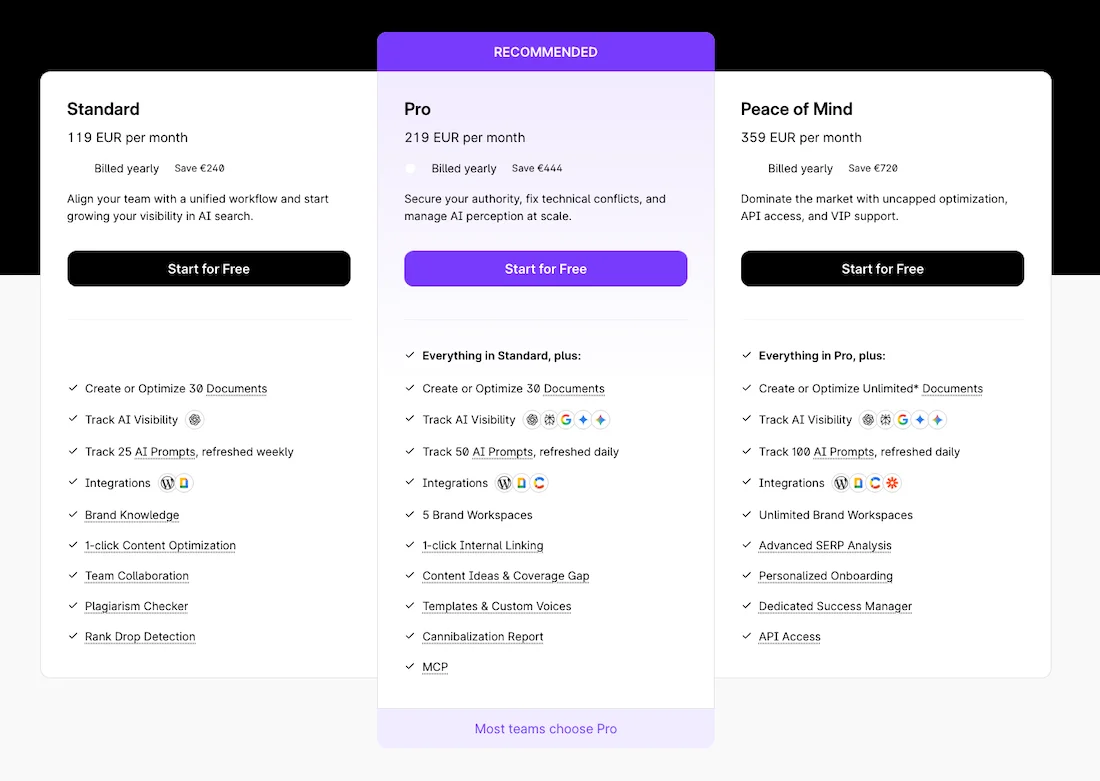
Positive Surfer Pricing
Surfer subscriptions start at €119 per month. Annual subscriptions offer a 17% discount.
Surfer builds deep logical relationships between entities and helps you create entire thematic clusters of articles. It should be said that the interface may seem complicated for beginners due to the abundance of technical metrics.
The subscription cost is not small, comparable to standalone SEO services. And if you follow all the optimization rules recommended by Surfer, the article may be slightly over-optimized.
Wrytix
Wrytix is a specialized tool for creating briefs, texts, and optimization.
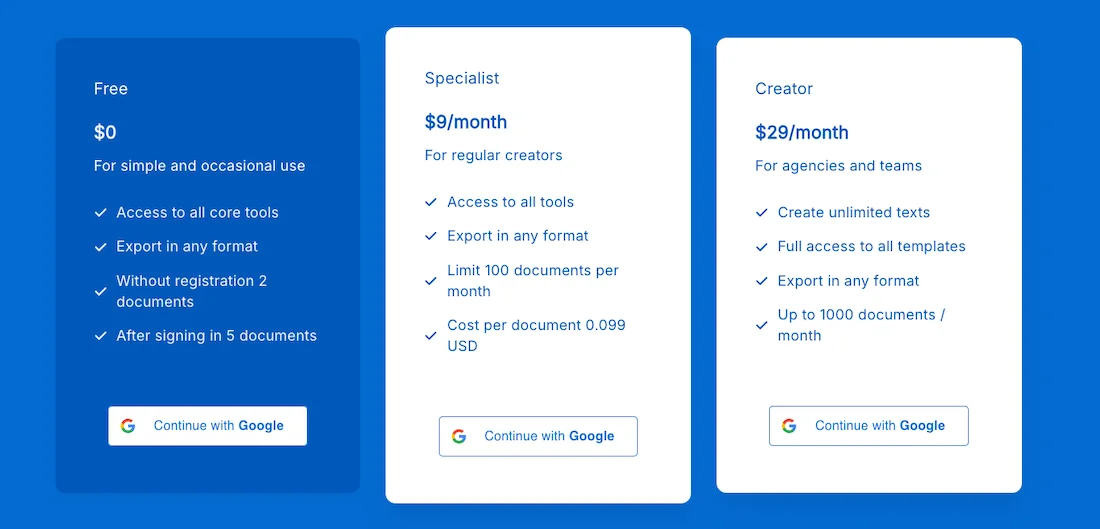
Wrytix Pricing
Wrytix starts at $9 per month. A free plan is also available.
Wrytix finds keywords for a website and topics for articles in a couple of clicks, generates site mapping, analyzes competitors and offers an exact heading structure, finds entities and informational gain, which is very important in modern realities.
The tool allows you to analyze text on the fly, rewrite the necessary paragraphs, and further optimize the text directly during the writing process.
Site Audit
The cloud-based scanner built into Semrush allows you to check the technical condition of a website. It shows an intuitive dashboard where all problems are divided by severity level: Errors, Warnings, Notices.
It is excellent for creating beautiful graphical reports for clients and basic website health monitoring. But if you do not want to overpay for this functionality, or you need maximum speed, detailed code debugging, or round-the-clock change monitoring, you can consider other alternatives for website analysis.
Screaming Frog SEO Spider
This is the global industry standard for deep technical website audits. It is a desktop program that is installed on a computer and uses RAM to scan the code, which ensures very fast performance.
SEO Spider Pricing
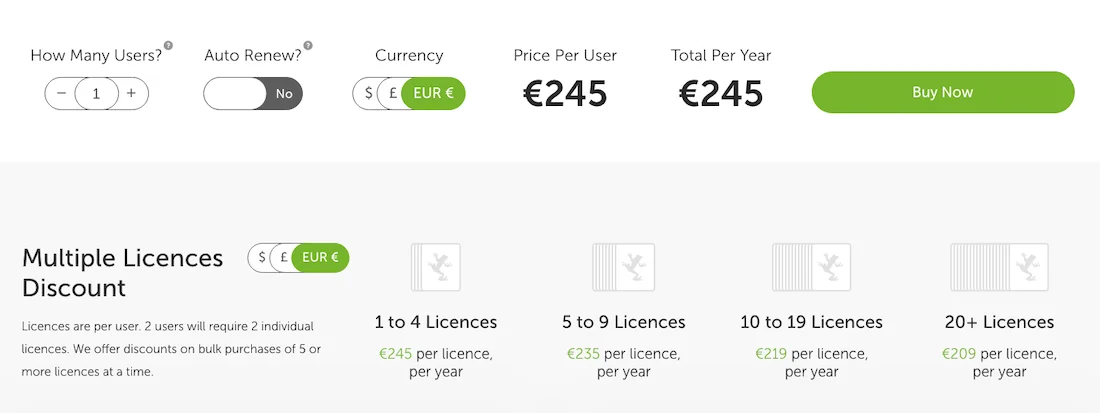
The cost of using Screaming Frog SEO Spider is 245 EUR per user.
Functionality
The parser allows you to check absolutely any website parameters: response code, title, meta, description, canonical, H1 and H2 headings, images, structured data, schema, hreflang attributes. With custom extraction, you can parse any website data, for example product prices or stock availability.
Screaming Frog easily scans websites on local servers, password-protected websites, and websites undergoing migration. There is a free version with a limit of up to 500 URLs.
Among the disadvantages, we can mention the dense and complex interface, which intimidates many beginners, and you will need time to understand the huge number of features available in Screaming Frog SEO Spider.
Netpeak Spider
Netpeak Spider is a direct competitor to Screaming Frog, focused on fast filtering, data segmentation, and a more modern UX and UI.

Netpeak Spider Pricing
The cost of using Netpeak Spider Pro starts at $20/1 month per user. The Lifetime version is $496.
Functionality
The program has a built-in calculator that calculates PageRank and simulates the distribution of weight across internal links.
This helps identify dead-end URLs that waste crawl budget. There is multi-domain scanning, which allows you to upload a list of hundreds of different websites and collect a consolidated technical audit for them in one click.
The interface has a convenient system of internal hints that shows what an error means and how to fix it.
There are Monthly, Yearly, and Lifetime subscriptions — forever at a fixed price. In some areas of configuration depth, it may slightly lag behind the main competitor in rare scenarios.
Sitechecker
A cloud-based SaaS platform that is fully focused on automating technical monitoring processes and round-the-clock monitoring of website changes.
Sitechecker Pricing
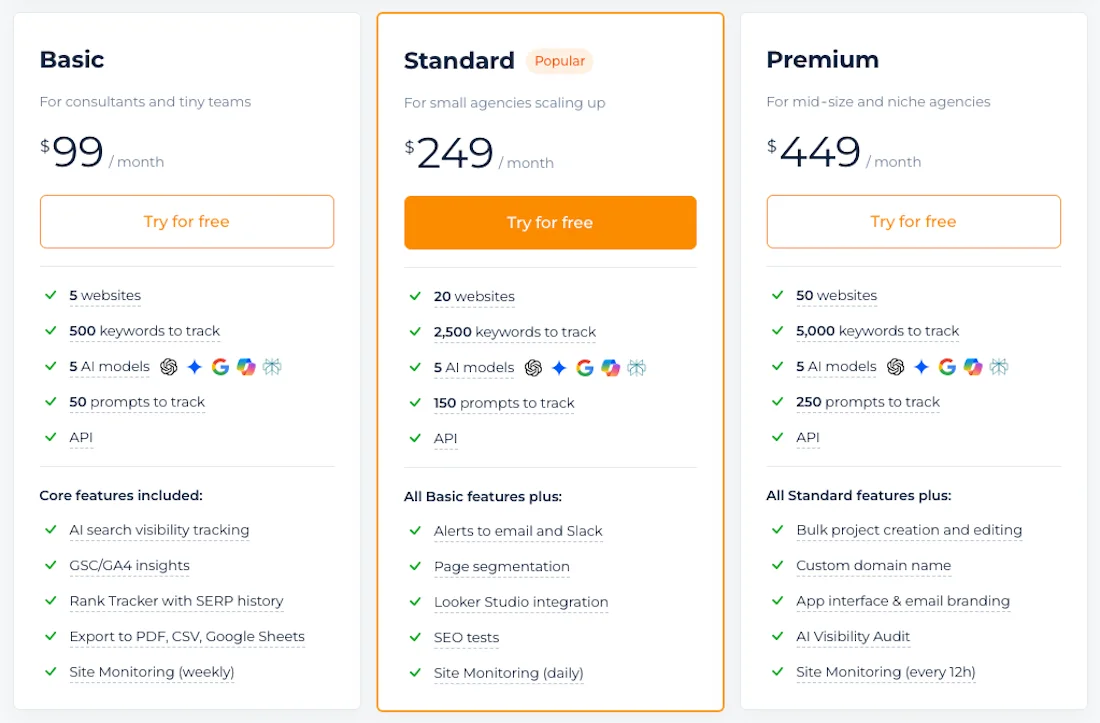
The cost of using Sitechecker starts at $99/month. There is a 17% discount when purchased annually.
Functionality
There is real-time 24/7 monitoring here — this is the main advantage over any competitor, because the entire system continuously monitors the website in the background, and if something happens to the website, Sitechecker sends a notification to Slack or email.
It should be said that the basic pricing plan has a strict limit on the number of pages that can be crawled, so for many this will be too expensive — paying for Sitechecker monthly when you can buy a subscription to Screaming Frog or Netpeak Spider.
Comparison Table: Site Audit
| Comparison Parameter | Semrush | Screaming Frog | Netpeak Spider | Sitechecker |
|---|---|---|---|---|
| Platform Type | Cloud-based SaaS platform | Desktop program (RAM + SSD mode) | Desktop program | Cloud-based SaaS platform |
| Custom Code Parsing | Unavailable | Excellent (Custom Extraction) | High level | Unavailable |
| 24/7 Monitoring Mode | Scheduled (by schedule) | No | No | Automatic (alerts in Slack in case of failures) |
| Learning Curve | Low (marketing dashboards) | High (engineering-oriented tabular interface) | Medium (tables with error hints) | Low (clear real-time error feed) |
| Price Segment | Expensive (limits within the overall plan) | Fixed annual license | Flexible license (monthly/annual) | Affordable (limits on pages that can be crawled) |
Competitive Analysis
Semrush has a Domain Overview module that allows you to perform an express analysis of a website. Here you have Organic Rank, Top Pages, Compare Domains. You simply need to enter the address of your website or competitor, get a detailed snapshot of its marketing activity, organic traffic dynamics, keyword overlap, referring domains, and even an approximate advertising budget.
This tool allows you to clearly see which pages and sections are driving your competitor’s growth. The main inconvenience is the cost of deep analysis. If you need to regularly export and compare semantics across dozens of domains simultaneously, the limits of the basic plans will quickly run out, and upgrading the subscription is expensive. And in some narrow niches outside the US and major European markets, the data in the graph may have inaccuracies. Therefore, you can consider other solutions for competitive intelligence.
Ahrefs
Of course, this is one of the main competitors in this area. Ahrefs also allows you to see a short snapshot of a website, traffic data, number of links, organic keywords, and paid keywords. In this regard, Ahrefs is very similar to Semrush in terms of the data provided, but the cost of the pricing plan is even higher than Semrush.
Alternatives can be the same SE Ranking and Serpstat, but again, the data may be inaccurate for rare geos.
Traffic and Market Analysis
Semrush has Traffic Analytics and Market Explorer modules, where the platform collects data based on a combination of panel data, clickstream, and search modeling.
Semrush shows not only search traffic, but also unique user visits, average session duration, bounce rates, traffic channels, direct visits, referral links, and social networks.
None of the platforms knows the exact traffic of another website unless the owner has made these metrics available themselves. Therefore, all these data are simulations on large websites.
Semrush shows excellent accuracy, but if a website is young and has less than several thousand visits per month, the system will make errors because there is not enough data. And access to advanced analytics requires an extended package. If your task is a quick macro-analysis of the marketing strategy of major players, then you can consider the main specialized competitors.
Similarweb
Similarweb is the global leader in web traffic and digital marketing analysis, with very good data accuracy based on clickstream.
Unlike other SEO services, Similarweb collects data through huge panels of internet providers and its own extension. The Market Channel module shows us the competitor’s business models in detail by percentage: how much traffic comes from direct, direct visits, email campaigns, display, and organic search. There is also a convenient free browser extension.
It should be said that the cost of a Similarweb corporate subscription is high and is measured in thousands of dollars, making it inaccessible to small businesses. But you can use its free version to get a high-level view of their data, and very often this data is enough.
DataForSEO
If you need raw data on traffic, keywords, and competitors without overpaying for ready-made visual dashboards, for which Similarweb and Semrush charge significant amounts of money, then DataForSEO is a very good technological solution on the market.
The service works via API and a pay-per-use model, with payment for actual requests. You get access to a search results database, competitor traffic volume, and keywords. The service is needed if you want to build your own analytics in Looker Studio, BI systems, or CRM while collecting data from different geos simultaneously.
The service has no ready-made graphical interface, so you need to be able to work with API requests and integrate data into spreadsheets.
Comparison Table: Traffic and Market Analysis
| Comparison Parameter | Semrush | Similarweb | DataForSEO |
|---|---|---|---|
| Data Source | Panel data + search modeling | Panel data (Clickstream) | Aggregated search results and web analytics databases |
| Channel Analysis (Social/Direct/Mail) | High level of detail (Traffic Analytics module) | Maximum macro-level detail on the market | Available as raw metrics (requires manual configuration and visualization) |
| Data Output Format | Ready-made graphical dashboards and reports | Ready-made interactive dashboards + browser extension | Raw structured data (JSON) via API |
| Learning Curve | High (interface overloaded with marketing tabs) | Medium (clear logic, convenient free extension available) | High (programming skills or BI system integration required) |
| Price Segment | Advanced (market trend analysis requires purchasing an expensive Trends add-on) | High enterprise pricing (measured in thousands of dollars) | Budget / Flexible (Pay-per-use model — pay only for actual requests) |
Rank Tracking
To control the effectiveness of an SEO strategy, you need a reliable rank tracker. In Semrush, position tracking is implemented in the Position Tracking tool.
Here you can track positions in free mobile search results, calculate the Share of Voice metric, group keywords by tags, and generate reports that will be sent to you, sending weekly reports on their changes.
The main problem with this module in Semrush is its pricing policy, and the limits on the number of tracked keywords are not very large.
If you simply need a high-quality rank tracker, you can consider other alternatives.
SE Ranking
It is considered one of the most balanced classic trackers on the market, offering an optimal combination of cost and data accuracy.
The SE Ranking interface has an automatic target URL assignment module. If a different page than the one you optimized appears in the search results for a keyword — a cannibalization problem — the system immediately starts highlighting this position with a red indicator.
SE Ranking stores position history for the entire lifetime of the project. There is also a Result Tracker tool that shows whether your website appears in AI blocks. But when adding a large number of regions and thousands of keywords, the interface becomes very heavy, requires time to load, and becomes not very convenient to work with.
AccuRanker
AccuRanker is a high-speed rank tracker created specifically for large consulting agencies and large e-commerce projects.
There is an On-Demand Refresh update. This is its main technological advantage, so you do not need to wait for the scheduled overnight position update.
You can simply press the refresh button yourself, and the system will send requests to the SERP in real time and provide you with current positions within a few seconds.
The interface is very clean and modern and handles a large number of keywords without problems. It should be noted that this is an isolated tracker; it has no tools for keyword collection or website auditing.
ProRankTracker
ProRankTracker is a specialized tracker that has adapted its logic to the modern realities of AI search and geo-optimization. Geo monitoring is the main feature of the service.
It tracks brand visibility, positions, and links inside generated AI responses well. It tracks positions within Amazon and YouTube excellently and has precise geo expansion down to a specific postal code. The interface is difficult for beginners due to the abundance of specific AI metrics.
Wincher
Wincher is an affordable, highly simplified tool for webmasters of small content projects, created according to the principle of nothing unnecessary.
There is a local tracker on maps for visualizing local SEO as a grid of pins on the map of the site. You can clearly see where your local point is located within a radius of one to five kilometers from the user.
There is a WordPress plugin that allows you to see positions directly in the site admin panel. In the starter package, you cannot assign a target URL for tracking systems; it links the keyword to the page it found itself, and there are no complex filters for SERP features.
Comparison Table: Rank Tracking
| Comparison Parameter | Semrush | SE Ranking | AccuRanker | ProRankTracker | Wincher |
|---|---|---|---|---|---|
| Update Frequency | Daily | Daily | Instant on demand (On-Demand) | Daily | Daily |
| AI Search Monitoring | Basic (SERP indicators) | Basic (AI Overviews blocks) | Yes | Monitoring mentions in AI Overviews and AI search results | Tracking AI Overviews and traditional SERP features |
| Learning Curve | High (tables can slow down) | Medium (heavy tables with 1,000+ keywords) | Medium (clean, isolated interface) | High (many specific AI metrics) | Low (WordPress plugin available) |
| Price Segment | Custom reports require purchasing a paid add-on | Balanced | Expensive enterprise pricing | Medium | Budget-friendly |
How to Build an Effective Tool Ecosystem?
Today, no professional team will limit itself to purchasing one expensive tool, even if it is Semrush. Because the optimal strategy for optimizing the budget and accelerating processes is to create a hybrid tool stack solution. You can continue using a Semrush subscription, not on the maximum plan, and supplement it with other services to fill gaps and perform routine tasks.
What stack can you build? Let’s give an example:
Keyword Research
It is best to use KeywordStat or Semrush.
KeywordStat helps you avoid burning expensive limits inside all-in-one tools on clicks within reports, instantly provides clean semantics without branded noise, has convenient data displayed on one screen, automatically groups keywords by intent, and has convenient sorting and filtering. There is a useful AI Insight feature to understand this keyword before creating a brief for the author. Fast clustering, copying, and exporting of the resulting keywords.
Semrush still remains one of the leaders in the niche; if you have a sufficient budget, you can continue using Semrush.
Backlink Analysis
You will need Majestic SEO for accurate checking of the quality of referring domains and drops if you buy expired domains and need to check them by TF and CF metrics. You need Ahrefs, Semrush, or SE Ranking for competitor backlink analysis or when purchasing guest posts.
Working with Text
I recommend using Surfer or Wrytix; they help you break down the texts of top-10 competitors, create a brief and structure for your own text, optimize keywords using LSI, and improve the article before publication.
Website Audit
Use Screaming Frog for deep desktop code analysis and custom parsing, or Sitechecker if you need round-the-clock website monitoring with alerts in Slack or email in case of failures.
Macro Traffic Analysis
I recommend using the free version of Similarweb for quickly evaluating traffic channels and overall traffic by geo, or Semrush.
Using this hybrid approach will allow you to save hundreds of dollars every month, increase the speed of data processing, improve the speed of teamwork, and avoid struggling with the complex interface of universal IT giants.