The SE Ranking platform has gained its popularity thanks to its affordable price and broad functionality.
In this article, we will review the SEO tools market, analyze the advantages and disadvantages of the SE Ranking tool, and consider the best alternatives for performing the most popular tasks: keyword research, backlink analysis, rank tracking, and other tasks.
List of Necessary Tools for Optimization
As projects grow, specialists face database limitations, complex interfaces, and the need to pay extra for additional features.
Even if you have chosen SE Ranking as your primary SEO tool, you will still need additional tools to perform various tasks and optimize the workflow.
I have compiled a list of tools for solving each task:
- Keyword Research: KeywordStat / SE Ranking
- Backlink Analysis: Majestic and Ahrefs / Semrush / SE Ranking
- Rank Tracker: SE Ranking / ProRankTracker
- On-Page & Content Tools: Wrytix / Surfer
- Website Audit: Screaming Frog / Netpeak Spider / Sitechecker
- Competitor Analysis Tool: Similarweb / Semrush
SE Ranking pricing
The SE Ranking pricing structure offers two main plans. These are the Core and Growth plans. There is also an Enterprise plan and Agency Pack, AI Search, and API packages available for an additional fee.
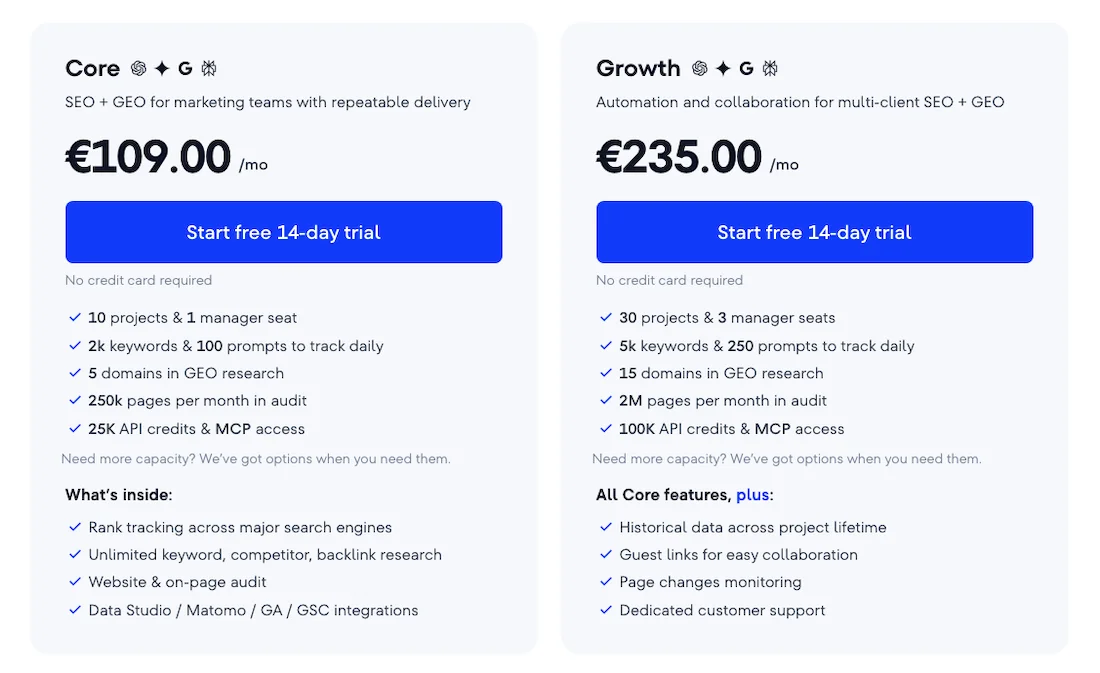
SE Ranking offers a free 14-day trial, with no bank card required for the trial period.
The Core plan is aimed at small marketing teams that need regular SEO analytics. For this price, you get 10 projects and one user seat; the functionality includes daily tracking of up to 2,000 keywords, analysis of up to 5 domains, geo, and a technical audit of up to 250,000 pages per month. You get unlimited keyword and backlink research and integration with Looker Studio, Google Analytics, and Search Console.
The Growth plan is designed for agencies with a multi-client portfolio, where automation and team collaboration are important. This plan has higher limits: up to 30 projects, three user seats included, tracking volume expanded to 5,000 keywords, the audit limit increased to 2 million pages per month, and 15 geo-domains.
Additionally, full history for the entire lifetime of the project is available, along with guest links for sharing the client’s account, monitoring changes on pages, and dedicated technical support.
The database of 3,700 is designed for one user; for team collaboration, there is an option to purchase additional user seats. Therefore, the platform has a modular system where users can separately purchase various additional packages or additional limits.
About SE Ranking
The SE Ranking platform is an all-in-one SEO tool positioned as a balanced, cost-effective solution for agencies and web studios.
Initially, SE Ranking developed as a platform for monitoring website visibility, SEO positions, keyword analysis, and backlink checking and evolved into a full-fledged SEO platform.
The main technological advantages of SE Ranking are the accuracy of position tracking. It is one of the best rank trackers on the market, with flexible charts and deep change history tracking. It has its own keyword and backlink database.
The Keyword Research and Backlink Checker modules allow you to collect keywords, collect seed queries, and evaluate the backlink profile of domains.
The Keyword Tool module also has free functionality. You can check how the service works.
The Backlink Checker module shows you the 10 latest backlinks completely free of charge. With a paid plan, you can see detailed backlink analytics.
There is a Backlink Monitor module — a universal tool that checks purchased or acquired links for indexing, the presence of noindex and nofollow tags, and whether the link is still present, which is convenient if you publish guest posts.
The flexible pricing structure allows you to adjust the volume of data required by your project, so the cost can be called both an advantage and a disadvantage at the same time.
Why do specialists look for SE Ranking alternatives?
The main triggers for looking for alternatives are the modular pricing policy and lack of limits. Users often dislike having to pay separately for additional features, for example, the Keyword Grouper tool charges for every grouped keyword even if you have a subscription. The same applies to modules for working with content and on-page audits — you need to purchase these modules separately.
If you work in highly competitive markets, the US or Western Europe, the depth of keyword research and the speed of the backlink crawler are inferior to industry leaders such as Ahrefs and Semrush.
The platform interface itself is divided into isolated tools, which is not very convenient and forces the specialist to make many unnecessary clicks to transfer data or switch between tabs.
Keyword Research
The keyword analysis tool in SE Ranking.
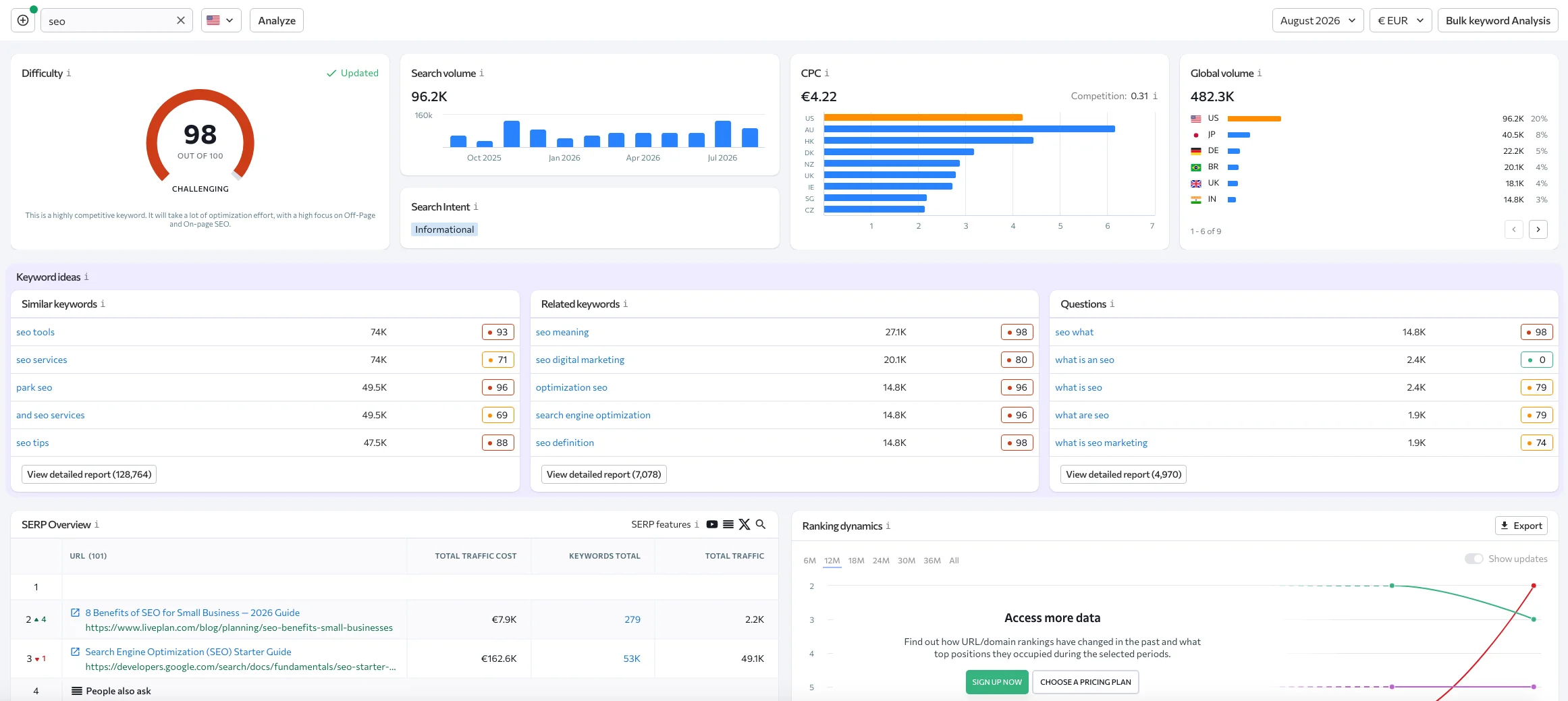
SE Ranking offers you a convenient set of metrics. On the SE Ranking dashboard, you can see Difficulty, Search Volume, CPC, Global Volume, Keyword Ideas, a list of similar relevant queries, Similar Related, and a Questions query block.
Here you have SERP Overview and Ranking Dynamics, as well as advertising blocks: Paid Keywords, Distribution of paid keyword rankings, Most popular keyword ads, and Ad copies samples.
It should be honestly said that the Keyword Research module in SE Ranking is implemented conveniently and looks very decent.
But if you want to look at competitors and find out what other keyword research tools are available, let’s move on to reviewing them.
KeywordStat
KeywordStat is a tool for fast keyword collection and analysis, automatic cleaning and clustering of keywords without overloaded charts.
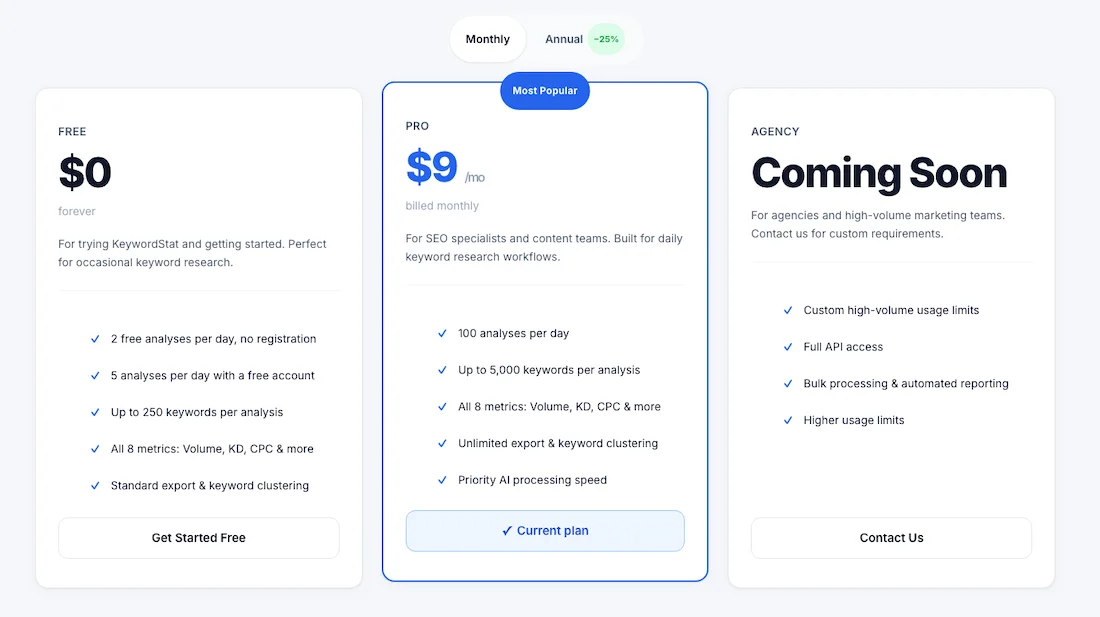
KeywordStat pricing
The service costs $9 per month when purchased annually. A 25 percent discount is available. There is a free demo version that allows you to perform 2 analyses per day without registering an account and 5 analyses after creating an account.
Functionality
In KeywordStat, you get all keyword analytics in one click. You simply need to enter a keyword, domain, or URL.
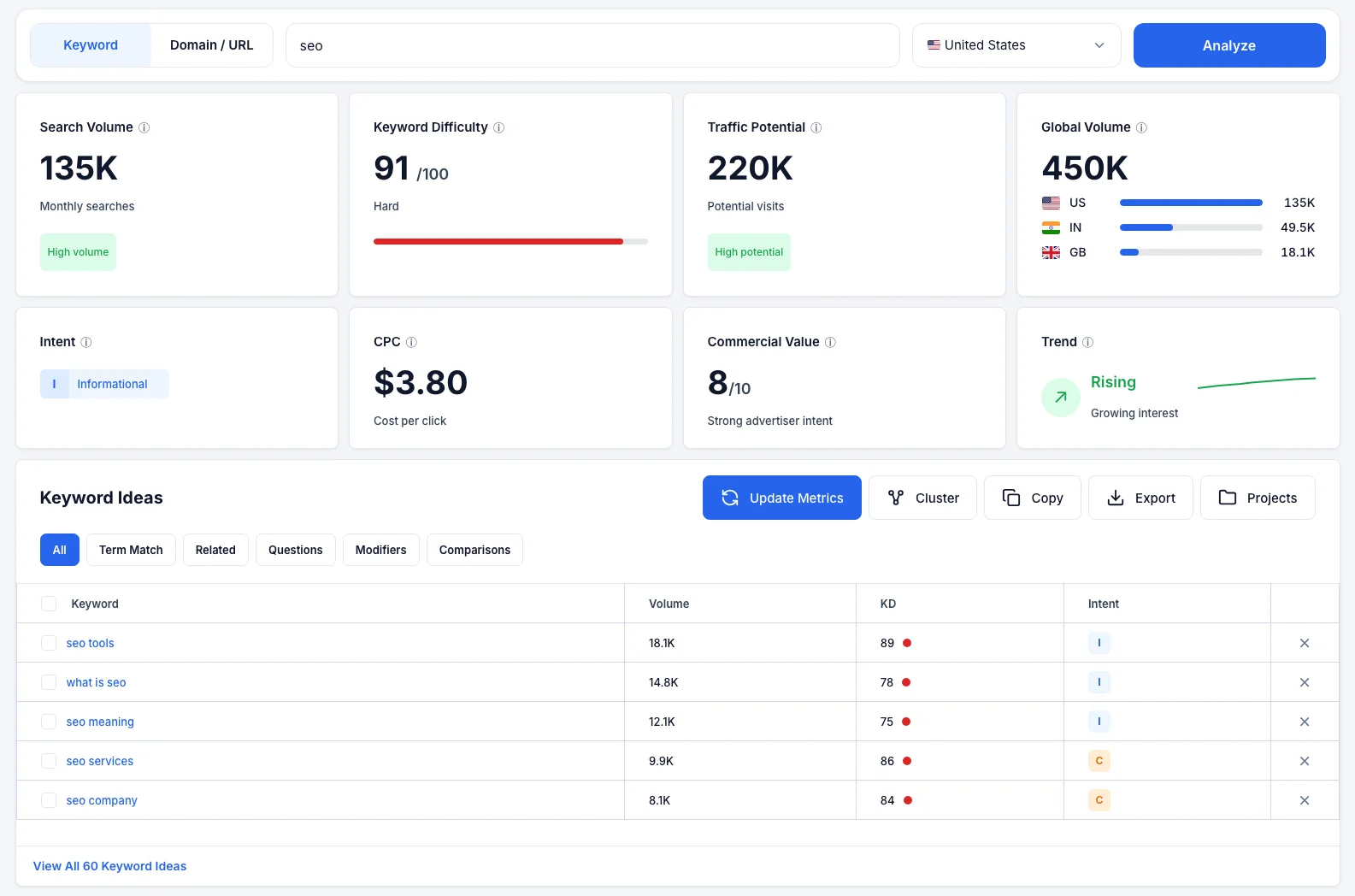
When analyzing a keyword, you get a dashboard with metrics such as Search Volume, Keyword Difficulty, Traffic Potential, Global Volume, Intent, CPC, Commercial Value, and Trend.
Next, you are provided with a list of Keyword Ideas. You can sort them by Term Match, Related, Questions, Modifiers, and Comparisons. For the selected keywords, you can update metrics, copy, export, or cluster keywords.
Clustering
Clustering is performed using two methods: Soft and Hard. Everything happens intuitively and in one click. You can copy or export the clustered keywords.
KeywordStat has an interesting AI Insight feature — a short text summary for each Seed Keyword, where the neural network explains the specifics of this keyword and its Intent in detail, provides recommendations on which page needs to be created, and makes a final conclusion as to whether you need this keyword or not. This will be very useful for beginner webmasters.
It should be added that there are no other functions here, such as position tracking or backlink analysis.
KeywordTool.io
KeywordTool.io is a specialized parser that collects data from Google search suggestions in real time.
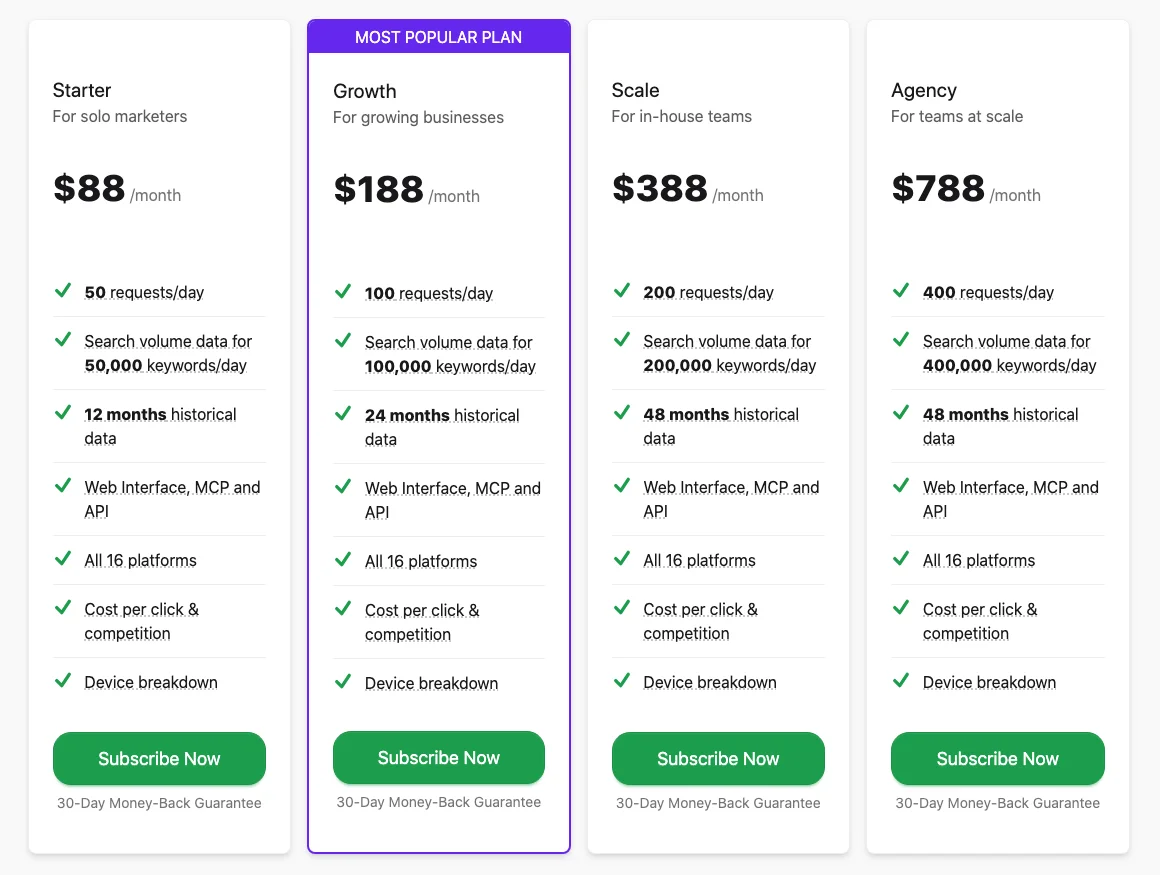
KeywordTool pricing
The cost of using Keyword Tool Pro is $88 per month when purchased annually. There is an option to get a 20% discount.
Functionality
Instead of focusing only on Google, Keyword Tool offers an entire line of tabs: Google, YouTube, Amazon, eBay, App Store, Instagram, TikTok, Reddit, Pinterest, and so on.
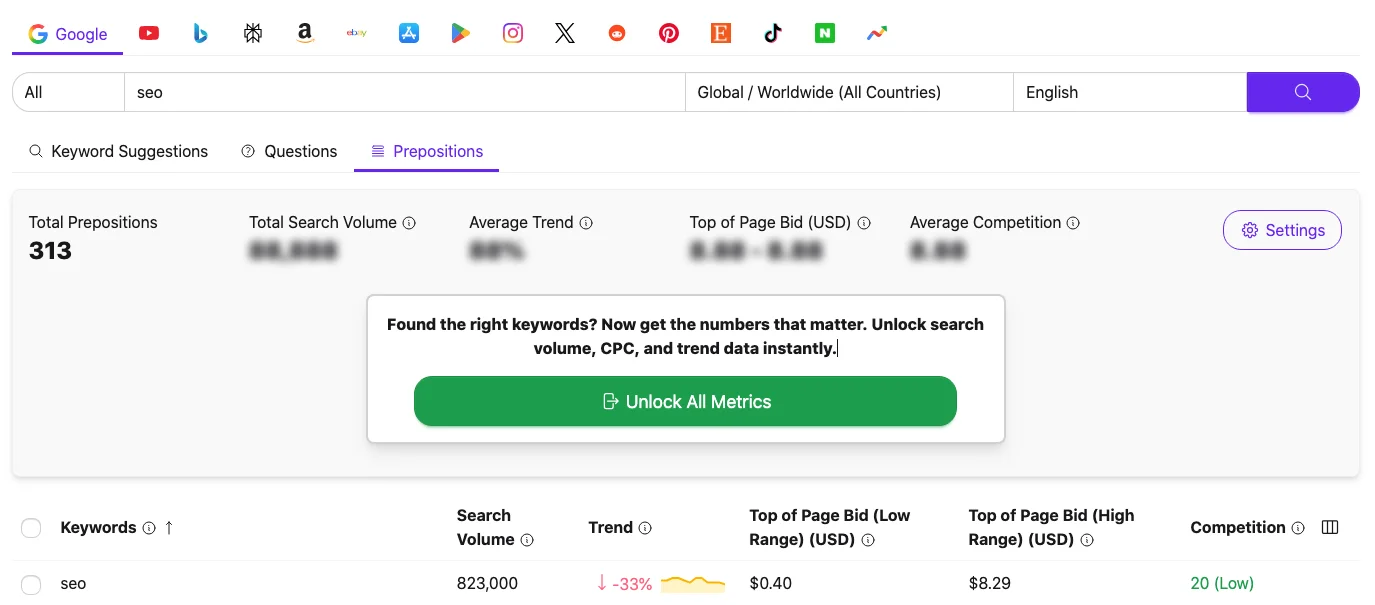
This service is great at finding long-tail keywords, conversational and low-volume phrases. It is very useful for e-commerce and content platforms to find keywords that have not yet made it into historical SERP databases.
The service collects suggestions from the Autocomplete API, search volume is taken from Keyword Planner, and it uses its own algorithms for simulating and estimating search volume.
KWFinder (by Mangools)
KWFinder is a popular tool that is part of the Mangools toolset and is positioned as specialized software for keyword research.
KWFinder pricing
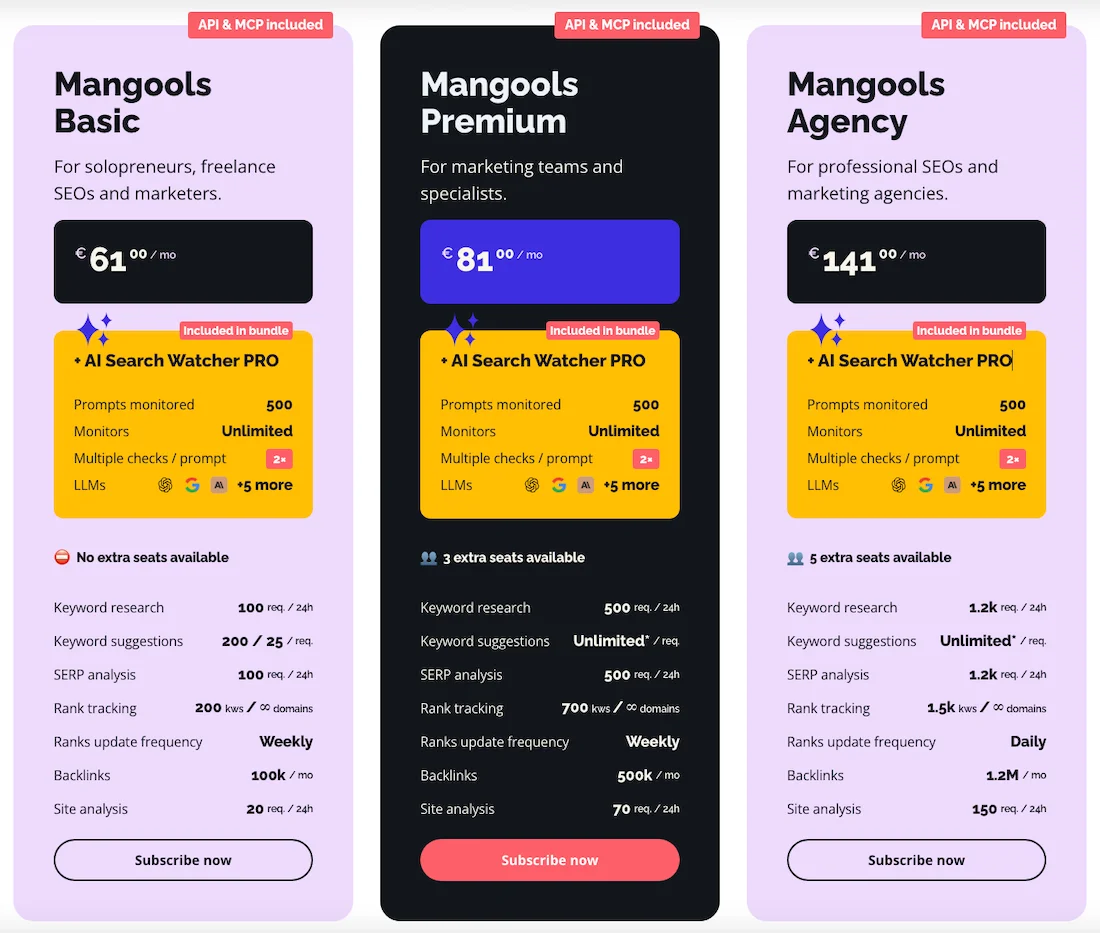
Cost: the cost of using Mangools starts at €61 per month, with a 35% discount when purchased annually.
Functionality
Keyword Finder is very popular among SEO specialists for its high-quality Keyword Difficulty calculation. The service interface is simple and clear and is divided into two screens.
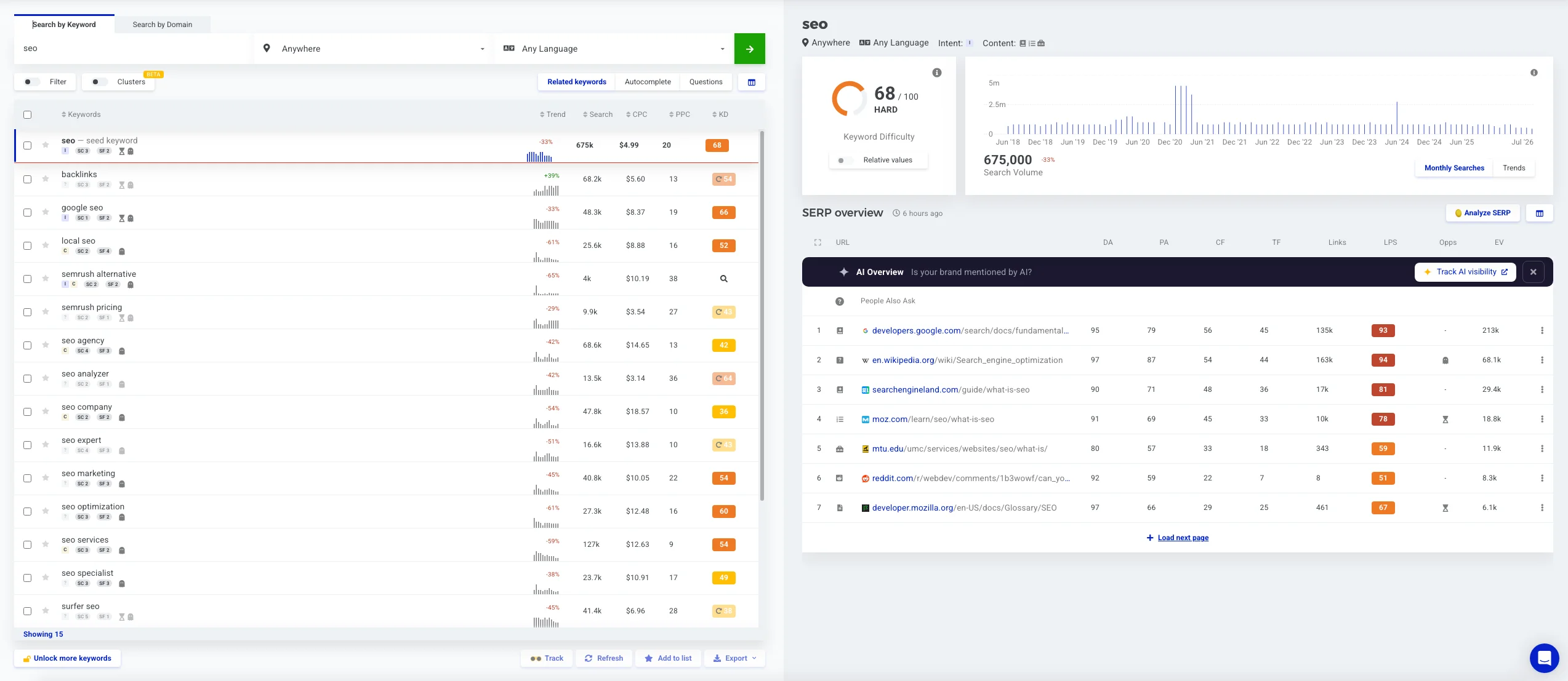
On the left, you see the search: Search by Keywords, Search by Domains, there is a filter and clustering. Keywords are divided into Related Keywords, Auto Complete, Questions. Keywords can be sorted by trend, search, CPC, PPC, and KD.
On the right, you have a dashboard showing Keyword Difficulty and Search Volume for the entire period. There is SERP Overview, which shows URLs and the main parameters: Domain Authority, Page Authority, Citation Flow, Trust Flow, number of External Backlinks, Overall Link Profile Strength, Keyword Opportunities, and Estimated Visits.
This service allows you to choose more than 50 thousand locations for search, not only a country but also a city, and therefore it is ideal for local SEO.
Basic pricing plans have limits on the number of reports.
Universal SEO Platforms
Ahrefs
Ahrefs is a recognized industry leader, with a Keyword Explorer module that has one of the largest databases in the industry.
Ahrefs Pricing
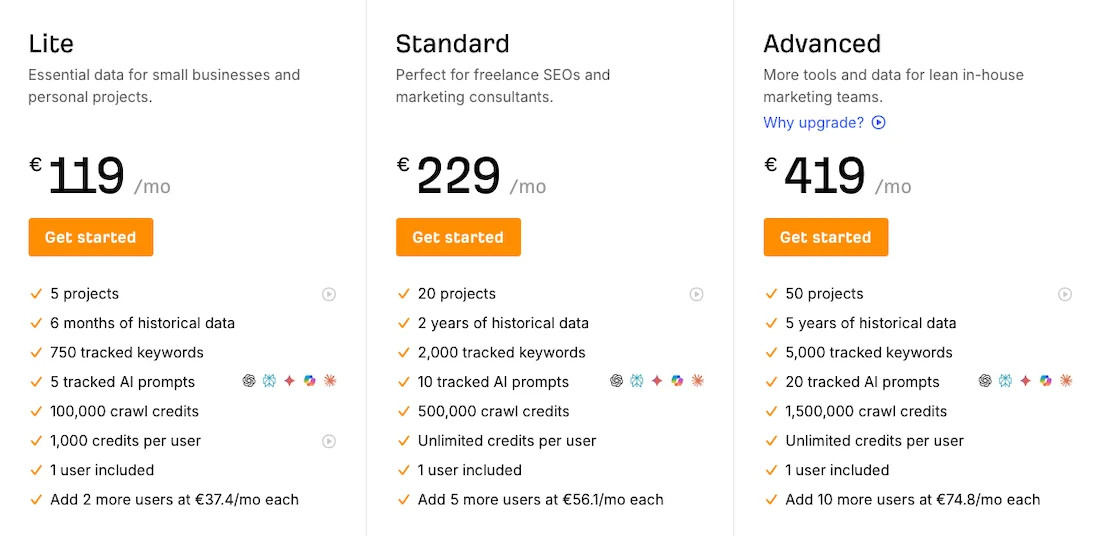
The cost of using Ahrefs starts at €119 per month, with a 17% discount when purchased annually. The cost may depend on your geo, and there are additional modules that you can purchase, as well as Enterprise packages for agencies.
Functionality
When analyzing keywords, the system shows you a detailed dashboard with Keyword Difficulty, Search Volume, Traffic Potential, and Global Search Volume. There is additional data on Growth Forecast, click data, CPC, CPS, and Mobile/Desktop breakdown.
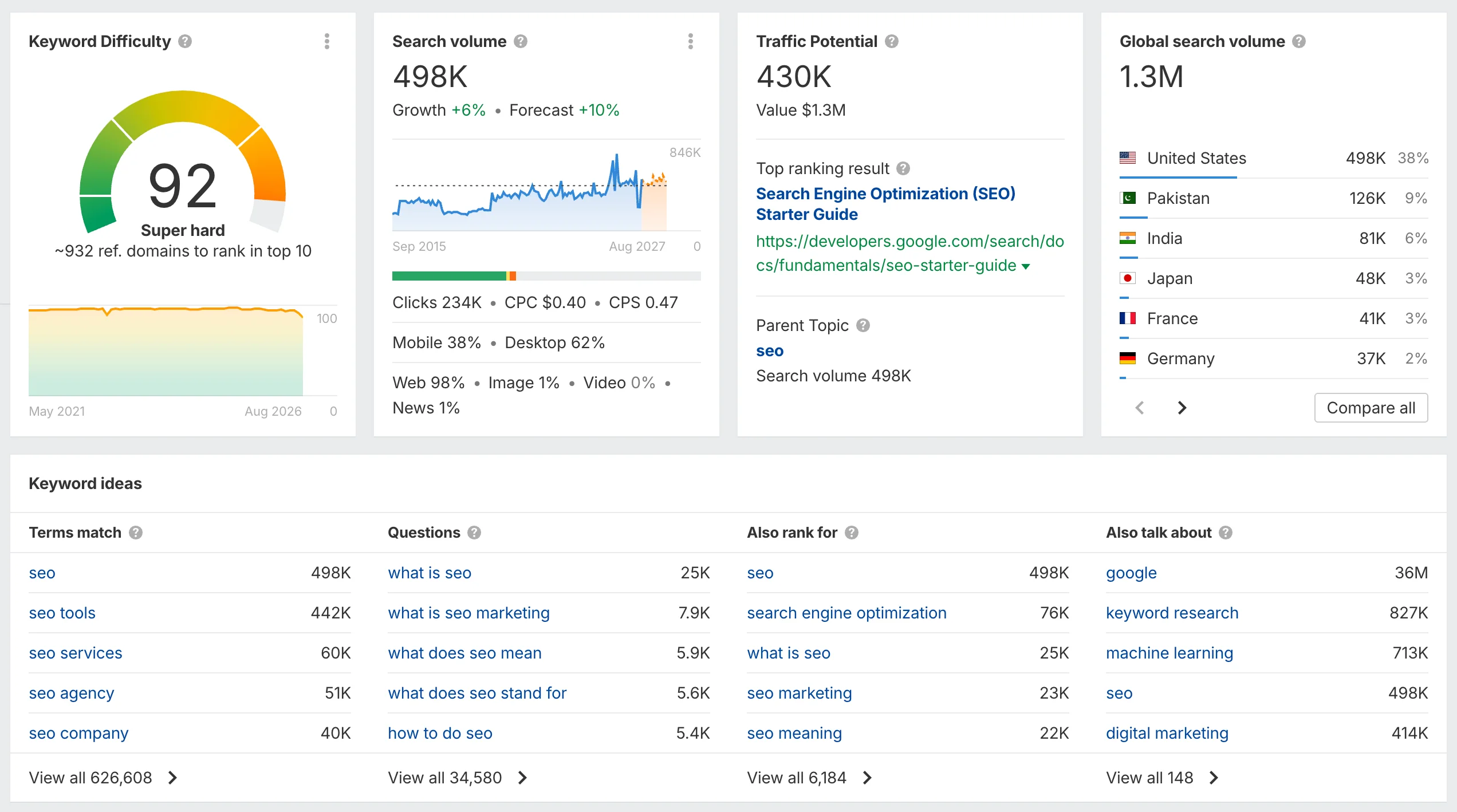
The Keyword Ideas block contains Term Match, Questions, Also Ranked For, Also Talked About, and Keyword Ideas also includes Matching Terms, Related Terms, Search Suggestions, and Global Terms.
There is an automatic Keyword by Parent Topic grouping function, but it works rather broadly.
The main disadvantage of Ahrefs is considered to be its credit policy, which has made it very expensive for simple keyword research, and therefore specialists are increasingly using it for traffic analysis and backlink analysis.
Semrush
Semrush is a full-fledged SEO tool, where the Keyword Research Tool has always been considered a benchmark for working with large datasets and analyzing keywords.
Semrush pricing
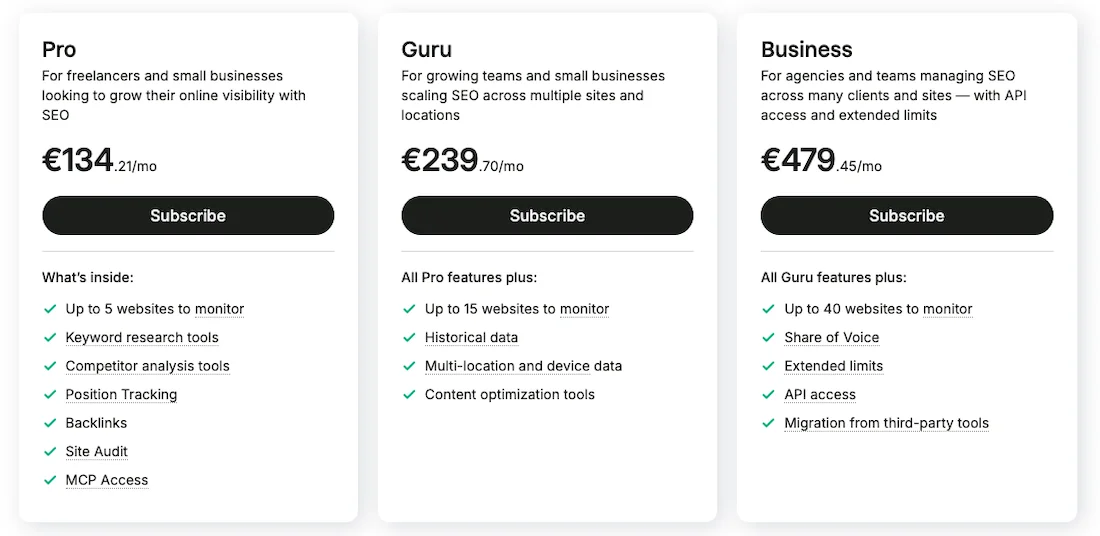
The cost of using the Semrush service starts at €134 per month. There is a 17% discount when purchased annually. There are additional options available for purchase and various plans for businesses and Enterprise plans.
Functionality
Semrush has a very convenient filtering database, where the system automatically creates folders and groups for instant semantic cleaning. The SERP Features column shows the presence of special SERP features, and the Intent filter allows you to exclude unnecessary types of queries.
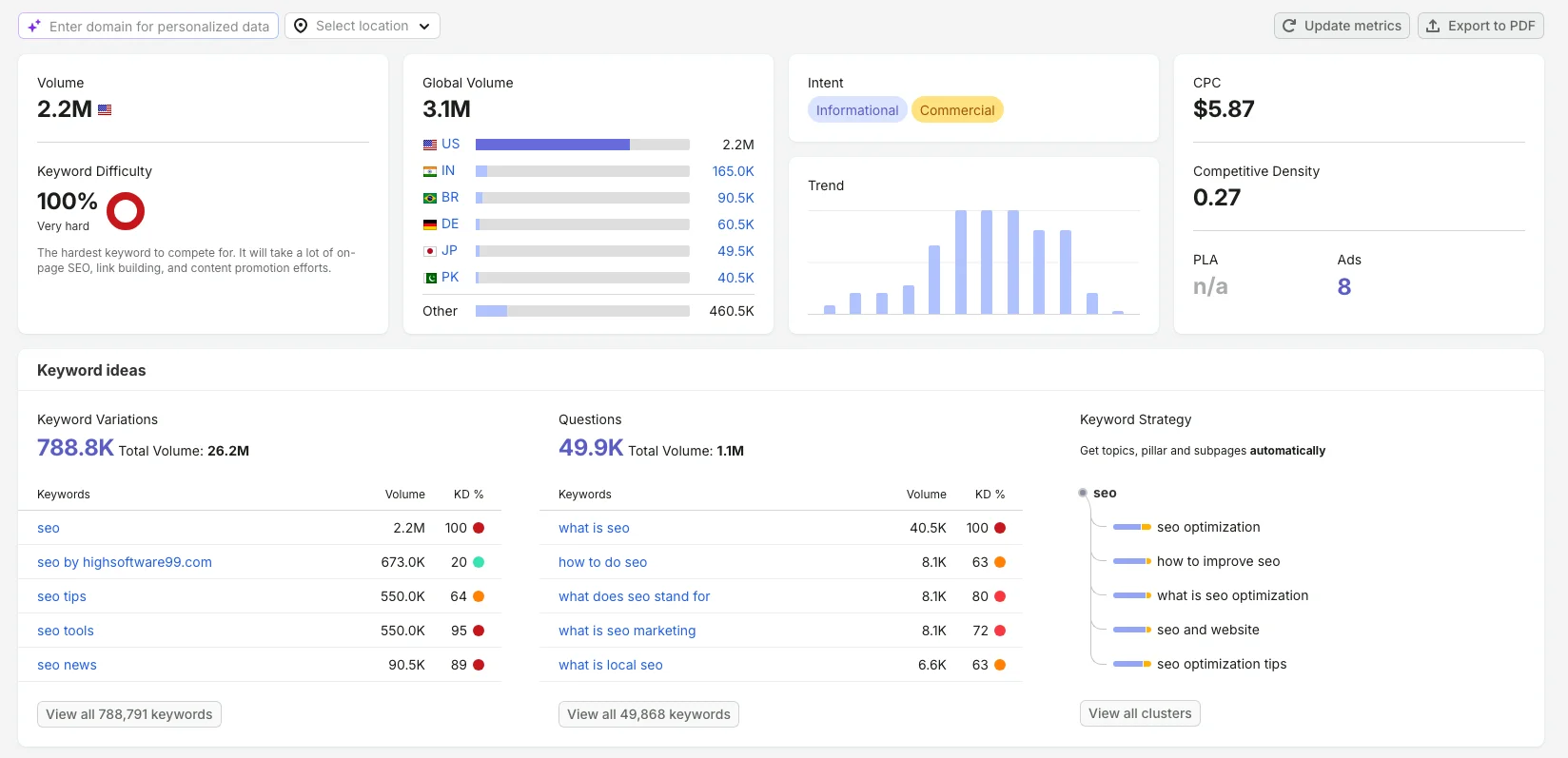
The interface is quite convenient, and the Keyword Overview module looks quite convenient, but the side menu is very overloaded with additional tabs, which can make it inconvenient for a specialist.
The Keyword Overview Dashboard itself contains data such as Volume, Keyword Difficulty, Global Volume, Intent, CPC, Trend, Competitive Density, and PLA Ads.
In Keyword Ideas, we have Keyword Variation, Questions, and Keyword Strategy. Here, SERP Analysis from 20 results is shown, displaying SERP Features blocks.
Among the disadvantages, we can mention the high price compared with SE Ranking and Ahrefs, so if you work in non-competitive geos, you may still consider using SE Ranking.
Serpstat
Serpstat is a classic SEO all-in-one tool with a tabular interface focused on working with data.
Serpstat Pricing
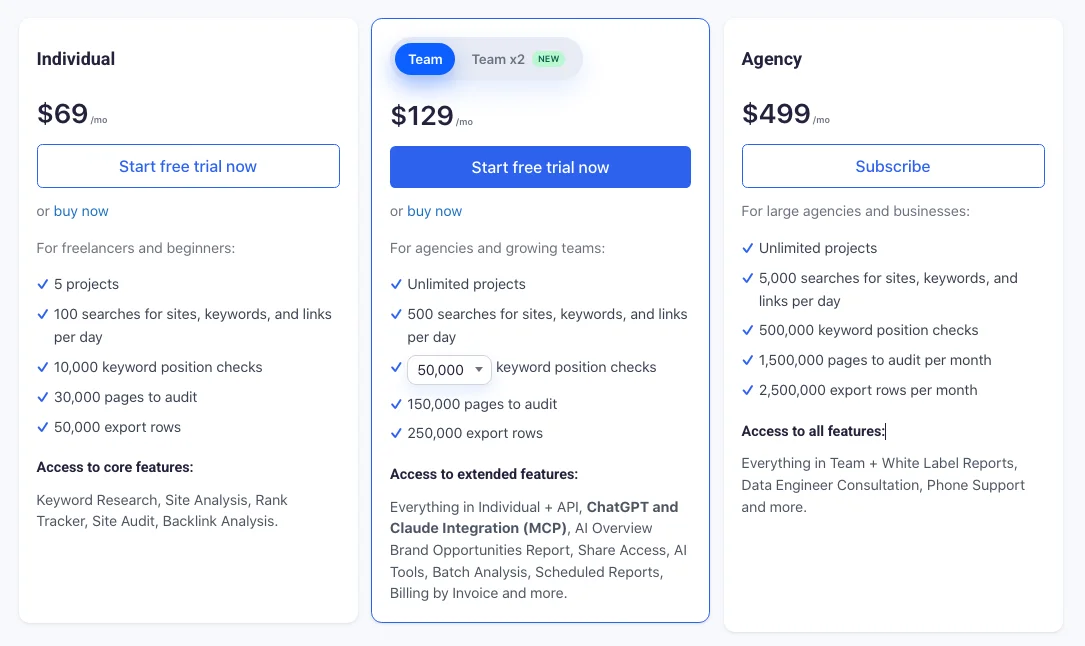
The cost of using Serpstat starts at $69 per month. There is a 27 percent discount when purchased annually. There are other pricing plans for agencies. There is Brand Monitor.
Functionality
The main disadvantage of Serpstat is an interface overloaded with text and charts, which makes it quite difficult for beginners to navigate, and the database may have gaps for some geos.
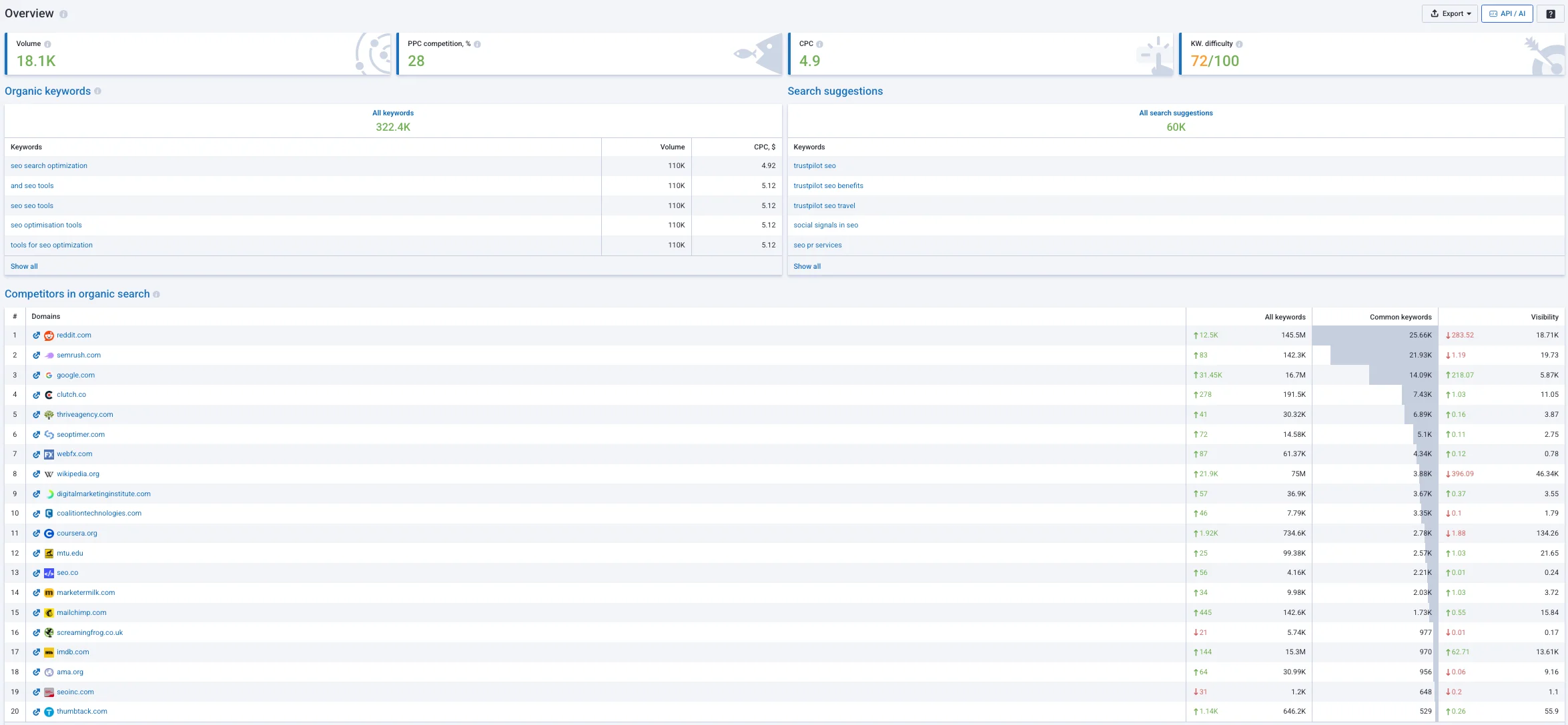
But the main advantage of Serpstat is a powerful and stable API solution. You can upload a huge list of competitor domains, export all semantic overlaps in one click, and the API allows you to integrate keyword metrics directly into internal corporate dashboards.
Ubersuggest (by Neil Patel)
Ubersuggest is a popular multifunctional platform with a minimal learning curve. The interface is very bright, convenient, and adapted for bloggers.
Ubersuggest Pricing
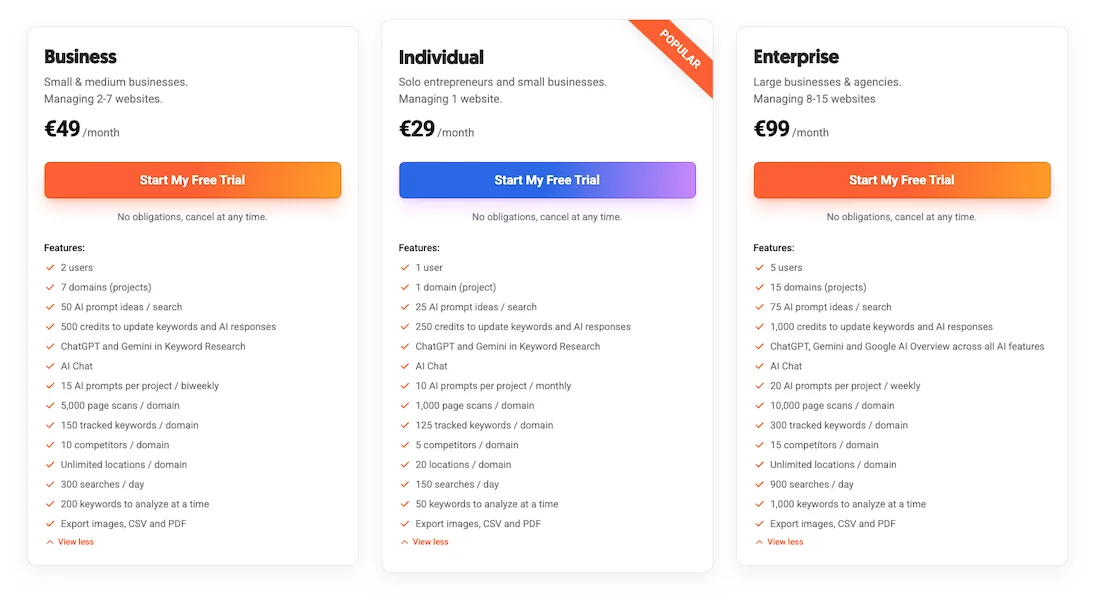
The cost of using Ubersuggest starts at just €29 per month, with an additional discount when purchased annually, and there are Lifetime versions available.
The starter version starts at €290, with the maximum being €990. This is precisely why this tool is very popular.
Functionality
Recently, the focus has been on an AI assistant that allows you to create structures for future articles on the go, based on selected keywords, and send them to an AI writer in one click to generate text drafts.
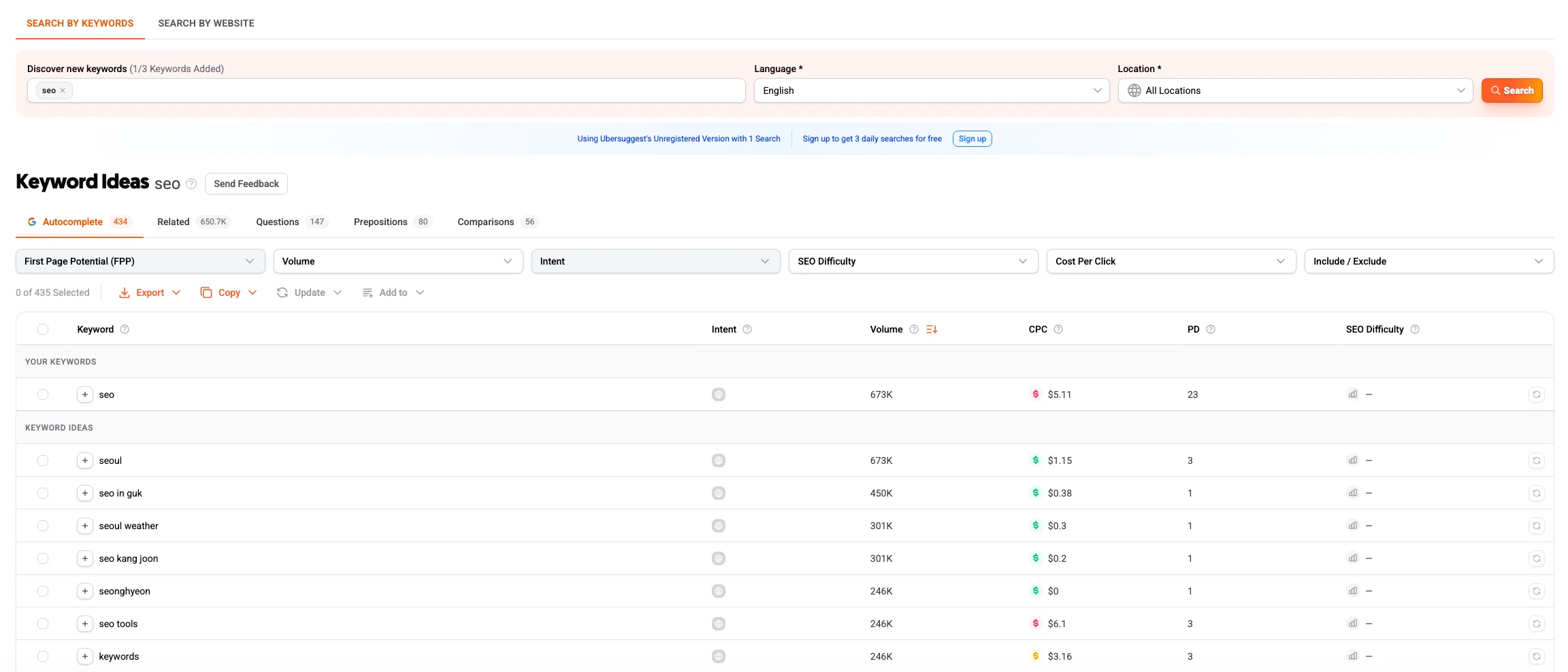
Professionals often criticize Ubersuggest for the low accuracy of data across different regions, especially outside the US, because the algorithm tends to heavily round or overestimate figures.
Comparison Table: Keyword Research Tools
| Comparison Parameter | SE Ranking | KeywordStat | SEMrush | Ahrefs | KWFinder |
|---|---|---|---|---|---|
| Database Completeness | High (well adapted to local geos) | High (focused on popular and cleaned semantics) | Maximum (one of the largest databases on the market) | Maximum (global leader, huge databases for US/EU/Global) | High (there are limits on the number of rows displayed in reports) |
| Data Accuracy | High (good accuracy for local regions) | Medium (focus on intent and ready-made evaluation rather than dry numbers) | High (accurate algorithms for calculating search volume and difficulty) | High (but may underestimate traffic in rare/local geos) | Medium (database is updated less frequently than major competitors) |
| Ease of Collection | Medium (requires navigation between tools) | High (all key data and AI tips on one screen) | Medium (requires getting used to the ecosystem) | Medium (requires switching between different reports and tabs) | High (convenient split screen with list and SERP) |
| Filters and Sorting | Good (standard SEO filters by parameters) | Advanced (quick filters by intent, KD, Volume, and keyword types) | Advanced (very deep filtering system in Keyword Magic Tool) | Advanced (flexible include/exclude conditions, SERP features) | Limited (cannot set complex phrase exclusions) |
| Clustering | Available (quality algorithm, but charged separately) | Available (built-in automatic AI clustering) | Available (Keyword Manager / Keyword Strategy module) | Basic (grouping by Parent Topic and Terms) | Available |
Backlink Analysis
The Backlink Checker module in SE Ranking allows you to get backlink data using metrics such as Domain Trust and Page Trust and see the total number of Referring Domains.
You can see the latest links from the last 30 days that appeared, disappeared, and broken links. There is also a proprietary Backlink Toxicity Score tool.
You can see the total number of Backlinks, as well as new and lost Backlinks.
The main compromise of SE Ranking is the depth and update speed of the Backlinks database. Its crawler collects links significantly slower than other popular platforms such as Ahrefs and SEMrush. If you work in competitive markets, in the US, Canada, or Western Europe, SE Ranking will most likely not show you all backlinks. It may miss hidden networks of websites and fresh competitor mentions.
For Eastern Europe and rare geos, SE Ranking may be even more interesting for you; if you need detailed backlink analysis or advanced visualization, let’s consider the following alternatives.
Ahrefs
This is the benchmark service in the niche, especially in the area of backlink analysis. Ahrefs’ bot database remains the largest on the market; Ahrefs detects mentions and links where other crawlers simply do not notice them.
There is a filter by types: dofollow, nofollow, anchor, traffic, and referring domains.
Sometimes, however, it scans too much link spam, which makes backlink analysis more difficult. The filters have an option to show only non-spam links. But these are all additional clicks.
Majestic
Majestic is a professional tool that has abandoned trendy marketing modules and modern UX and focuses on mathematical analysis of calculated graphs.
Majestic Pricing
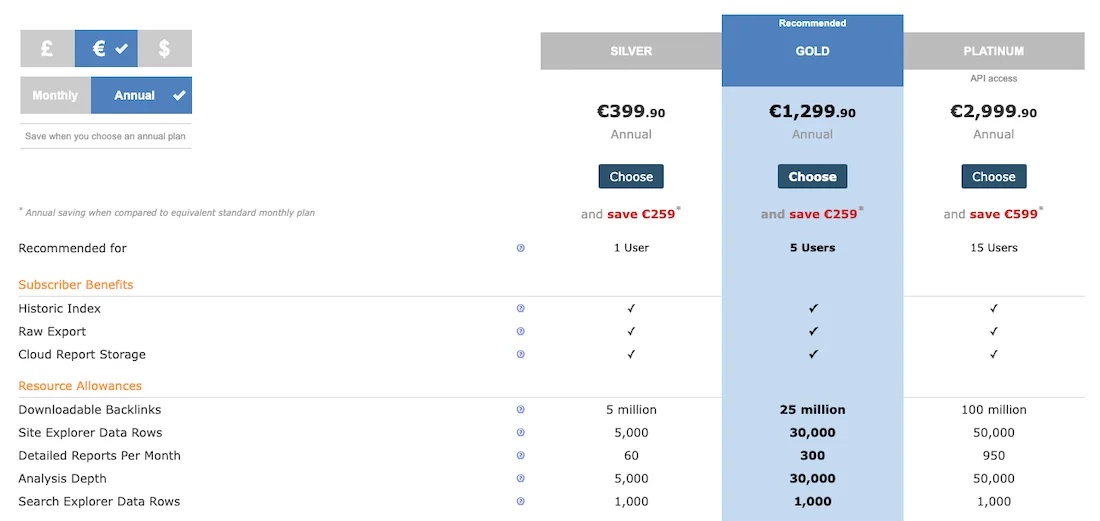
Thanks to its narrow specialization, it maintains an affordable subscription price. The cost of using Majestic starts at €39.99 month. When purchasing the service annually — from €399.90.
Functionality
The main Majestic metrics are the legendary Trust Flow and Citation Flow.
A visualized link graph and Link Profile are built. The Link Profile graph allows you to determine in two seconds whether a domain is spammed or not. If CF is high and TF is low, the site is toxic.
Trust Flow and Citation Flow are displayed for each discovered link. There is an option to export backlinks.
The Bulk Backlink Checker tool will be very useful for bulk checking drop domains.
The disadvantage can be called the morally outdated, overloaded interface, which requires time to get used to.
There are other functions in the service, but they are not very popular among SEO specialists.
Semrush
Semrush is one of the closest competitors to Ahrefs and SE Ranking, which has significantly modernized its crawler in recent years. It calculates its own Authority Score and Authority Score Trend metrics and shows the Network Graph.
The dashboard consists of Referring Domains, Backlinks, Monthly Visits, Unbound Domains, Overall Toxicity Score, shows new and lost domains and backlinks, categories of Referring Domains, Top Anchor, Referring Domain by Authority Score, Backlink Types, Link Attributes, The Distribution, Top Countries, and Top Pages by domain.
The second Network Graph module allows you to automatically visualize website networks and helps uncover BBS strategies of major players.
Semrush often gives an inflated Toxic Score, not fully understanding local websites and classifying them as spam, while the cost of Semrush is comparable to Ahrefs.
Comparison Table: Backlink Analysis Tools
| Comparison Parameter | SE Ranking | Ahrefs | Semrush | Majestic SEO |
|---|---|---|---|---|
| Backlink Database Depth | Medium (suitable for local SEO) | Maximum (detects hidden PBN networks) | Very high (fast discovery of new links) | Deep historical archive (history spanning years) |
| Purchased Link Monitoring | Available, built into the basic plan | Only general crawling, Alerts tool for new or lost links | Available (within the Backlink Audit module) | No |
| Learning Curve | Low (simple, intuitive interface) | Medium (requires filtering out spam scrapers) | Medium (clear visual graphs) | High (outdated text-based interface) |
| Price Segment | Budget-friendly (fixed pricing) | Premium (credit system with charges for clicks) | Premium (part of the overall heavy all-in-one tool) | Affordable (strict focus on link building) |
Website Audit
The Website Audit tool in SE Ranking is a classic cloud-based scanner. It crawls the website, finds broken links, duplicate pages, indexing issues, redirects, collects them into a convenient dashboard, and separates errors by severity level.
The cloud crawler depends on the power of the platform’s servers. On large websites, scanning can take a long time. The cloud crawler will not be able to scan a website that is under development, on a local service, or in a closed test environment where external access is blocked.
The tool provides a standard marketing report, but is not suitable for deep engineering work, custom parsing, or page weight simulation.
Therefore, if you need maximum speed, detailed code debugging, round-the-clock change monitoring, and affordable professional software, you can consider other tools for analysis.
Screaming Frog SEO Spider
The global industry standard for deep technical optimization. The program is installed on a local computer and uses its resources.
SEO Spider Pricing
The cost of using Screaming Frog SEO Spider is $279 Price Per User.
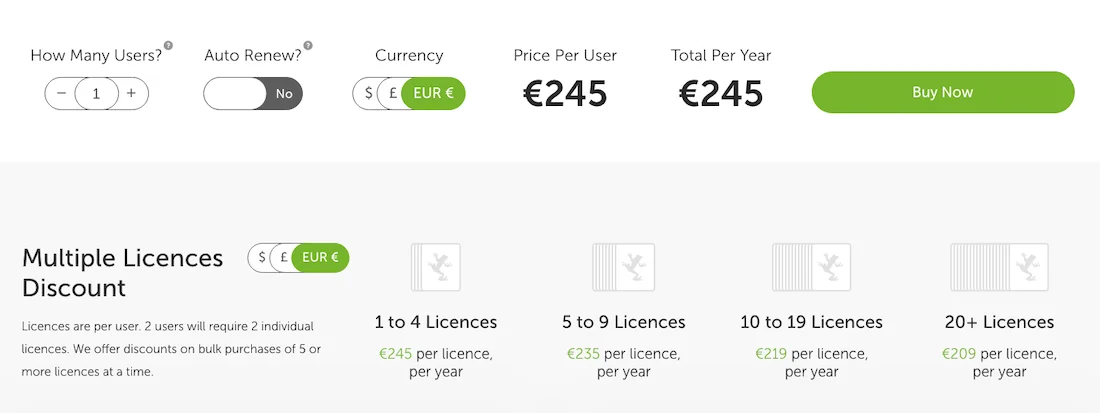
Functionality
Screaming Frog can be switched to data storage mode — Database Storage Mode. This allows you to scan millions of websites even on weak laptops, storing data on an SSD rather than RAM.
SEO Spider allows you to check absolutely any website parameters: Response Codes, title, meta-description, canonical, h1 and h2 headings, and Schema.org structured data.
With the Custom Extraction feature, you can parse any data from website pages. Screaming Frog SEO Spider easily scans websites on local servers, password-protected websites, or websites undergoing migration.
There is a free version with a limit of up to 500 URLs.
There are probably no disadvantages, although it can be said that the complex interface and desktop version may intimidate beginners, but SEO professionals have been working with this software for a long time.
Netpeak Spider
Netpeak Spider is another desktop crawler and direct competitor to SEO Spider, created with an emphasis on fast filtering, data segmentation, and a more modern UX/UI.
Netpeak Spider Pricing
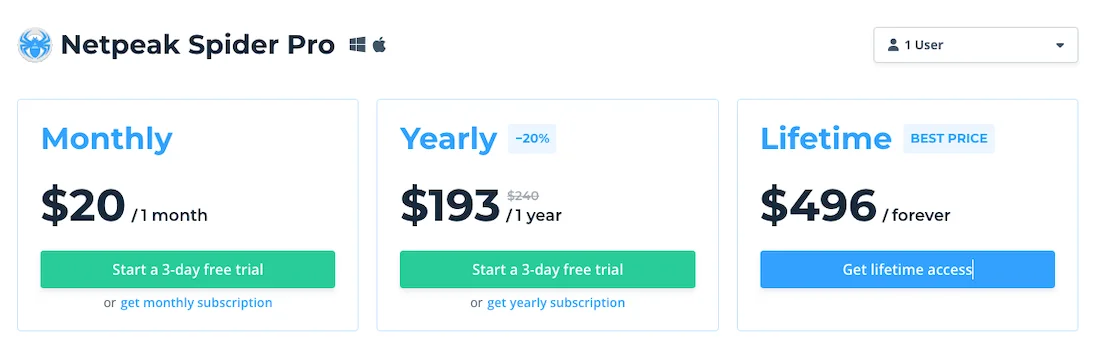
The cost of using Netpeak Spider Pro starts at $20/1 month per user. The Lifetime version costs $496.
Functionality
It has PageRank calculation simulation within the program, as well as a calculator that simulates the distribution of weight across internal links. This helps instantly identify dead-end URLs that waste crawl budget.
There is multi-domain scanning, which helps you upload a list of websites and collect a unified technical audit for them in one click.
The program works on a subscription model: monthly, yearly, and there is a lifetime version.
Sitechecker
Sitechecker is a cloud-based SaaS platform focused on automating technical monitoring processes and continuous monitoring of website changes.
Sitechecker Pricing
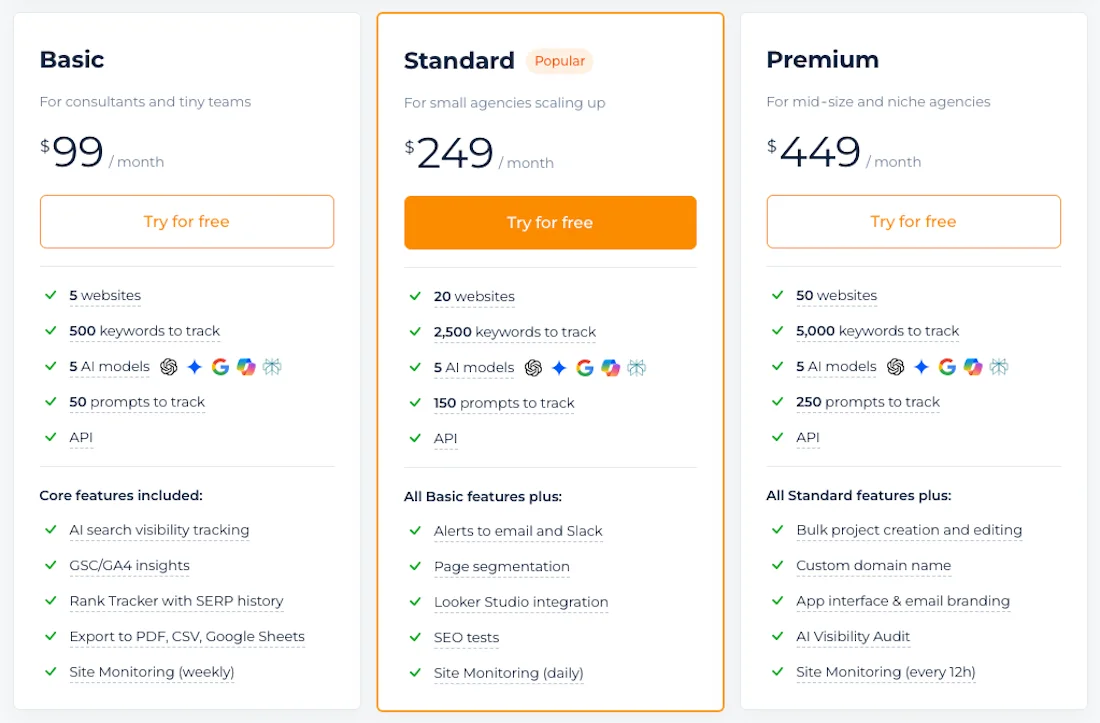
The cost of using Sitechecker starts at $99/month. There is a 17% discount when purchased annually.
Functionality
There is a Real-time Monitoring 24/7 mode, where the system continuously monitors the website in the background, and if you make any changes to the website, you immediately receive a notification in Slack or by email.
Comparison Table: Website Audit Tools
| Comparison Parameter | SE Ranking | Screaming Frog | Netpeak Spider | Sitechecker |
|---|---|---|---|---|
| Platform Type | Cloud-based SaaS | Desktop software (RAM + SSD mode) | Desktop software | Cloud-based SaaS |
| Custom Code Parsing | Unavailable | Excellent (Custom Extraction) | High level | Unavailable |
| 24/7 Monitoring Mode | Scheduled (by schedule) | No | No | Automatic (alerts in Slack in case of failures) |
| Learning Curve | Low (marketing dashboards) | High (engineering-oriented tabular interface) | Medium (tables with error hints) | Low (clear real-time error feed) |
| Price Segment | Affordable | Fixed annual license, free version available | Flexible license (monthly or annual) | Affordable (limits on pages that can be crawled) |
Rank Tracker
Position monitoring has historically been the strongest and most developed SE Ranking module because this service was originally created as a position tracking service.
In the Detailed table, position accuracy, flexible separation by devices, desktop, mobile, by search databases, and an automatic report builder for clients are offered. SE Ranking stores position history from the moment the keywords are added.
The main inconvenience of this module and the interface in general is its overload. When adding a large number of regions, cities, and thousands of keywords, the table turns into a large amount of data that is difficult to work with, can slow down, and disrupt the unified analytical workflow.
The database is updated once a day, and on-demand position tracking uses the account’s internal limits, so if you need speed, a focus on local SEO, or fast position tracking, let’s consider alternative solutions.
Sitechecker
Its tracker is integrated into the service ecosystem. It provides round-the-clock domain status monitoring.
The Sitechecker graphical dashboard records visibility dynamics in the range from 1 to 100. The key feature of the service: if a keyword’s position drops sharply, the interface automatically overlays this graph with the history of changes to your website, and you can see whether the position dropped because of competitors’ actions or because you updated something on the page.
The tool is quite simple; it has no extra features, and its targeting and grouping functionality for large lists is inferior to specialized solutions.
Wincher
Wincher is an affordable tool for independent webmasters of content projects and is built according to the principle of “nothing extra.”
The main advantage is a mobile-local rank tracker for Google Maps, which visualizes local promotion as an interactive grid of pins directly on the city map. You can see where the location is positioned within a radius of one, three, or five kilometers from the user.
There is a convenient WordPress plugin. There are no advanced filters by SERP segments. In the starter plan, you cannot manually and strictly assign a target URL to the selected keyword.
ProRankTracker
A specialized tracker optimized for modern search and geo-optimization. The tool provides a separate AI Visibility block.
It tracks brand positions targeted within generative responses, ChatGPT, Perplexity, Gemini, GPT. It tracks positions on Amazon and YouTube.
There is a fairly high learning curve for beginners, and the abundance of specific metrics makes it not very popular among specialists, but the service is quite good.
AccuRanker
This is a high-class rank tracker of the appropriate level, created for large consulting agencies and large-scale e-commerce projects.
It has an On-Demand Refresh feature, where the system does not force you to wait for the scheduled overnight update. You press a button, and it sends requests to the SERP in real time, providing current keyword positions within a few seconds and displaying the Share of Voice metric.
This is a highly specialized, isolated tracker with a high subscription cost. It has no additional modules.
Comparison Table: Rank Tracker Tools
| Comparison Parameter | SE Ranking | Wincher | ProRankTracker | AccuRanker | Sitechecker |
|---|---|---|---|---|---|
| Update Frequency | Daily | Daily | Daily | Instant on demand (On-Demand) | Daily |
| Local Tracking | Accurate (down to city level) | Convenient (pin grid on Google Maps) | Accurate (down to postal code/ZIP) | High (enterprise level) | Basic (down to city level) |
| AI Search Monitoring | Basic (AI Overviews) | Tracking AI Overviews and traditional SERP features | Deep (ChatGPT, Perplexity, Gemini) | Yes | No |
| Learning Curve | Medium (heavy tables with 1,000+ keywords) | Low (WordPress plugin available) | High (many specific AI metrics) | Medium (clean interface without third-party modules) | Low (integration into the overall website ecosystem) |
| Price Segment | Balanced | Budget-friendly | Medium | Expensive | Affordable |
Competitor Analysis Tool
The competitor analysis tool in SE Ranking works based on classic search modeling.
In the interface, you insert a URL, select a country, and analyze the website. The system shows data such as Domain Trust, Page Trust, Organic Traffic, Paid Traffic, Referring Domains, and Backlinks.
Organic Keywords, Distribution of Organic Keyword Ranking, Keyword by Intent, Intent and SERP Feature are shown. Paid Keywords are also shown.
In local markets of Eastern Europe, this data looks very stable. When analyzing competitors in the US, Asia, and Latin America, SE Ranking can sometimes show incomplete data, especially for low-volume queries. You may miss the actual traffic and competitors’ pages.
SE Ranking evaluates only SEO and PPC search traffic, so you will not see visits to a competitor’s website from social networks, email campaigns, referral links, or direct visits.
No service knows the exact traffic of another website, including SE Ranking. But if competing platforms use a large-scale Clickstream panel to simulate real user behavior, SE Ranking is limited to a mathematical search results model, which reduces the accuracy of macro-analysis.
If you need more accurate data and precise analysis of marketing channels, you can consider the following alternatives.
SimilarWeb
SimilarWeb is the absolute global leader in macro-analysis of web traffic, collecting data through large-scale panels of internet providers.
SimilarWeb provides maximum channel detail, breaking down the entire competitor business model: it shows direct visits, referral links, organic search, social networks, email campaigns, and display advertising. This allows you to immediately understand where the competitor gets its customers.
The main data sources are Clickstream, its own user panel, direct measurement data (GA), scraping, and public sources. Because of this, SimilarWeb provides almost accurate analytics on traffic and traffic channels for large websites.
SimilarWeb may show insufficient data for new and small websites.
The corporate subscription costs several thousand dollars, making it inaccessible to small businesses.
But you can use this service on the free plan, and the free plan provides a good amount of data.
SimilarWeb also has a free browser extension.
Semrush
Semrush has a Domain Overview section, which is considered one of the best new tools for competitor intelligence. In one click, you get a Dashboard showing i-search, SEO metrics, organic traffic data, and paid traffic data.
The top list of organic keywords, Keywords by Intent, Competitive Positioning Map, backlink data, and advertising data are provided right here.
Top Page shows the pages that customers visit from hidden sources, including internal email campaigns or paid traffic.
The Semrush database for foreign geos is noticeably superior to SE Ranking.
However, the high subscription cost and overloaded interface may discourage you from using Semrush and push you toward using SE Ranking or SimilarWeb on the free plan.
Serpstat
Serpstat is a multifunctional platform that is very good at serving as a tool for bulk processing and batch analysis of competitor data.
The main advantage of Serpstat for professional teams is its flexible API and batch analysis. The batch analysis module allows you to upload a large list of competitor domains and export all semantic overlaps without spending huge limits on clicks in the interface.
The powerful API makes it easy to integrate competitor metrics directly into internal corporate dashboards.
The disadvantage is an interface overloaded with text and charts that seems outdated, and there may be gaps in the database for some geos.
Comparison Table: Competitor Analysis Tools
| Comparison Parameter | SE Ranking | Semrush | Serpstat | Similarweb |
|---|---|---|---|---|
| Data Source | Local search modeling | Panel data (Clickstream) + search | Search modeling (SEO/PPC) | Global Clickstream panels (internet providers) |
| Channel Analysis (Social/Direct/Mail) | Unavailable (Google SEO/PPC only) | High level of detail (Traffic Analytics) | Unavailable | Maximum macro-level detail |
| Batch Analysis via API | Limited | Available on higher-tier enterprise plans | Excellent (main engineering advantage) | Available on custom Enterprise plans |
| Learning Curve | Low | High (overloaded with marketing tabs) | Medium (classic tabular interface) | Medium (convenient free extension available) |
| Price Segment | Budget-friendly | Premium | Medium | High enterprise pricing |
On-Page Content Marketing Tools
SE Ranking has a Content Marketing module that includes tools such as Content Marketing Tools, Content Editor, and AI Writer. These tools are fairly new but have already become popular.
The Content Marketing Tool has an internal Content Score, checks your text against a technical checklist, compares it with competitors’ parameters, helps generate a content plan, find article ideas, and create basic briefs for authors.
The content modules are priced separately, and you will have to pay extra for them.
Recommendations in On-Page Checker are often advisory in nature, it directly counts keyword occurrences, has weak sensitivity to Google NLP algorithms, and sometimes does not understand the context or synonyms of words, which can make optimization based on its suggestions look over-optimized, spammy, and unnatural.
If you need content creation automation, we will consider specialized alternatives.
Positive Surfer
Positive Surfer (Surfer SEO) – it is a global industry leader in content SEO correlation and text analysis.
Positive Surfer Pricing
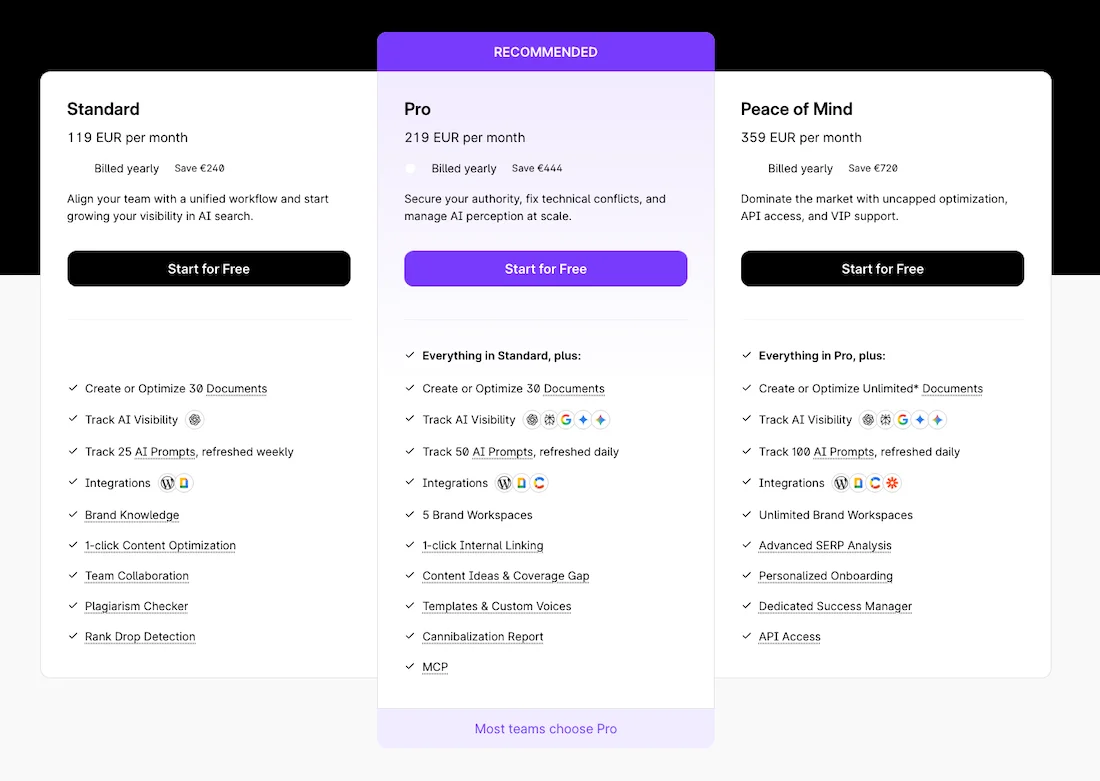
Surfer subscriptions start at €119 per month. Get a 17% discount with an annual subscription.
Functionality
It has an interactive Content Editor where you write and edit text directly in the interface. There is an optimization scale from 0 to 100 that changes in real time.
The service analyzes phrase density, the number of images, and paragraphs for headings. It has automatic authority, Topic Authority, which helps build logical relationships between articles, forming content clusters to strengthen the website in Google’s eyes.
The disadvantages include the high subscription cost, which is comparable to the price of SEO platforms, and the interface is overloaded and very complicated for beginner copywriters.
Wrytix
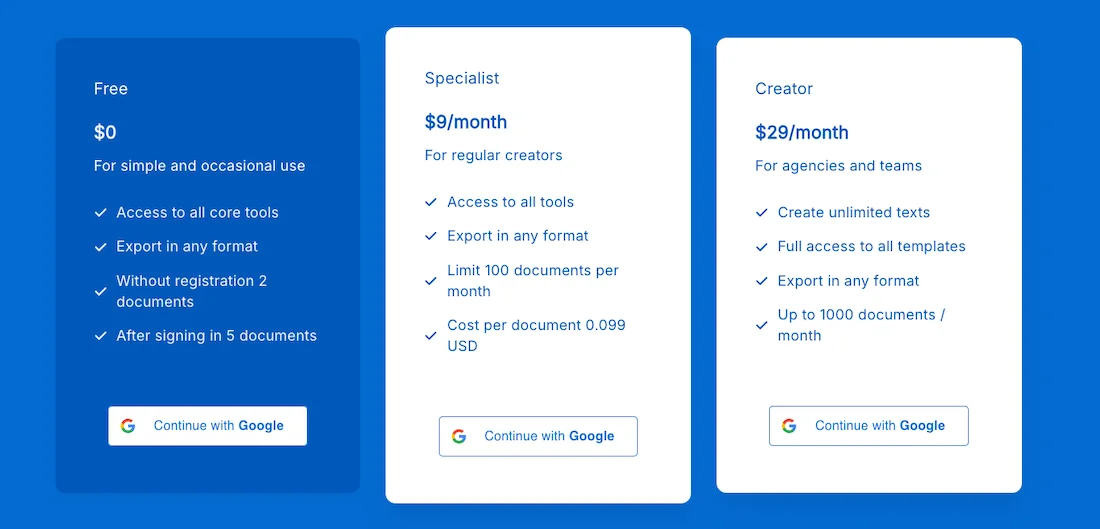
Wrytix is a next-generation specialized platform that combines keyword mapping, keyword research, auditing and competitor analysis, structure creation and text writing, an NLP optimizer, and a full-fledged AI writer.
Wrytix Pricing
Wrytix starts at $9 per month. A free plan is also available.
Functionality
The service studies the structure of successful competitors’ articles in a couple of clicks, formulates a technical brief with a ready-made hierarchy, and takes into account all text requirements: headings, lists, and quotes.
There is an option to rewrite an additional paragraph, add informational gain, and optimize text for AI Overview.
The built-in AI writer has a convenient interface with an editor, and you can create texts directly in this tool.
But Wrytix is a young product and, like any growing project, is still in the process of actively expanding its functionality and polishing its interface.
Comparison Table: On-Page SEO & Content Tools
| Comparison Parameter | SE Ranking | Wrytix | Surfer SEO |
|---|---|---|---|
| Analysis Logic | Comparison with the TOP-10 search results and analysis of LSI/TF-IDF words | Analysis of the actual top search results by LSI and NLP entities | Deep analysis of textual factors of the top 10/20 competitors |
| Built-in AI Writer | AI Writer module | Available (draft generation, paragraph optimization) | Available (available as a separate paid add-on) |
| Learning Curve | Low (standard checklist) | Medium (requires working with AI suggestions) | High (overloaded with technical metrics) |
| Price Segment | Charged separately for each page check | Transparent (package plans without additional charges) | High subscription cost |
How to Build an Effective Tool Ecosystem?
SE Ranking is a powerful comprehensive tool that combines a wide range of functions in one interface.
In practice, no professional team limits itself to purchasing one universal tool because each tool is good at certain functions.
Sometimes professionals lack data depth, or they need to pay extra for additional modules, which negates the financial benefits that seemed attractive at first glance.
The optimal strategy for optimizing the budget is to build an optimal stack of solutions where each service performs its task perfectly.
I want to give you an example of such a hybrid stack for SEO tasks.
For keywords: KeywordStat
The KeywordStat service provides clean semantics without branded noise in one click, clusters it for free based on real intent, and generates AI site recommendations based on landing page types.
SE Ranking also works well for keyword research.
Backlink analysis: Majestic + Ahrefs, Semrush, or SE Ranking.
Majestic will give you unique information on Trust Flow and Citation Flow metrics, which are highly valued by SEO specialists on the market. Ahrefs or Semrush provides a large backlink database, especially for competitive geos. SE Ranking has a great Backlink Monitor tool and a good database for Europe.
Traffic analysis: SimilarWeb
It is necessary for you for quickly evaluating major players. If you need deeper analytics, you can purchase a subscription. Consider using Semrush.
Website audit: Screaming Frog SEO Spider or Sitechecker
You can use the free desktop version or the paid version if you have a large project.
Sitechecker will allow you to monitor website changes around the clock with instant alerts in Slack or email if something breaks on the project.
Position tracking: SE Ranking or Sitechecker
SE Ranking is probably the best tool for this. If you have a small local website, you can consider Wincher.
On-page optimization and working with text: Wrytix or Surfer.
These tools analyze the top search results, create briefs for copywriters, check the text, and work as full-fledged AI writers.
Using this hybrid model and these tools allows you to eliminate compromises within universal all-in-one tools, automate routine tasks with modern AI tools, and ensure full control and fast, comprehensive work for an SEO team without hidden overpayments or payments for additional modules.