Keyword research is the process of finding and analyzing search queries that people enter into search engines such as Google and others.

- What is Keyword Research?
- Keyword Research in the Era of AI Search and GEO
- Website Structure for Planning
- Finding New Growth Opportunities
- Main Types of Keywords
- Informational Keywords
- Commercial Keywords
- Transactional Keywords
- Navigational Keywords
- Keywords by Search Volume
- Local and Global Keywords
- Keywords by Relevance Over Time
- Short-Tail Keywords
- Long-Tail Keywords
- Branded Keywords
- Non-Branded Keywords
- How to Find Keyword Ideas?
- All-in-One SEO platforms
- Keyword Research Tools
- Keyword Tool.io
- KWFinder (Mangools)
- Question & Long-Tail Tools
- Low-Competition Tools
- Content & SERP Tools
- Free Tools
- SEO Extension
- Reddit, Quora and Forums
- YouTube
- AI Platforms
- Collect Metrics
- How to Conduct Keyword Research in the Age of AI and GEO
- Keyword Research Quality Checklist
- Conclusion
What is Keyword Research?
It is a process that starts with brainstorming, when you roughly understand how users might search for your product or service, and as a result you get a finished document with the structure of your website, keywords, metrics and the types of pages that need to be created.
Let me help you conduct Keyword Research. I will give you both theoretical information and specific practical tips and examples.
Where do we start? Most often, you can start with an analysis of your product catalog if you have an eCommerce website, or from the description of your product features if you have an online product.
In this way, you have assumed which queries potential customers might use to search for your product or service. Next comes the comparison of these queries with real user searches, meaning how they actually search.
Then comes the analysis and work with these queries. We need to understand which queries are more relevant, which have traffic potential and commercial potential.
And then comes the implementation of these keywords, understanding which type of pages should be created for specific keywords: landing pages, articles and other types of pages, and what we will place on them.
Keyword Research in the Era of AI Search and GEO
Before launching the keyword research process and using any SEO tool, you need to understand the true user intent, which is called search intent.
If the page does not match the intent, Google will lower its ranking or not rank it at all due to poor behavioral factors.
All keywords can be roughly divided into four categories.
- Informational intent — learn. These are blogs, guides, FAQ sections.
- Commercial intent — compare. Reviews, rankings, tables.
- Transactional intent — buy. Product and pricing pages.
- Navigational intent — find a brand, login page, contacts.
Website Structure for Planning
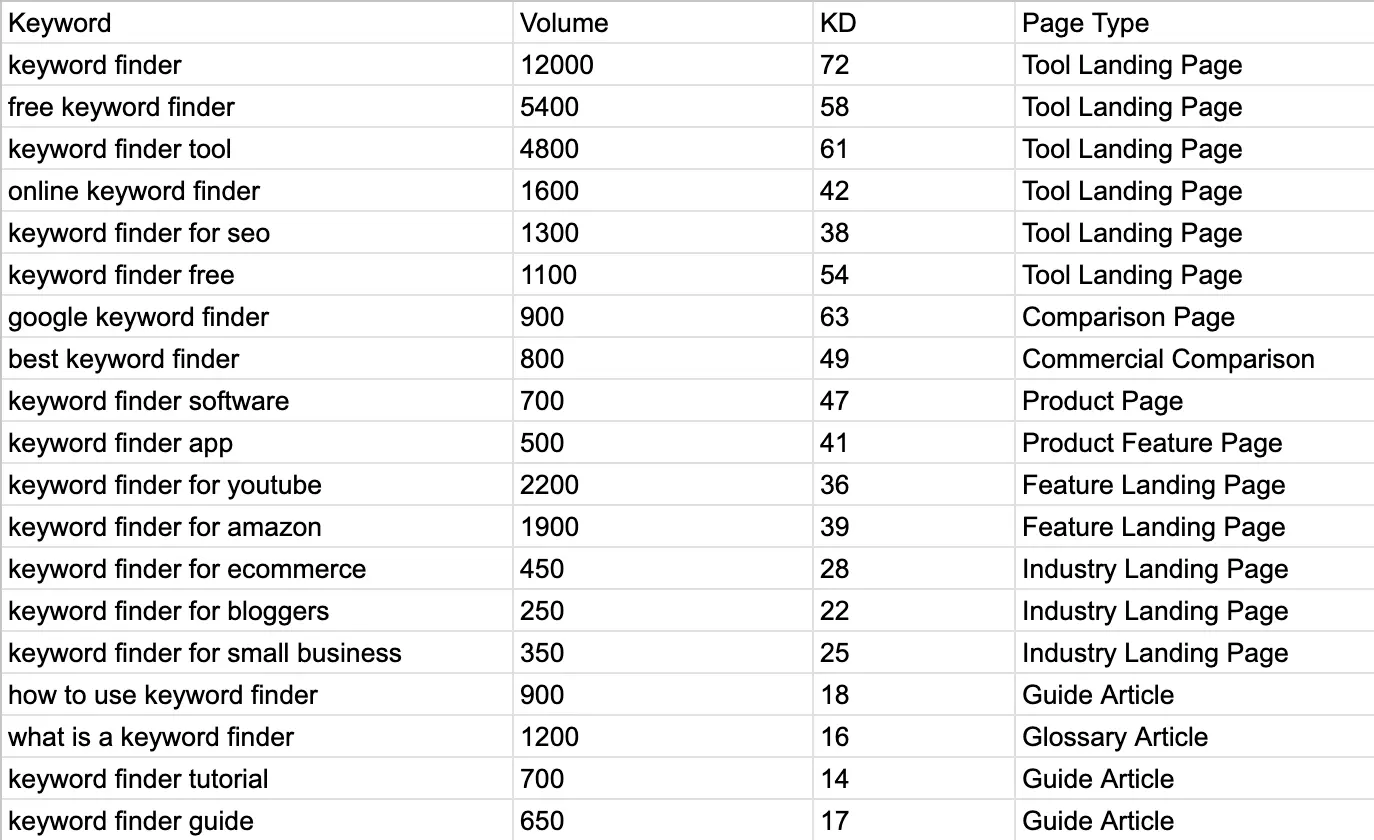
When we already have all these questions, we can plan the website structure.
Based on keywords, we can create the structure of an online store: product pages, categories, subcategories, filter pages, and other special pages for specific queries.
If these are informational queries, it makes sense to place them in blog articles, a glossary, a knowledge base, a help center, an academy center, and other informational sections.
If these are commercial queries, we can create separate landing pages for them.
If you have a SaaS project or some kind of tool, then you will no longer need product and category pages. In this case, you can create separate pages for each service or feature.
If your service performs several different functions and provides several services, you can create a separate page for each feature or service, as well as additional pages describing the capabilities of individual products.
This will allow you to attract additional traffic.
Site Structure Example
Finding New Growth Opportunities
In many niches, there are a large number of queries that competitors may ignore.
For example, if you have a service or some AI tool, you can create separate landing pages for startups, small businesses, freelancers, analysts and other specific audience segments.
Such narrower queries often produce better SEO results.
First, they are less competitive. It may turn out that your competitors simply have not created content on this topic. They may have taken a broad topic such as “AI Tool” or “CRM Software”, described how it works, and stopped there.
Second, such queries are often more conversion oriented because the person is already looking for a specific solution to their problem, and you have a landing page specifically created for this query. This significantly increases the likelihood of attracting targeted traffic and conversions.
Main Types of Keywords
Keywords can be categorized in different ways. I will talk about them in more detail in separate articles because it is impossible to describe everything within this article: it would become too large.
Let’s simply list the main types and look at what they mean.
Informational Keywords
These are queries where the user is looking for an answer to a question.
For example:
- what is keyword research;
- how to do keyword research;
- how to find keywords.
The main goal of the user is to get information and understand the topic.
Commercial Keywords
These are queries where the user is already choosing a product or service.
It is important to understand that a commercial query is not only queries containing words such as “buy” or “order”.
This category also includes queries such as:
- best;
- compare;
- review;
- alternatives;
- how to choose.
For example, the query “how to choose CRM software” looks informational, but in reality the user is already at the product selection stage.
Transactional Keywords
These are queries where the user is already ready to take an action.
For example:
- buy;
- order;
- registration;
- login;
- subscription.
Such queries show that a person is as close as possible to conversion and is ready to complete a transaction.
Navigational Keywords
These are queries where the user is looking for a specific brand, website or page.
For example:
- KeywordStat login;
- KeywordStat pricing;
- account login;
- company address.
The user already knows where they want to go and uses search as a navigation tool.
Keywords by Search Volume
By search volume, keywords are usually divided into three groups:
- high volume (short-tail);
- medium volume (mid-tail);
- low volume (long-tail).
In this article, I have already explained in detail what these are and how they differ from each other.
Local and Global Keywords
Keywords can also be divided based on geo dependency.
Local Keywords
These are queries that contain a specific location.
For example:
- cafe in New York on Manhattan;
- SEO agency in central Madrid;
- dentist in Berlin Alexanderplatz.
For such queries, the user’s location plays an important role.
Global Keywords
These are queries that are not tied to a specific country or city.
For example:
- Keyword Finder;
- SEO research tool;
- AI writing tool.
The user does not care where the company or the product servers are located. The main thing is that the tool works online.
Keywords by Relevance Over Time
Another popular classification is based on how relevant keywords remain over time.
Evergreen Keywords
These are the so called evergreen keywords that maintain stable demand over many years.
For example:
- how to tie a tie;
- how to choose a laptop;
- how to write a resume.
The trend for such queries remains relatively stable.
Although it is worth considering that many of these topics have already been covered in detail by a large number of websites.
In addition, modern LLM systems are often able to answer such questions faster and more conveniently than a separate article. Therefore, if you are thinking about writing such articles, then you will need a lot of effort to make the articles better than those that are already at the top.
Seasonal Keywords
These are queries whose demand depends on the season.
For example:
- swimwear;
- sunglasses;
- winter tires;
- snowboarding products;
- New Year gifts.
During a specific season, such queries grow sharply and then decline again.
Trending Keywords
These are queries related to new events, products and technologies.
For example:
- new iPhone;
- latest AI tools;
- new Google updates.
I am intentionally not naming a specific iPhone model because by the time you read this article, the next iPhone model may already be released.
Such queries are very sensitive to the freshness of information. Therefore, if you work with trending content, you need to constantly follow the news and regularly update your materials.
Short-Tail Keywords
Short-tail keywords are short queries consisting of one, two or three words. For example: SEO, IT, CRM, AI, VPN, running shoes, and so on.
What are their characteristics?
They have very high search volume, high competition and are difficult to rank for. At the same time, user intent is often unclear.
When we enter the word “SEO”, we do not understand what exactly the person wants: to order SEO services or to read about how SEO works.
You may receive a lot of traffic from such a query, or you may receive no traffic at all. Google tries to understand what exactly the user is looking for and therefore often shows several possible answers in the search results.
Your chance of reaching the top becomes even lower because the search engine may:
- provide a quick answer directly in the search results;
- show an AI Overview;
- display different content types;
- show videos on the topic;
- display large informational websites;
- show featured snippets.
Google itself does not fully understand the user’s intention and tries to satisfy several possible search scenarios at once.
Therefore, ranking for short-tail keywords requires very high website authority. But even in this case, determining user intent will be quite difficult.
Long-Tail Keywords
Long-tail keywords are longer and more specific queries. For example:
- SEO agency in New York;
- Best CRM for small business;
- How to do keyword research;
- Running shoes for flat feet.
Such queries provide a much clearer indication of what exactly the user wants.
They usually have:
- lower search volume;
- lower competition;
- higher conversion rates;
- clearer intent.
Therefore, ranking for such queries is significantly easier.
This is exactly why many websites receive the majority of their SEO traffic from long-tail keywords, and this mechanic forms the foundation of the SEO Avalanche technique. According to this methodology, a website should target search volume tiers that match its current organic traffic levels. By capturing low-volume long-tail terms first, the site builds the necessary traffic momentum to naturally graduate to highly competitive, high-volume keywords over time.
Moreover, a single page can rank for a large number of long-tail queries while not ranking for short-tail queries at all. This is a completely normal situation.
Branded Keywords
Branded keywords are queries that contain the name of a brand or company.
They are very useful, but there is one important nuance here. For users to search for you by brand name, they first need to know about your brand.
This usually happens through display advertising, PR, content marketing, social media and other marketing channels.
Because people cannot search for something they have never heard of, and that is logical.
Therefore, working with branded queries is not so much about attracting a new audience as it is about acquiring and protecting traffic related to your own brand.
There are often situations where competitors or affiliates take advantage of branded searches.
For example, a company does not actively protect its brand in search results, and other websites create review pages, rankings, comparisons or alternatives and begin receiving this traffic.
In some cases, this traffic is then monetized through affiliate marketing, and sometimes users are simply redirected to competitors. I know many people who made a fortune from this back in the day. But let’s not talk about that, those times are long gone.
Therefore, branded keywords also require attention.
Branded keywords are queries that contain the name of a company, brand, product or service.
In our case, examples may include:
- KeywordStat;
- KeywordStat pricing;
- KeywordStat keyword research tool;
- KeywordStat alternatives.
In other words, the user already knows about the brand and is looking for a specific page, feature, service or additional information within that brand.
Such queries usually have high conversion rates because the user is already familiar with the product and is much closer to making a decision.
They also often have low competition. However, this is not always the case.
If you have a popular product that can be replaced by alternatives, competitors may actively compete for this traffic. For example, they may create comparison pages, alternatives pages or reviews and try to capture users during the decision making stage.
Therefore, in some niches even branded keywords can have fairly high competition.
Previously, some third-party sites could rank for these queries. It’s great that Google fixed this. I know of a company that was losing a lot of money on this. I’ll keep this a trade secret and won’t name the company, as it’s unethical.
Non-Branded Keywords
As the name suggests, non-branded keywords are queries that do not contain a brand name.
If we talk about our product, examples of such queries may include:
These are queries entered by users who are not yet familiar with your brand.
Almost every SEO strategy is aimed specifically at acquiring traffic from such non-branded queries.
This is because the volume of branded traffic is usually limited. It largely depends on how many people already know about your brand and what marketing or media activities you have previously conducted.
Non-branded queries allow you to attract a new audience. The user already knows their problem or task and is looking for a solution, but does not yet know about the existence of your product.
That is why such queries usually become the primary source of SEO traffic.
When I was working on the SEO promotion of my website KeywordStat, I decided to use two strategies at the same time.
First, the name KeywordStat itself contains a keyword. Essentially, it is a combination of the words “keyword” and “stat”, meaning keyword statistics. This already helps search engines somewhat understand the topic of the project.
However, it is very difficult to grow only through a branded name. Even if the query KeywordStat is considered branded, the volume of such traffic will still be limited.
Therefore, branded promotion alone is not enough.
That is exactly why I run a blog and publish materials on other thematic pages of the website. This allows me to attract users through non-branded queries and gain additional organic traffic from search engines.

How to Find Keyword Ideas?
There’s no single keyword research and analysis tool. Large, professional SEO teams use a whole stack of keyword research and analysis tools, not just one.
Depending on your goals, objectives, budgets, and current processes, I’ll discuss various keyword research tools and group them into broad categories.
All-in-One SEO platforms
There is no single tool for keyword research and analysis, and large and professional SEO teams use an entire stack of tools for keyword research and analysis, rather than limiting themselves to just one tool.
Depending on your goals, your tasks, your budgets, and your current processes, I will tell you about different keyword research tools and group them into large categories.
These platforms are best suited for competitor analysis, your own website analysis, keyword research and analysis, traffic estimation, as well as backlink profile analysis.
In this article, we are only looking at keyword research, so we will not talk about links here. I will explain how these platforms can be used for keyword research and analysis.
Ahrefs
This is the leader of the niche, the global standard for website analysis, link building, keywords, missed search terms, content gaps, seeing where you rank and where you do not.
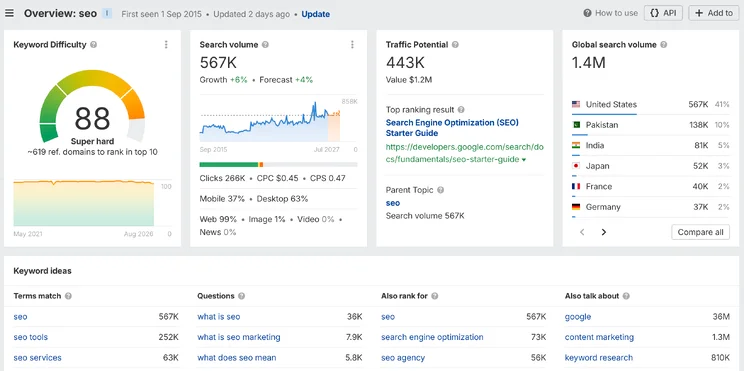
Among the disadvantages, we can mention the fairly high cost and limits on different pricing plans. This is critical for Keyword Research because the budget gets used up very quickly.
Keywords for unpopular and competitive websites are quite limited because the entire focus is concentrated on large GEOs. And you may notice that for less competitive GEOs there will simply be zero or very low search volume, or there will be no data at all.
SEMrush
Also one of the market leaders. A very large keyword database, good PPC analytics. Keyword Magic Tool is their flagship tool for collecting keywords, with convenient automatic grouping of suggestions by topics. SEMrush automatically labels keywords by intent type (Informational, Commercial, Navigational, Transactional). And for keyword analysis, this saves many hours of work.

As for the disadvantages, we can say that the interface is a little overloaded with features, and it will be easy for a beginner to get confused. And also a fairly high price.
SE Ranking
This tool is something of a golden middle. An optimal price-to-quality ratio. They have also implemented commercial/informational intent detection.
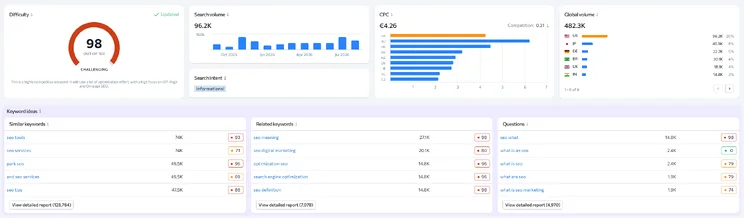
There is a rank tracker and a built-in clustering module, which is very convenient.
Among the disadvantages, we can note that the keyword database in new niches is updated very slowly.
There are also problems with keyword difficulty estimation for key GEOs. They differ significantly from what Ahrefs and SEMrush provide. But, on the other hand, for unpopular GEOs, for Eastern Europe, there is a good keyword database.
Serpstat
It can also be classified as having an optimal price-to-quality ratio. This service has a powerful SERP structure analysis module, good historical data on domain positions, as well as a very strong clustering module. There is Batch Analysis — you can upload a list of thousands of keywords and get search volume and difficulty for them. Tree View shows competitors’ keywords as a structure of their website, which helps you instantly understand which clusters specific sections of competitors’ websites were created for.
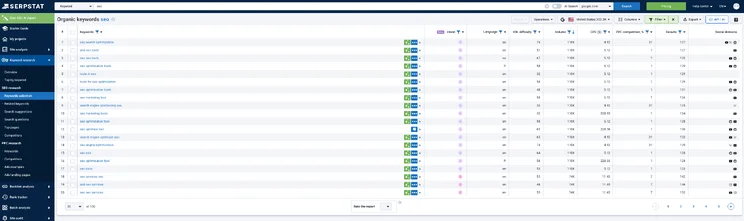
Among the disadvantages, we can note the UX, which is somewhat outdated and very overloaded with data.
Also, the data for competitive GEOs is not entirely accurate, but on the other hand, there is good data for Eastern Europe, and in general this tool is quite popular in Eastern Europe. There are some separate points regarding links, but in this context we will not talk about links.
Ubersuggest
It appeared on the market as an inexpensive alternative to Ahrefs, but over time it found its own positioning.
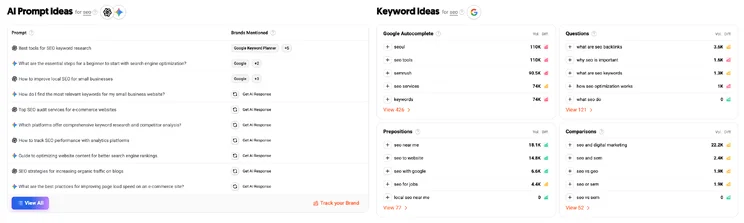
An affordable tool on the market, it also offers the possibility of purchasing a Lifetime license, which is rare in the SEO tools market.
The new modern interface is very clean and easy to understand. There is AI integration. It is suitable for content marketers who do not need complex technical metrics but simply need ideas for articles.
The disadvantages include the fact that keyword data, such as Keyword Difficulty, will be quite inaccurate compared to Ahrefs. Due to the low cost of the service, databases are updated less frequently, and finding new topics there will be difficult.
Keyword Research Tools
These tools are best suited for finding search terms, scraping search suggestions, and instantly expanding basic queries. And if you need tools only for keyword research, I would recommend using these specifically.
KeywordStat
This is a tool that works very quickly and simply, automatically removes junk keywords, groups queries by intent, and gives you clean analytics.
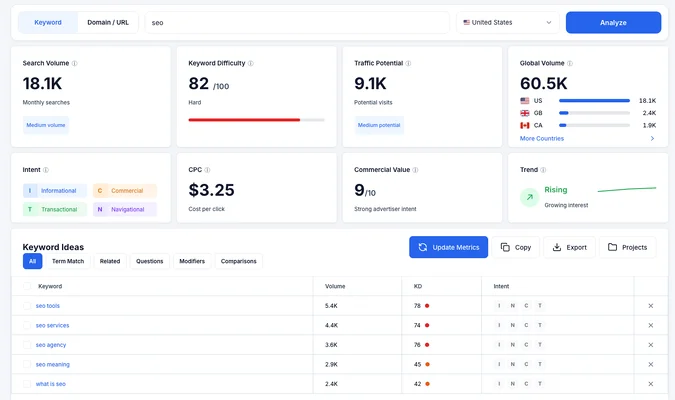
There is convenient sorting by keyword types: Term Match, Related, Questions, Modifiers, Comparisons.
Sorting by volume, by KD, query intent detection, convenient copying and exporting of data.
It has a pleasant and modern interface. Among the disadvantages, we can point out that the tool is focused only on keywords, meaning it does not have any additional functions.
The service has domain analysis, but it works rather superficially, not in the way you are used to doing it in other tools, for example, in Ahrefs or Semrush.
Keyword Tool.io
This is a powerful suggestion scraper. It scrapes suggestions not only from Google, but also from Amazon, YouTube, App Store, Pinterest, TikTok, and other services.
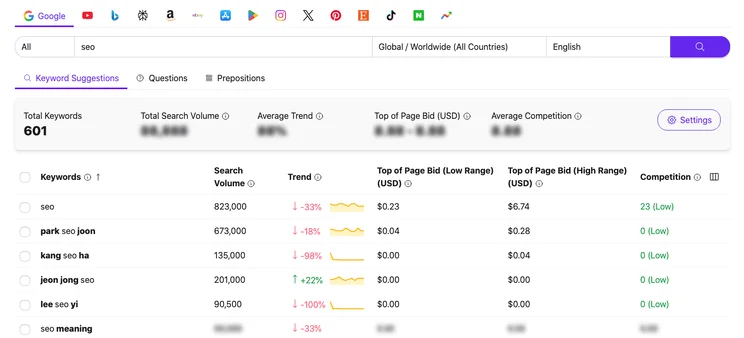
In the free version, it shows the keywords themselves, but hides (blurs) the search volume and CPC data. To see the data, you have to pay.
Among the disadvantages, we can note that the professional version is quite expensive for a tool that only does scraping. And you will also need quite a lot of time to clean the keywords because it scrapes everything.
KWFinder (Mangools)
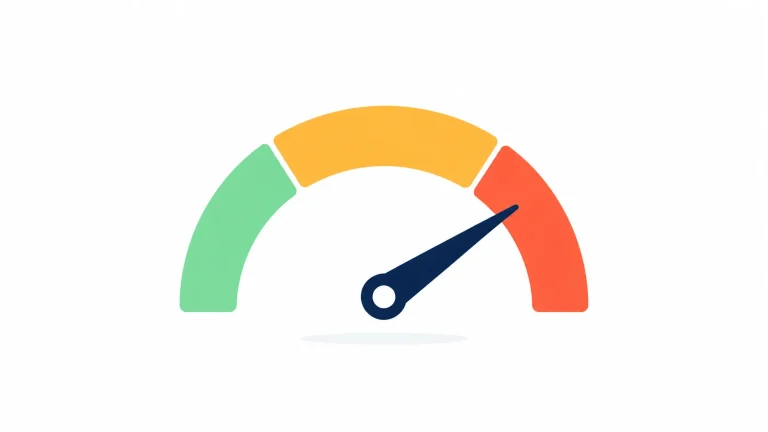
It is part of the multifunctional Mangools tool. One of the tools in this service. Good clean interface, with clear color indicators of difficulty (green/yellow/red). A pretty good Keyword Difficulty score that is close to real-world values, and, in fact, this is what made it famous on the market, because it showed good Keyword Difficulty, especially for local SEO.
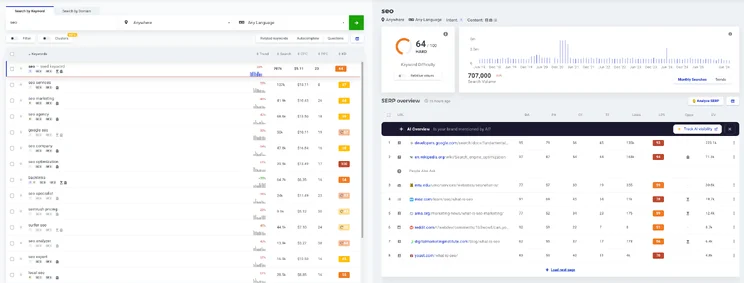
Among the disadvantages, we can say that there are limited search limits per day even on paid plans.
Keywords Everywhere
A multifunctional service, but its main task is keyword research, which is why it is included in this group. It shows different metrics, search volume, CPC, competition. A multifunctional browser extension (for Chrome and Firefox) where you can get answers directly while browsing Google.

Payment is based on the number of words or credits checked, but these credits are quite cheap. Among the disadvantages, we can say that it is not very convenient for bulk exports and complex clustering of large numbers of keywords.
Question & Long-Tail Tools
Tools for finding questions and long-tail keywords. They work based on Google search suggestions (Google Auto-complete), adding question prefixes (“why”, “how”, “what”) to your seed keyword.
They are well suited for creating informational content. If you have a blog or news website, they are good at scraping queries that appear in People Also Ask blocks.
AnswerThePublic
One of the most popular services that searches for such keywords. It turns dry lists into visual mind maps, which are great for presentations and content plans for colleagues and teams.
Among the disadvantages, we can say that the free version is very limited. And after the service changed ownership, the pricing became quite high.
AlsoAsked
A tool that shows the real relationship between queries, which question Google asks after clicking on the previous one.
If Answer The Public scrapes suggestions (Auto-complete), then AlsoAsked scrapes the PAA block (People Also Ask).
Among the disadvantages, we can say that the subscription cost is high, considering, for example, that the software solves only one narrow task.
Because of Google’s algorithms for protecting PAA blocks from scraping, the tool may work slowly or return a “no data” error for rare local GEOs.
AnswerSocrates
A direct competitor to Answer the Public. A service that collects questions in dozens of languages without registration. It combines search suggestions (like ATP), the People Also Ask block (like AlsoAsked), as well as data from Google Trends. The interface is quite simple, and it integrates search volume data.
There are paid plans, starting from fairly affordable ones, and there is a large pricing plan with large numbers of credits per month.
Low-Competition Tools
They are suitable for new websites and implementing the SEO Avalanche technique because they look for weak spots in search results, in Google’s top results, so that you can find low-competition queries and get your first traffic.
LowFruits
A popular tool that saves a huge amount of manual work, highlighting keywords in search results where weak blogs, forums, or Reddit are sitting in the top 10 and can be overtaken.
There are visual markers (apple icons). If there are forums or a weak website in the top 10, they call it “Low-hanging fruit.” The more apples a keyword has, the easier it is to get into the top results.
LowFruits divides the analysis into two stages: first you generate a list of ideas, and then spend credits on “Analyze” (SERP Analysis).
It takes a lot of time to analyze each tool. But why does it work for so long? Because it makes a request for each keyword, a request to the real SERP results.
KeySearch
A niche tool for niche content projects that calculates keyword difficulty using its own formula. There is an excellent Content Assistant feature. It shows which LSI words competitors from the top results use.
The disadvantages include an outdated interface and a somewhat specific workflow that you need to get used to.
Keyword Chef
Built-in smart filters that cut e-commerce giants such as Amazon out of the search results on the fly, leaving only keywords available to small websites.
There is automatic cluster detection directly during import and unique filter presets (for example, searching by intents Best, How-to, Review in one click).
It works on a Pay-As-You-Go system (payment for credits). It works well on the English-speaking market, but the database for other countries is quite limited.
Content & SERP Tools
These tools are needed to build topic authority, find hidden LSI words/entities, as well as analyze content and its semantic relevance.
Surfer SEO
An excellent content editor that tells the copywriter in real time how many words need to be added and what needs to be added to the article to bring it to perfection.
There is a Chrome extension that integrates the content brief directly into Google Docs or WordPress.
However, when using this tool, you need to approach it with a cool head, because if you use all the suggested optimizations and bring the score to 100%, the text will become over-optimized and quite unreadable for people.
Keyword Insights
This service is excellent for processing large amounts of data. It groups tens of thousands of keywords at once based on real search result clustering. In one pass through the dataset, it determines: Cluster (group), Intent (informational/commercial), and Page Type (a new article is needed or an old one can be optimized). This saves a huge amount of manual work.
A fairly expensive tool created for the needs of large SEO agencies and large corporate websites. It uses a strict credit system, so frequent runs of large keyword databases are expensive.
Clearscope
A very accurate tool on the market, it works based on the Google NLP API and analyzes semantic entities (Entities). It teaches the copywriter to cover a topic at the level of meanings, rather than simply inserting LSI words.
It helps an article reach the top without aggressive link building. Among the disadvantages, we can note its high price, which will be unaffordable for most webmasters.
Free Tools
They are suitable if you want to get direct, clean data directly from search engines. This is more data that allows you to roughly understand the search results. For comprehensive keyword research, collecting your keywords, finding and analyzing them this way will be quite difficult, but we still need to talk about them.
Google Autocomplete
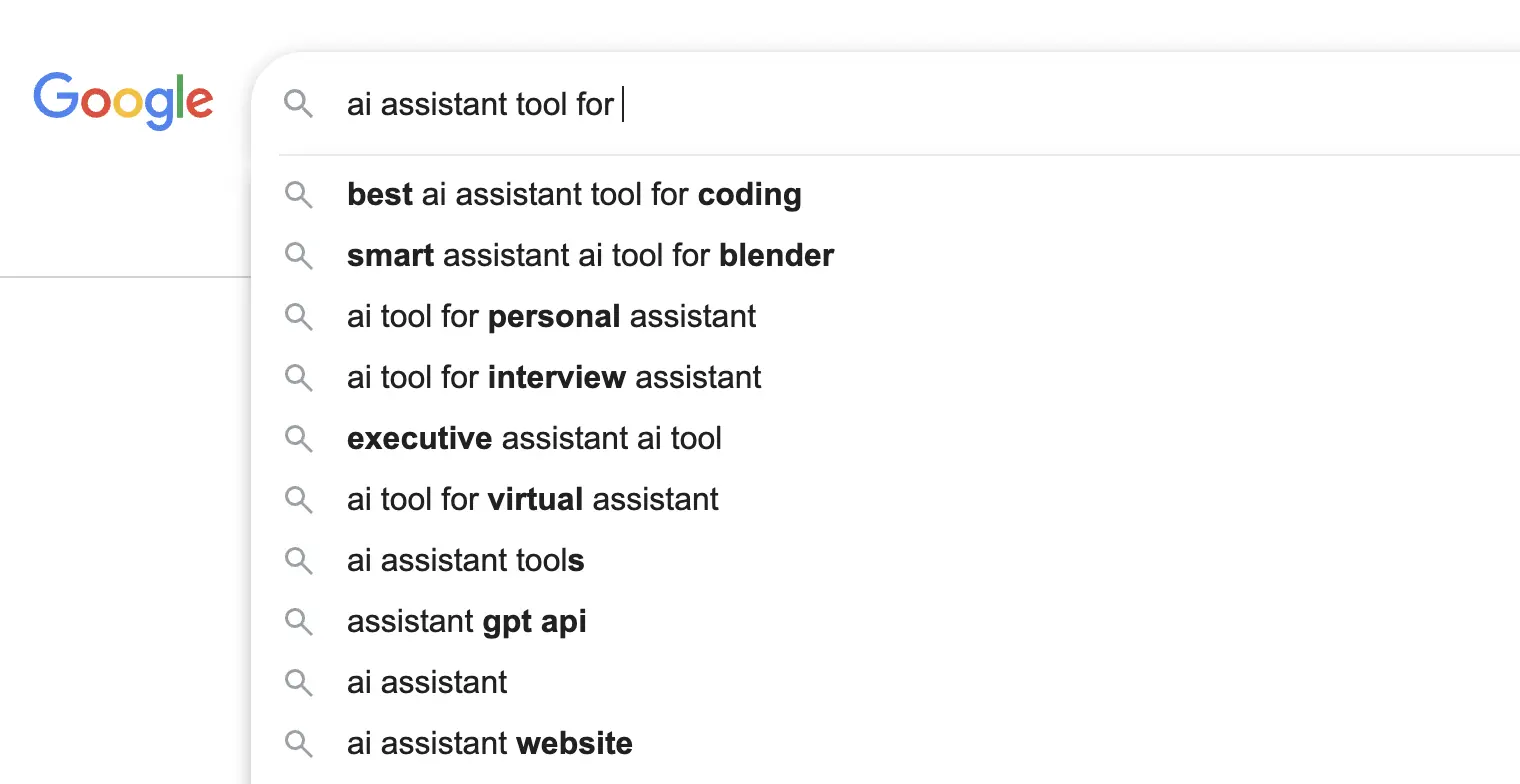
This is the simplest source for finding ideas.
Shows fresh trends, real user queries right now. The tool is completely free and works directly in Google search results. There are no metrics, search volume, or difficulty, and collecting suggestions manually in large volumes is practically impossible.
To avoid copying suggestions manually, you can use free browser extensions or scrape them using basic scripts.
You can simply enter a query into the Google search bar, and the system will automatically suggest additional query variations.
For example, if you enter the query “Keyword Research”, Google may suggest:
- Keyword Research Tool;
- Keyword Research Process;
- Keyword Research Guide;
- Keyword Research Checklist;
- Keyword Research Template.
All of these suggestions are based on real user searches, making them an excellent source of content ideas.
People Also Ask (PAA)
It finds informational queries directly in Google that can be useful for your article or FAQ. These queries are taken directly from the logic of search algorithms. But it will be difficult to manually collect such deep chains of questions because the block simply keeps scrolling.
This is also more for looking at which direction you can search in at all.
For example, for the query “Keyword Research”, you may see questions such as:
- What is Keyword Research?
- Why is Keyword Research important?
- How to begin Keyword Research?
Each of these questions can become a separate article, a section within an article, or an additional landing page on your website.
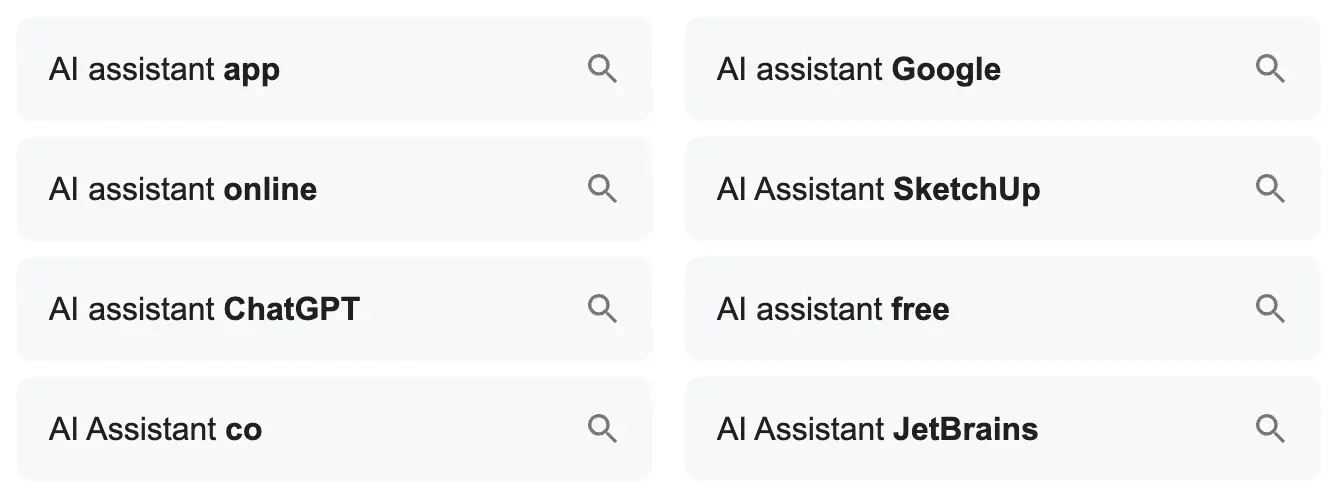
Related Searches
At the bottom of Google’s search results, you will find the related searches section.
This section helps uncover additional directions for topic research.
For example:
- Keyword Research example;
- Keyword Research process;
- Keyword Research strategy;
- Keyword Research for SEO.
This is often where you can find a large number of useful long-tail keywords for your blog.
Google Search Console
This is a real tool from Google that shows the queries for which your website is already ranking. These are the most accurate data.

But for this, you must already have traffic, and this tool will be good for additional optimization if you forgot to include some keywords in the text, and it can also help you create new pages for missed clusters.
GSC shows data with a delay of 2–3 days and hides some super-low-volume queries (anonymizing them for user privacy).
And this service is available only for your website, and you will not be able to analyze competitors with it.
After connecting your website to Google Search Console, you will be able to analyze:
- search queries;
- pages;
- countries;
- devices;
- Search Appearance;
- time periods.
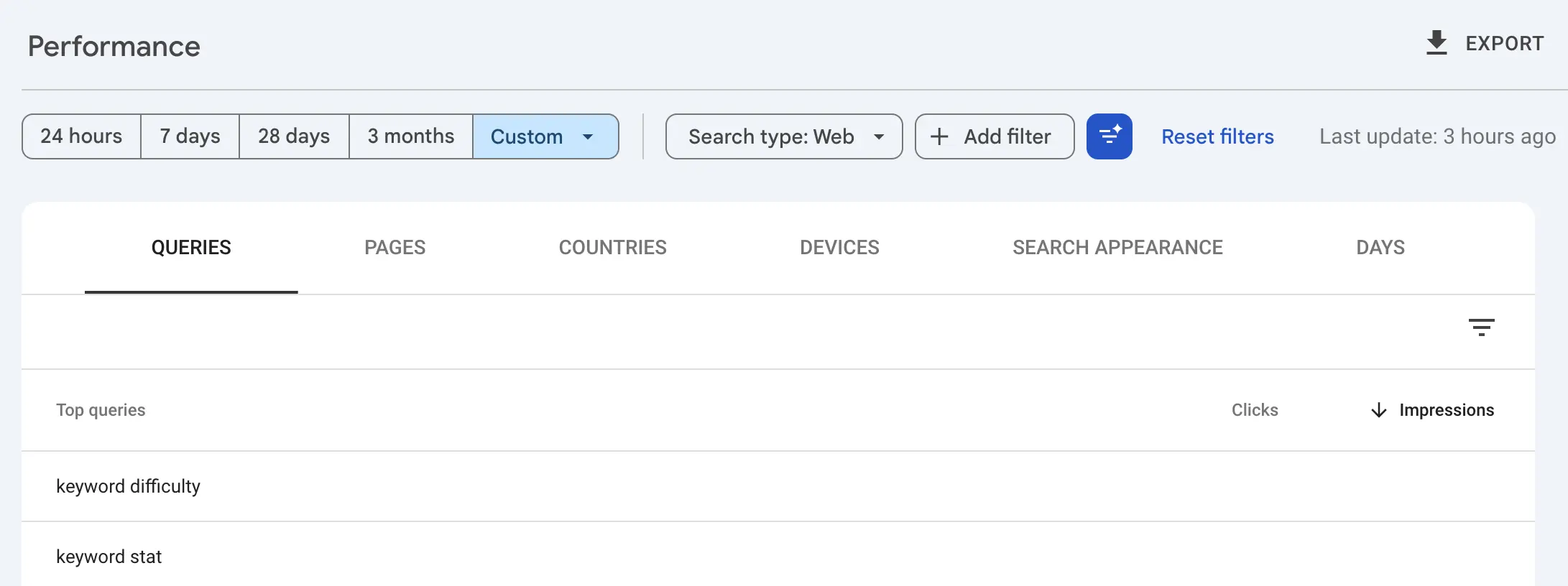
You can also use filters to analyze:
- Web;
- Images;
- Video;
- News.
Google Search Console allows you to:
- compare periods;
- analyze individual queries;
- compare pages;
- work with regular expressions (Regex);
- create advanced filters;
- find queries that contain or do not contain specific words.
This is one of the most powerful tools for analyzing your own search visibility.
The advantage is that you see real Google data directly, without intermediaries.
There is only one disadvantage: the tool is available exclusively for your own website.
If you want to analyze a competitor through Google Search Console, it’s impossible. Or get a job at their company. It’s just a joke! 😉
Bing Webmaster Tools
It should also be said that Google is not the only one with tools. Do not forget about Bing’s tool.
This tool provides full deep SEO functionality, including search volumes completely free of charge, without limits in its interface.
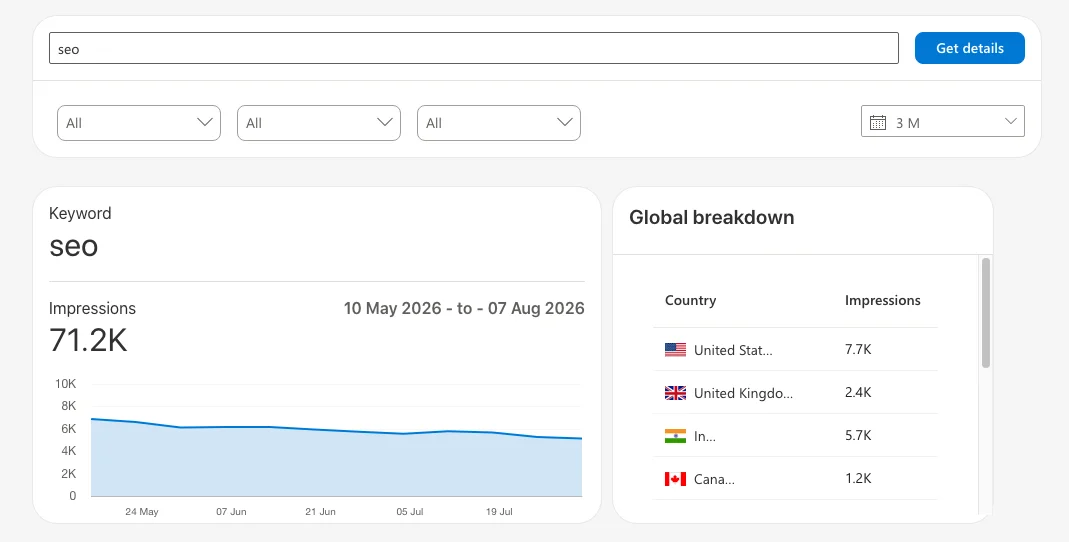
Bing Webmaster Tools has a built-in Keyword Research tool that pulls data from the entire Microsoft ecosystem (including Windows and Edge browser searches).
The keyword database for countries outside the US and Western Europe will be quite weak.
SEO Extension
There are also tools such as browser extensions for doing SEO on the fly. They are suitable for quick express analysis, checking and optimizing competitors’ content directly while performing a regular search.
Keyword Surfer
This is a free extension from the creators of Surfer SEO. It is great for quickly and superficially estimating query search volume directly in the search bar, and it also shows the cost per click.

The database here is updated quite rarely, so you should not rely on these figures, but it is very good for rough estimates.
Keywords Everywhere
I have already talked about this tool, and it has a great browser extension that you can also install and get data directly from Google search results.

SEOquake
A very old classic plugin that was acquired by SEMrush. It allows you to evaluate the parameters of a specific page and see which keywords are contained in the title and H1 tags, as well as see the text length and basic SEO metrics of the domain.
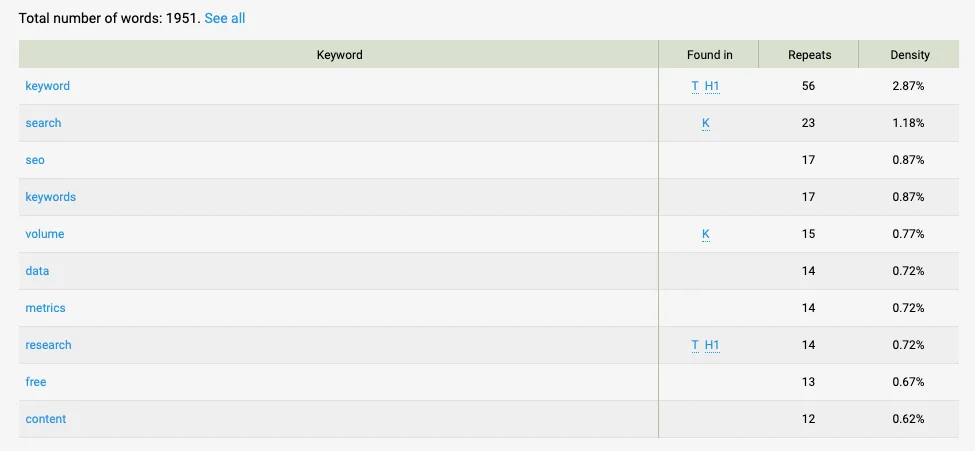
There is a Keyword Density module that shows one-, two-, three-, and four-word phrases that occur most frequently in a competitor’s text, and their percentage ratio. This is a good way to understand on the fly which LSI keywords the leader’s text is oversaturated with.
This tool is not suitable for finding new keywords. It is more intended for textual on-page analysis of a specific URL.
Competitor Analysis
This is one of the most important tools, especially when starting a new project.
Our goal is to understand how competitors are getting their traffic.
To do this, you can analyze:
- most visited pages;
- pages with high traffic volume;
- topical clusters;
- website categories;
- blog sections;
- service pages.
You know without me that there are many SEO platforms: Ahrefs, SE Ranking and others. The logic is very simple: if a competitor receives traffic from certain pages and queries, then these topics have already proven their value, and you can use them in your strategy.
Very often, this type of analysis allows you to find dozens or even hundreds of relevant keywords in just a few clicks.
Reddit, Quora and Forums
Various forums and communities are an excellent source of semantic data.
The advantage of such platforms is that users formulate their questions in natural language.
Very often, this is where you can find query formulations that have not yet appeared in traditional keyword research tools.
YouTube
YouTube can be considered one of the largest search engines in the world. People enter millions of search queries there every day.
Therefore, YouTube can be an excellent source of new ideas for you, especially for informational content.
By analyzing YouTube search suggestions, titles of popular videos and user comments, you can discover additional topics for articles, guides and educational materials.
AI Platforms
You can also use modern AI platforms.
More and more users search for information through:
- ChatGPT;
- Gemini;
- Claude;
- Perplexity;
- Grok;
- other LLM systems.
Such platforms help identify real user questions, understand how people formulate their queries, discover which topics appear most often and determine which problems concern the audience.
In addition, AI tools allow you to quickly generate additional ideas, group topics and discover new directions for your content strategy.
Therefore, today AI platforms are becoming another important source for keyword discovery and user demand research.
Collect Metrics
After expanding the Keyword Research, you need to evaluate the value of each query.
That is why modern research tools provide a large number of additional metrics.
They help you make decisions based on data rather than intuition.
Search Volume
Search Volume shows the average number of searches per month.
For example:
- Keyword Research: 12,000 searches;
- Keyword Clustering: 1,500 searches;
- Keyword Intent Analysis: 3,500 searches.
This metric helps you understand overall demand and potential traffic volume.
It is not the most important metric, but it is a good benchmark for evaluating market size.
High search volume does not always mean high keyword value, but in most cases strong demand is still a positive signal.
Keyword Difficulty
Keyword Difficulty shows how difficult it will be to rank at the top of the search results for a specific query.
Usually, this metric is measured on a scale from 0 to 100. Different tools use different methodologies. However, it can generally be divided into 3-4 levels:
- 0-10: low competition;
- 10-40: moderate competition;
- 40-80: high competition;
- 80-100: very high competition.
For new websites, it usually makes sense to start with less competitive keywords. There’s no standard for determining Keyword Difficulty; each tool has its own metric. Keep this in mind when analyzing.
Ranking difficulty is influenced by:
- website authority;
- quantity and quality of backlinks;
- level of competition;
- content quality;
- overall domain expertise.
CPC (Cost Per Click)
CPC shows the average cost per click in paid advertising.
A question naturally arises: why should an SEO specialist look at advertising data?
The answer is quite simple. If companies are willing to pay a lot of money for a click on a keyword, then that keyword is generating customers and sales.
Therefore, CPC helps evaluate the commercial value of a keyword.
However, you should not rely solely on this metric when making decisions.
Traffic Potential
This is one of the most useful metrics because it shows not only the search volume of a specific keyword but also the overall traffic potential of a page.
We have already discussed that a single page ranks for a large number of keywords. Therefore, I believe that relying only on Search Volume is not enough.
Very often, a page created around one primary keyword receives most of its traffic from dozens or even hundreds of related long-tail keywords.
That is why Traffic Potential is often a more useful metric for marketers than standard search volume.
How to Conduct Keyword Research in the Age of AI and GEO
The classic approach to collecting keywords, when we simply scraped all the keywords and looked at their search volume, no longer works.
Now Google and other search engines, as well as AI search engines, evaluate content at the level of meanings and entities.
I have prepared a step-by-step keyword research plan adapted to the requirements of GEO.
Entity Research
Systems think not in individual words, but in relationships between concepts, knowledge graphs.
And your task at the start will be to collect not just a seed keyword, but a cloud of concepts related to it, without which the topic will not be considered fully covered.
How to do this?
If you are writing an article about keyword research for a search engine, the marketing entities will include not only keywords, but also search intent, LSI, topical authority, Google Search Console, SERP.
And if these entities are not present in your text, then this article will be superficial. And the algorithm will consider it exactly that way.
Let’s give an example from other niches.
For example, the fitness niche. For the topic of losing weight at home, important entities for you will be calorie deficit, strength training, metabolism, interval training.
If the niche is CRM, then for the topic of sales automation, the entities will be lead generation, B2B funnel, API integration, end-to-end analytics.
Finding Conversational Prompts and Long Questions
With the development of voice search and chatbots, people have already stopped entering dry queries such as “best CRM.”
We are already writing long conversational phrases.
And at this step, we collect real formulations that users may ask AI.
Our task is to shift the focus from commercial databases to People Also Ask blocks, Google forums, and question generation with the help of LLMs.
Let’s look at an example in the SEO niche.
Instead of the SEO-did price, we need to collect queries such as how to check technical errors on a website yourself or for a fee if I am not a programmer.
In the construction niche, instead of “turnkey kitchen renovation,” we need to find “which flooring should I choose for a kitchen if I have a large dog at home, small children, and so on.”
Analysis of AI Search Sources
If we previously analyzed the top 10 websites in organic search results, now we need to analyze where AI Overviews get their data to generate their quick answers.
You need to enter a basic query into the search engine, look at the instant answer blocks, pay attention to the link cards. These will be the sources used to generate this answer.
You need to analyze the structure of the source websites.
Most often, AI cites pages that contain structured data, clear tables, numbered lists, pertinents, quotes, and structured markup.
And if AI displays this answer in a table, then your future page should also contain a table.
Creating Information Gain
Google officially states that it uses the information gain patent. Google penalizes websites that simply paraphrase other articles from the TOP 10. At this stage, we need to find the lack of meaning.
Study competitors’ articles for the required cluster.
If they are all written in the same way, then you need to determine what value you can add to this project yourself.
For example, if in the finance niche, instead of another rewrite of the article “What is Bitcoin,” add a semantic map, blocks with comments from practicing traders, or real profitability charts for the current month, or some kind of built-in inflation calculator.
For example, in the cooking niche, instead of a standard recipe, you can add a block “What to do if the dough has risen,” three ways to save the pie.
This will be your information gain.
Clustering by Answer Intent
Forget about old clustering methods, for example, hard clustering, which split queries like “buy a car” and “car sales” into different pages just because these phrases did not match.
Modern AI easily understands synonyms and context, and therefore we should group queries by the type of answer that fully satisfies the user’s need.
We need to combine keywords into one cluster not based on linguistic similarity, but on semantic similarity.
For example, for the queries “How to set up a sales funnel, CRM deal stages, examples of a B2B funnel, and a lead movement diagram” — this is the same semantic cluster, because the user needs a deep page about B2B with semantic infographics, rather than four different short articles on each topic.
Creating an LLM-Friendly Content Structure
A good result of keyword research will not be a list of keywords with their density and insertion type, how many times to use this word, but a semantic technical specification, a semantic brief that will be optimized for reading by language models.
You need to insert structural elements, blocks, question-direct answer, with clear question-based H2 headings and a concise answer in the first paragraph.
I would recommend using somewhere around 40–50 words without fluff and only useful information. This will be an ideal trigger for appearing in Google’s quick answer blocks.
Lists and tables can also be used.
You can put characteristics, prices, and steps into these formats.
Use, for example, markup so that AI can better read the information on your page.
Keyword Research Quality Checklist
Before moving on to content creation, I recommend going through this short checklist and making sure that your semantic core and website structure meet the key requirements.
Topic Relevance
Make sure that:
- all keywords are related to your business, product, goods or service;
- there are no irrelevant keywords;
- all major business areas are covered.
Semantic Coverage
Make sure that:
- all major search queries have been collected;
- high-volume keywords have been researched;
- mid-volume keywords have been researched;
- long-tail keywords have been collected;
- real user queries have been added;
- competitor keywords have been analyzed.
Metrics
Make sure that for every important keyword you understand:
- Search Volume;
- Keyword Difficulty;
- search intent;
- business potential;
- potential value for the project.
Clustering
Make sure that:
- search queries are grouped into logical clusters;
- each cluster corresponds to a separate page;
- there is no overlap between clusters;
- keyword cannibalization has been eliminated;
- internal page competition has been eliminated.
Website Structure
Make sure that:
- a page type has been defined for each cluster;
- internal linking has been planned;
- a structure of categories, subcategories and filters has been created;
- the main website sections have been defined;
- a content creation plan has been prepared;
- a page publishing plan has been created.
If all items in this checklist are completed, then the keyword research has been conducted properly.
As a result, you get not just a list of keywords, but a complete SEO content strategy: a clear website structure, a map of future pages, an understanding of search intent and priorities for further project growth.
Conclusion
Keyword Research is the foundation of a successful SEO and content strategy. It is deep and detailed keyword research that helps you understand what your audience is searching for, which pages need to be created and what content should be placed on those pages.
The modern Keyword Research process includes:
- keyword discovery and expansion;
- metric analysis;
- search intent evaluation;
- keyword clustering;
- website structure planning;
- content prioritization;
- content creation.
Today, conducting a complete Keyword Research process without modern tools is extremely difficult.
You can use several tools simultaneously or choose one primary tool for your workflow. The important thing is to rely on real data rather than assumptions.
Tools such as KeywordStat help automate most of the manual work related to keyword discovery and analysis, identifying key metrics and finding new growth opportunities.
Because of this, you will be able to discover promising keywords, evaluate their potential and make decisions based on data rather than intuition, guesses or common SEO myths.
As a result, you will get a clear website structure, a strong content strategy and a list of priority pages that are truly capable of attracting search traffic and helping your business grow.
That is all from me. Thank you for reading this article. If you are interested in SEO, Keyword Research and content marketing, be sure to check out the other materials on this website as well.