Suggestive Keywords are keywords and lists of relevant terms, phrases, or questions that appear in the dropdown menu when you type a query into the Google search bar.
They are also known as Autocomplete Suggestions, Google Suggest, Query Suggestions, Search Suggestions, Search predictions or Type-ahead search .
- Why Suggestions Keywords Are More Important Than You Think
- How Do Search Suggestions Work?
- What Are Suggestions Keywords?
- How to Find Suggestions Keywords?
- How Do Search Suggestions Work?
- What Types of Suggestions Keywords Exist?
- Using Search Suggestions to Optimize Product Pages in E-commerce
- Final Thoughts
Why Suggestions Keywords Are More Important Than You Think
Many SEO specialists are still obsessed with high-volume keywords. I see this all the time. They spend weeks trying to rank for extremely competitive search terms, lose to large websites, spend their budgets on links and content, and then wonder why their traffic is not growing and why their leads remain disappointing.
Suggestive keywords usually tell a different story. They help us understand user intent more clearly, create better content, and attract less irrelevant traffic.

How Do Search Suggestions Work?
Every time you start typing a query into Google, the search engine suggests several possible ways to complete the phrase. These suggestions are based on real user behavior and are constantly updated.
That is exactly why these keywords are important for us: they reflect new trends and changes in demand much earlier than standard SEO tools.
What Are Suggestions Keywords?
Suggest keywords are the suggestions that appear in the autocomplete dropdown when a user starts typing text into a search bar. The search engine offers these terms based on popular searches performed by users.
But for an SEO specialist, these are not just suggestions. They are a ready-made list of topics that already interest the audience. That is exactly why we target these keywords.
These suggestions reflect the real wording that users use in their searches, and instead of simply guessing which keywords our potential customers might use, we receive the answer directly from the search engine. Sounds pretty good, doesn’t it?
You stop focusing on vague, broad terms and begin to clearly understand who is searching for information and what problem is behind that search.
If you search Google for “email marketing software,” Google’s suggestions may quietly reveal what people are actually interested in:
- Email marketing software for e-commerce
- Email marketing software with automation
- Email marketing software for small businesses
And most SEO beginners overlook this, but it can be a fatal mistake.
How to Find Suggestions Keywords?
Finding suggestive keywords is one of the simplest and most effective ways to expand your semantic core. There are several ways to do this, from manual collection to automated parsing of large numbers of queries.
Method 1 — Use Google Autocomplete
The easiest option is to simply start typing a query into the Google search bar.
For example, if you enter:
Google may suggest:
- keyword tool free
- keyword tool online
- keyword tool for seo
- keyword tool for youtube
- keyword tool alternative
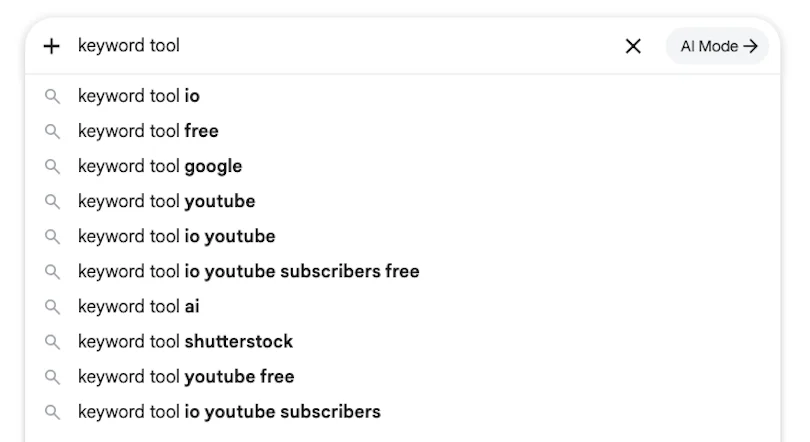
Each suggestion represents a potential keyword for a separate page or even a dedicated article.
By the way, take a look at the search suggestions that appear for you when you type the query Keyword Tool.
The advantage of this method is its simplicity, while the disadvantage is that you only see a small portion of the available options. It can take a lot of time to go through all these queries manually.
The Alphabet Soup Method
This is an old keyword research methodology. The method consists of adding letters of the alphabet to your base query.
For example:
keyword tool a
may show:
- keyword tool amazon
- keyword tool ai
- keyword tool app
Then you check:
- keyword tool b
- keyword tool c
- keyword tool d
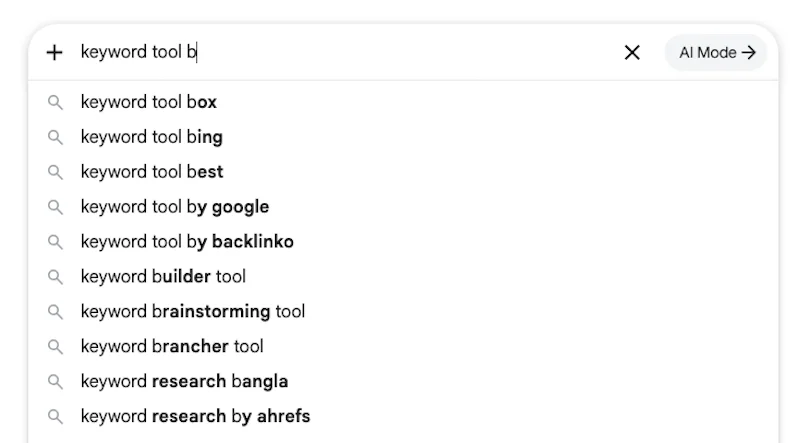
A single query can generate hundreds of additional keywords.
You can enter your niche keyword and then use a systematic approach. Simply type each letter of the alphabet one by one and see what suggestions Google provides for that keyword.
The biggest drawback is that you cannot easily copy these queries. In the past, we had a small hack: we could click the “Report” button and copy the keywords, but Google removed this feature for some reason. Apparently, they do not want us copying these keywords.
We can solve this very easily. You can take a screenshot and upload it to an AI assistant, then simply say, “Export the list of queries for me.”
So, as real SEO specialists, we can always find a way around the problem.
Using Question Modifiers
Very often, search queries are phrased as questions, which means these queries reflect a specific user need and are extremely valuable for content creators.
Therefore, try adding question words to your primary keyword.
For example:
- What are suggested keywords?
- How to find suggested keywords?
- Why are suggested keywords important?
- When to use suggested keywords?
- Which suggested keywords should I target?
These queries are ideal for writing informational articles, building FAQ sections, creating article headings, or even discovering entirely new content ideas.
Analyzing Search Suggestions and Social Platforms
You are not limited to Google. You can also use search suggestions from YouTube, Bing, Amazon, eBay, TikTok, Pinterest, and other platforms.
For example, if you create video content or focus on YouTube Search, use YouTube suggestions separately from Google. It is an excellent source for creating videos and educational content.
Specialized Tools
As I mentioned earlier, manually cycling through words is not very convenient. It is difficult to copy queries, and it takes a lot of time. There are many tools such as AnswerThePublic or Keyword Tool and others.
You can simply search for Google Autocomplete Tool or Keyword Suggestion Tool, and you will find plenty of tools that offer this functionality.
Our Keyword Stat service also helps automate suggestion collection if you need to gather hundreds or even thousands of suggestion keywords.
What do you need to do?
- Enter a seed keyword.
- Select a search engine.
- Choose a country.
- Start collecting data.
The tool automatically processes letter combinations, question modifiers, and additional modifiers already built into the system, collecting significantly more suggestions than you could gather manually.
As a result, you receive a well-structured list of search queries that can then be used for your SEO strategy, content planning, and website architecture.
How Do Search Suggestions Work?
When you use Suggestion Keyword tools, you should understand where these suggestions come from. They are not generated randomly. Behind them are complex algorithms, and I will reveal a little bit about how this system actually works under the hood.
A Bit of Theory
Suggestion Keywords are generated automatically using machine learning algorithms that analyze billions of real user searches in real time.
When a person starts typing a query, the search engine tries to predict what they are looking for. To do this, it uses various signals:
- popular searches;
- search frequency;
- current trends;
- country and region;
- user language;
- seasonality;
- search history.
This is exactly why the list of suggestions is constantly changing.
The main goal of search engines is to predict user intent, save time, and help people formulate their queries faster.
While Google initially used simple Trie data structures to accurately match text prefixes, modern autocomplete is based on advanced neural networks and Transformer models. This allows the search engine to understand semantic context in real time, predict user intent even in the presence of typos, and deliver personalized, context-aware predictions within milliseconds, rather than simply retrieving raw text matches from a database.
If a few years ago people were searching for Keyword Tool Free, today you can find queries such as Keyword Tool AI, Keyword Tool with AI Suggestion, or AI Keyword Tool because search suggestions react very quickly to market changes and allow SEO specialists to spot new trends before their competitors do.
That is exactly why search suggestions can be more useful than some keyword databases.
Most SEO tools rely on their own keyword databases. While these databases contain millions of keywords and are updated regularly, they do not always keep up with the latest trends.
Search suggestions have a different advantage. They are generated directly by the search engine itself.
This means that when you work with these queries, you know that users are searching for them right now.
For content marketing, this is especially important because while competitors are writing articles based on old keywords, you can already discover new topics almost in real time.
What Types of Suggestions Keywords Exist?
It should be said that not all suggestions are equally useful. Of course, they need to be cleaned, filtered, and not all of them should be taken into account.
Let me explain the main categories of suggestion keywords.
Long-Tail Keywords
These are longer and more specific search queries.
For example, you enter Keyword Tool, add the word for, and get queries such as:
- Keyword Tool for e-commerce;
- Keyword Tool for Amazon sellers;
- Keyword Tool for local SEO.
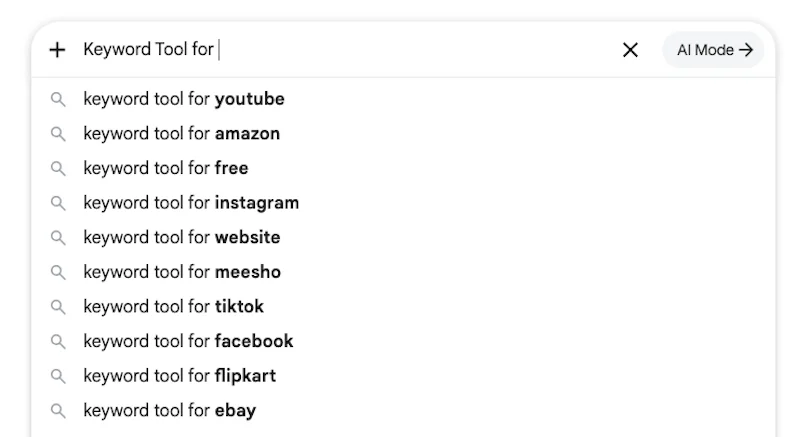
These queries usually have lower competition and higher conversion rates because the user already knows what they want.
You can continue expanding these searches and discover extremely specific long-tail keywords.
Some of these queries may have very low individual search volumes in legacy databases. This is where beginners make the mistake of discarding them. In 2026, don’t look at individual keywords in isolation. Instead, evaluate the traffic potential of the entire topic cluster. If the overall cluster potential is high and KeywordStat shows a low Keyword Difficulty (KD) score, these suggestions will be ideal tools for inclusion in FAQ sections or subheadings to attract targeted traffic.
Question Keywords
These are search queries phrased as questions.
You can simply take your main keyword and add modifiers such as how, what, why, and so on.
These are excellent keywords for creating informational articles, guides, FAQ sections, and similar content.
Therefore, if you are writing content-focused articles, be sure to pay attention to question keywords.
Comparison Keywords
We know that users often compare different solutions before making a purchase.
They may compare different tools, for example:
- KeywordStat vs SEMrush;
- KeywordStat vs Ahrefs;
- KeywordStat vs Keyword Planner;
- KeywordStat vs SE Ranking.
These queries usually have very strong commercial potential.
You should also pay attention to keywords that include the word alternatives.
In this case, I would recommend creating dedicated landing pages where you explain the differences between two tools.
In other words, take your product and your main competitors and create pages targeting “vs” and “alternatives” queries.
Users who have never heard of your brand can discover your product through comparison pages. And this approach works surprisingly well.
Commercial Keywords
These are all queries related to purchasing a product.
Therefore, you can use modifiers such as best, top, pricing, and review.
For example:
- Best Keyword Tool;
- Keyword Tool pricing;
- Keyword Tool reviews;
- Keyword Tool alternatives.
These keywords are especially valuable for SaaS projects and commercial websites, as is the case with promoting the KeywordStat service.
Trending Keywords
Autocomplete suggestions can help identify emerging trends.
Recently, many queries have started including modifiers such as AI, ChatGPT, and Automation.
This creates a large number of opportunities for SEO and content marketing.
Therefore, you can also use trending modifiers to discover new topics and new growth opportunities.
Using Search Suggestions to Optimize Product Pages in E-commerce
Throughout this article, I have focused on creating landing pages and blog content, but there is another important use case for search suggestions — optimizing product pages in online stores.
Shoppers rarely search for products using short queries. In most cases, they use detailed phrases that include product features, intended use cases, and specific characteristics. Each of these phrases reflects a specific customer need.
Optimizing Product Titles
For example, if the base query looks like this:
mechanical keyboard
Search suggestions may show:
- mechanical keyboard wireless
- mechanical keyboard for gaming
- mechanical keyboard rgb
- mechanical keyboard for mac
- mechanical keyboard silent
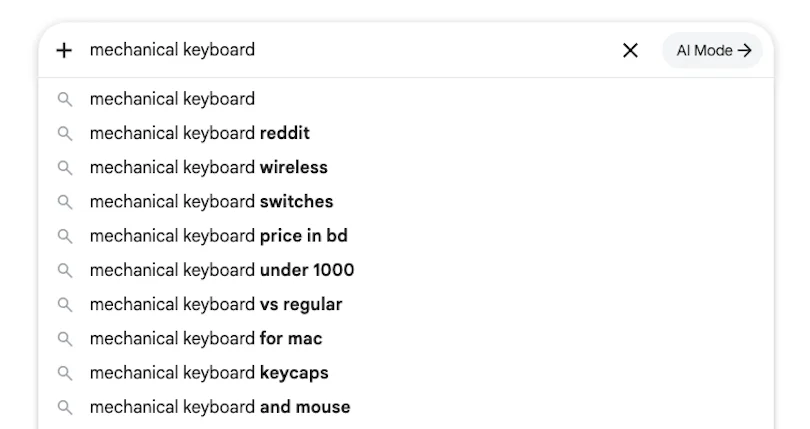
Each of these phrases reflects a specific customer need.
If users are searching for Mechanical Keyboard Wireless, including the word Wireless in the product title can improve relevance for both search engines and customers.
Expanding Product Descriptions
Search suggestions can reveal which product features matter most to your audience.
If suggestions frequently contain terms such as Wireless, RGB, Silent, or Hot Swappable, then these features should be explained in detail within the product description.
It is a fairly logical approach.
FAQ for Product Pages
Question-based suggestions help identify the information potential customers are looking for.
For example:
- Is mechanical keyboard good for gaming?
- How long do mechanical keyboards last?
- Are mechanical keyboards louder?
Answers to these questions can be added to the FAQ section of the product page.
Creating Additional Pages
If you notice that suggestions consistently show demand for specific product variations, it may make sense to create dedicated categories or filter pages with static URLs, effectively creating new landing pages.
For example:
- Wireless Keyboards;
- Red Keyboards;
- Black Keyboards;
- Keyboards for Students.
This can become a very effective way to expand your semantic coverage and create additional pages.
Improving Internal Search and Filters
In the same way, you can do more than just create static pages — you can improve your filtering system as well.
If search suggestions show that users regularly search for specific product attributes, those attributes should be added to your catalog filters.
This will improve both the user experience and your ability to capture additional search demand.
Final Thoughts
Search suggestions remain one of the most valuable and underrated sources of SEO data because, unlike traditional keyword databases, these suggestions appear in real time and help uncover new traffic opportunities.
With their help, you can:
- find long-tail keywords;
- discover new content topics;
- understand your audience’s search intent;
- build new topical clusters;
- optimize pages and product listings;
- identify commercial queries with high conversion potential.
That is why many SEO specialists rely on automated tools to collect and analyze search suggestions.
If you want to discover more keywords and build content plans that stay ahead of your competitors, pay attention to suggestion keywords.
That is all from me. Thank you for reading this article and for reading other articles on my website.