Ahrefs remains the recognized leader in the niche among SEO and marketing tools.
But rising subscription prices may prompt you to look for alternatives.
I want to analyze the market of existing tools and consider what alternatives to Ahrefs may be available to you for each specific task: keyword research, backlink analysis, traffic analysis, and other tasks.
List of necessary SEO Tools
To optimize the budget and speed up your work, I recommend dividing tools by task and suggest specific services for optimal performance:
- For Keyword Research: KeywordStat
- For Backlink analysis: Majestic and Ahrefs / Semrush
- For Traffic analytics: Similarweb / Semrush
- For Rank Tracking: SE Ranking / Sitechecker
- For Site Audit: Screaming Frog / Netpeak Spider
- Content Ideas & Optimization: Wrytix
We will examine the main modules in more detail to understand which services can be alternatives, and at the end of the article, we will combine them into a working ecosystem.
Ahrefs pricing
Ahrefs has several pricing plans. The most popular ones are Lite, Standard, and Advanced. There is also an Enterprise plan and paid add-ons.
The Lite plan is aimed at owners of small websites and personal projects. This is a basic set of tools with an infrastructure limitation. The depth of historical data is limited to six months. There is an internal credit limit of one thousand per user. Rank Tracker is updated weekly for 750 keywords. This is a compromise option for small-scale specialists who do not require deep historical data.
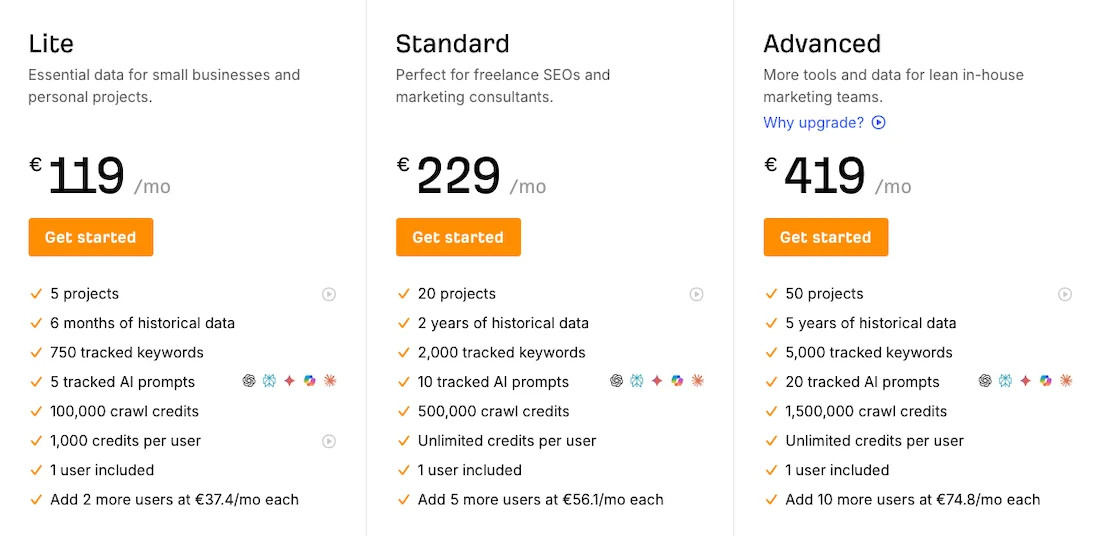
The Standard plan is suitable for a full-fledged workflow and is a balanced choice for marketers and specialists. The main advantage of the plan is the activation of unlimited credits per user and an increase in data depth to two years. There is a limit on technical crawling of up to 500 thousand per month, and the number of tracked keywords is up to 2,000. The plan provides access to the Portfolios module for monitoring up to 100 target URLs.
The Advanced plan is designed for in-house teams and agencies, with the limit expanded to 50 projects, 5,000 keywords, and 1.5 million credits for site crawling. A feature of this plan is access to five years of historical data, which is important for analyzing long-term trends, as well as expanded export capabilities of up to 4 million rows.
For large corporations and agencies, there is an Enterprise plan, which requires an annual contract. This plan starts at €1,394 per month. It includes all the features of Advanced and removes key limitations, provides unlimited data history, flexible limit management, and unlimited API access.
Ahrefs allows you to purchase the necessary features directly within your subscription. Scaling the team requires an additional monthly payment for each seat, while users can separately increase limits for the number of verified projects, AI prompts, or the volume of word exports.
About Ahrefs
The Ahrefs service is deservedly considered one of the main tools in search marketing. It has few competitors as an all-in SEO platform. The project started as a specialized backlink crawler, and today its backlink database remains the largest on the market.
The service itself is functional and constantly evolving, expanding its ecosystem with both time-tested utilities and completely new modules.
Keyword Explorer for keyword research, Content Explorer for finding and analyzing content, Site Explorer for conducting site analysis, AI Responses shows citations in AI assistants and LLM services. And, of course, Backlink profile.
Ahrefs remains one of the best tools for backlink analysis, and the Ahrefs name itself signals the strongest functionality of this tool.
However, the platform’s development toward becoming a universal SEO suite and changes in its pricing policy are prompting specialists to look for alternative solutions. There are credit limitations that become noticeable during intensive work and the processing of large datasets, and actively switching between different reports quickly exhausts the limits.
And this is precisely why using such software for many tasks can sometimes become impractical. Users do not want to overpay for features they do not need if, for example, they only use link-building functions or keyword research.
The service is constantly updated and is transforming from a classic SEO service into a platform for artificial intelligence optimization: AEO and GEO, powerful analytics modules, Brand Radar, AI Assistant, AI Content Helper, AI Content Grader, Social Media Manager, and others are being added.
But if you only need keyword research, there is no point in overpaying for SMM tools.
Keyword Research
The Keyword Explorer module in Ahrefs is well designed. After you enter keywords, you get a convenient dashboard. It shows detailed analytics, including keyword difficulty, search volume, traffic potential, and global search volume.
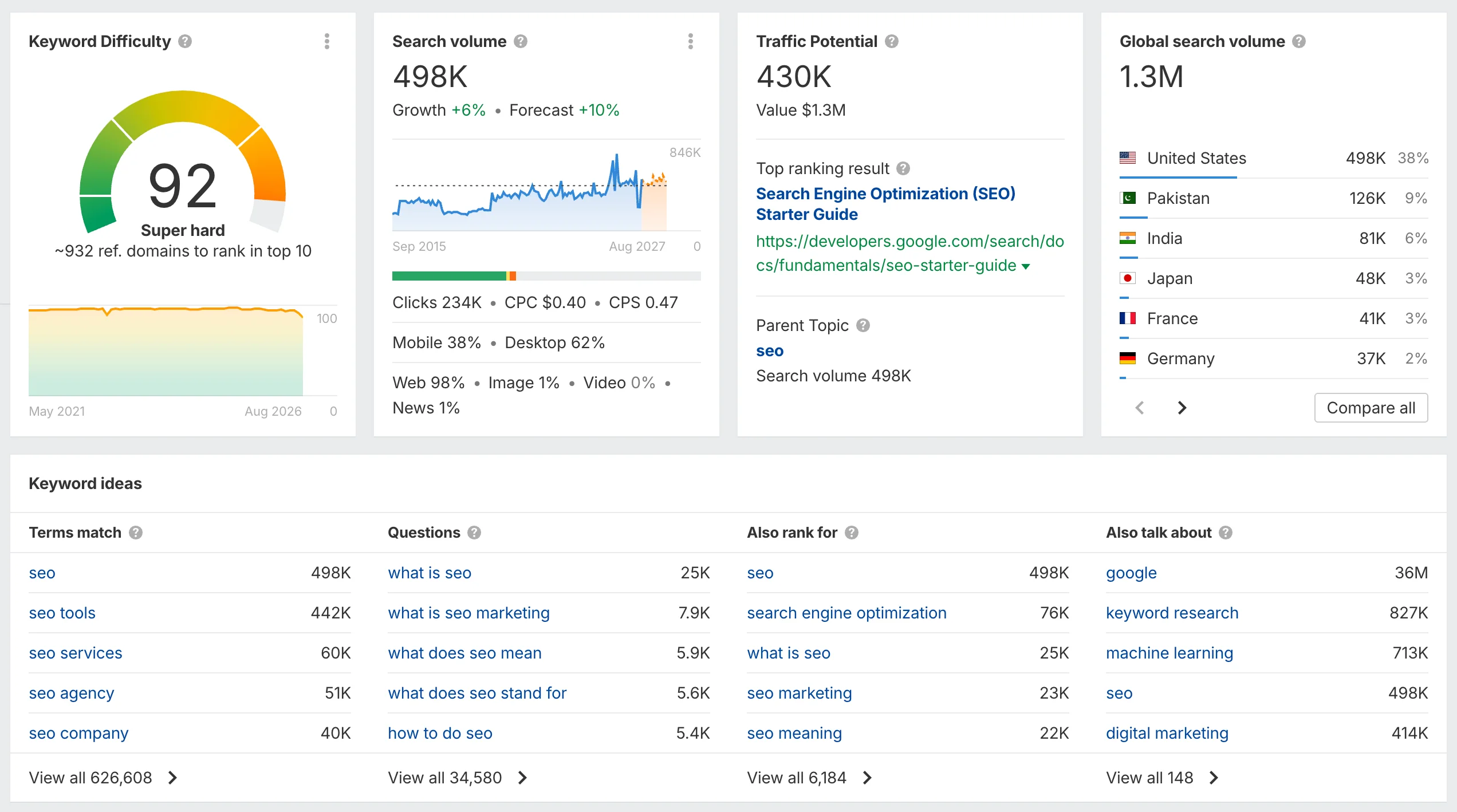
It shows Keyword Ideas and SERP Overview for the given query, which contains URL, page type, number of words, DR, number of backlinks, number of domains, traffic, value, keywords, and top keyword and value for the top keyword.
Nevertheless, when working with rare geographies and rare local regions outside the US and UK markets, users regularly encounter a lack of data.
Many queries are either absent from the database or have a search volume in the range of 0–10. Because of this, traffic potential in local geographies often displays underestimated figures, as the algorithm simply does not take hidden low-volume queries into account.
It should be said that the problem with the accuracy of the search volume metric has become more acute recently because of the mass adoption of Google AI answers. Now the intent of the query and optimization for entities are already more important.
Search itself has changed, people are clicking on links less often, and search phrases themselves have become much longer and now look more like conversational prompts. Traditional search volume in Ahrefs does not account for this AI shift and simply displays dry figures from last year, which no longer guarantee real clicks.
The keyword research itself in Ahrefs is also tightly tied to marker words. In the interface, they are called Top keyword. When a specialist enters an exact formulation, they get similar phrases for that query, but they do not know what phrases people might use in search and risk missing an entire layer of traffic.
At the initial Overview screen, the system offers you quick queries from the database, forming basic preview blocks of ideas.
The Term Match tab provides phrases with an exact match, where its data is heavily limited in rare geographies.
The Block Questions section shows queries, and in practice, there will not be many queries there; they are also tied to the main keyword.
The Also rank for tool rarely provides useful related topics, as it simply parses Google suggestions, while the Also talk about tab provides practically no useful value for creating the structure of a specific article.
To start working, you need to go to Keyword Ideas. You have access to the following reports: Matching Terms, Related Terms, Search Suggestions, and Global Terms. You can switch between these tabs to find keywords.
For each group of keywords, you can get Intent, KD, SV, and other data: Growth Rate, Device Distribution, Global Search Volume, Traffic Potential, Global Traffic Potential, CPC, Click per Search, Parent Topic, number of SERP Features, and Trend.
There are convenient filters that allow you to sort keywords. There are also built-in automatic grouping functions available here: Cluster by Parent Topic and Cluster by Terms. In practice, these functions work normally, but the interface itself is not convenient for keyword clustering.
Therefore, if you need specialized keyword research tools, do not want to configure too many filters, make unnecessary clicks, or overpay for excessive features, I recommend considering specialized alternatives.
KeywordStat
KeywordStat is designed for quickly finding and cleaning up keyword semantics without overloaded chart-heavy dashboards, unlike Ahrefs, where you need to switch between screens. KeywordStat gives you all the necessary analytics at once on a single screen with one click, eliminating the need to navigate through a complex interface quest.
KeywordStat pricing
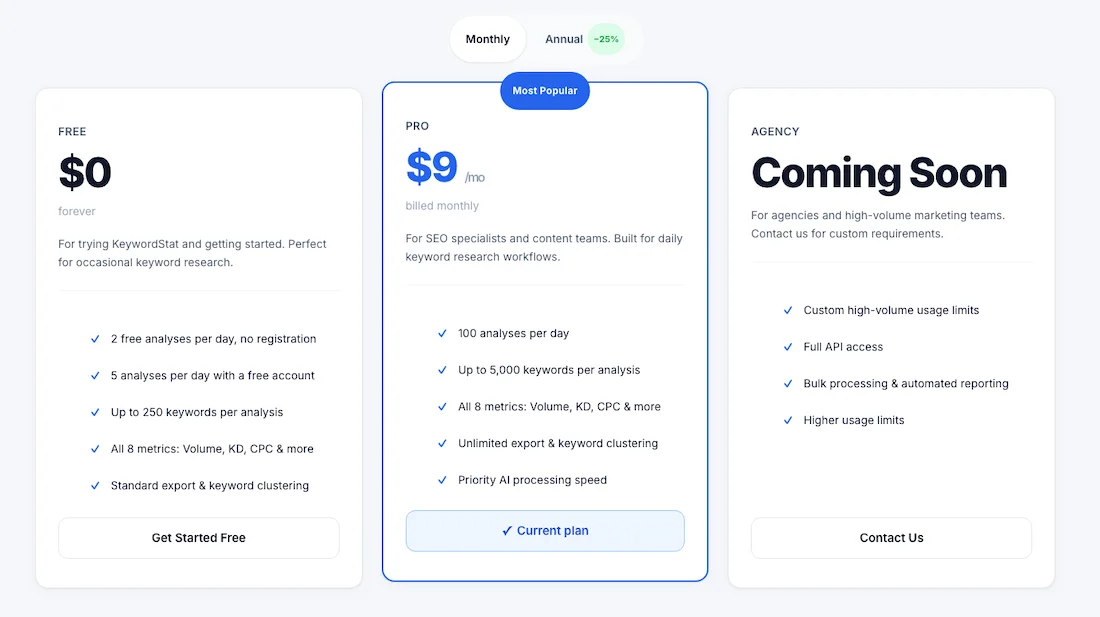
The cost of using KeywordStat is $9 per month. There is a 25% discount when purchasing an annual plan. There is also a free plan limited to 2 free analyses per day with no registration and 5 analyses per day with a free account.
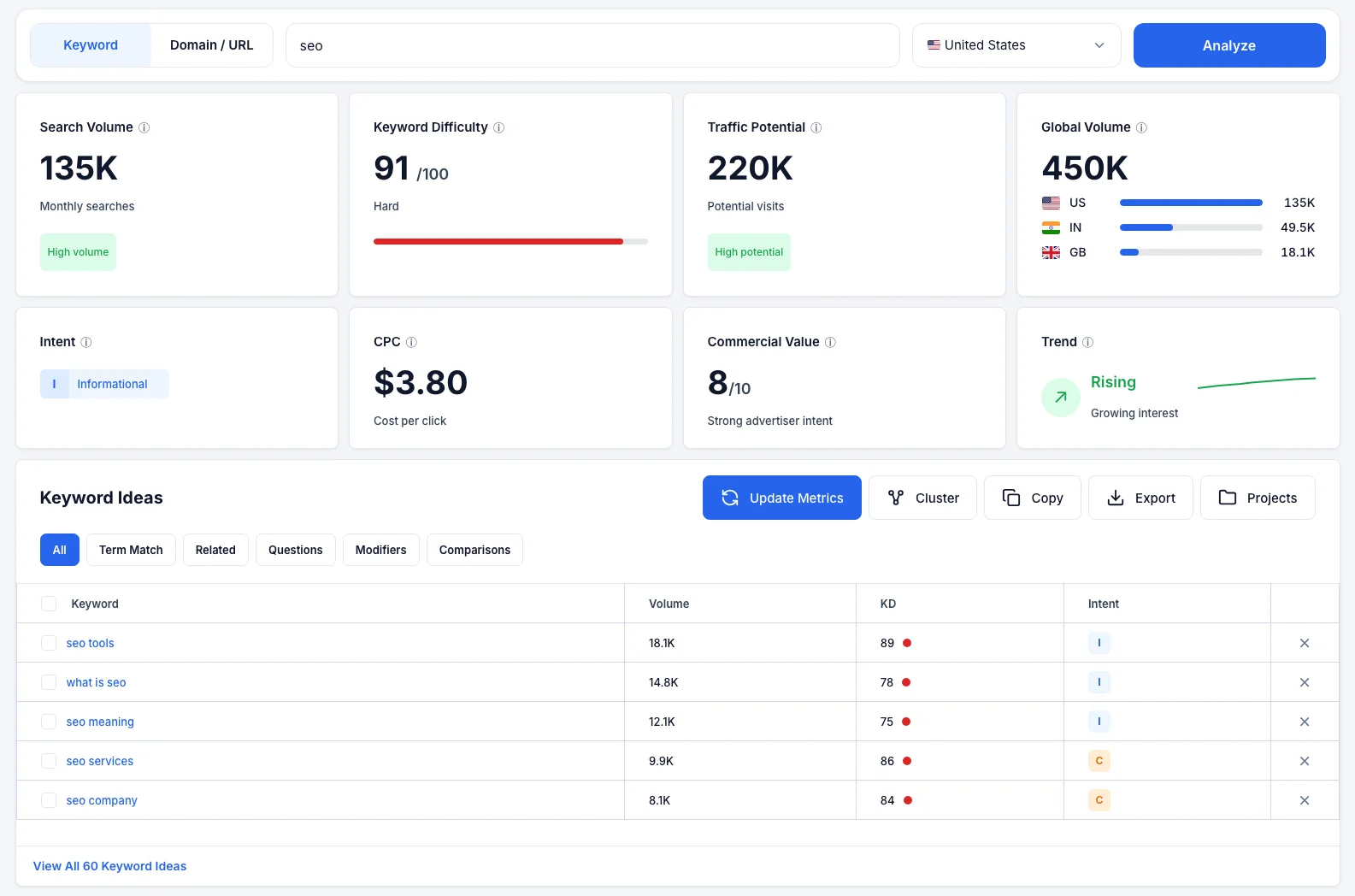
The platform works quickly. You simply enter a keyword and get a dashboard with all the key metrics: search volume, keyword difficulty, traffic potential, global volume, intent, CPC, commercial value, and trend.
KeywordStat has a small AI Insight feature. It is a short text reference that explains in detail the specifics of the keyword, its intent, recommendations on which page to create for this query, evaluates the difficulty of the keyword, and gives you a final conclusion on whether it is worth taking this keyword into work at all.
Keyword generation
The interface includes a convenient idea generation system: term match, related, questions, modifiers, comparisons. This is a convenient set of keyword filters.
Clustering
The service uses artificial intelligence for automatic keyword clustering, groups keywords by similarity, and offers a simple data export.
The system cleans keywords using AI and gives you only ready-to-use keywords that you can take into work.
You can sort them by volume, by KD, and take the query intent into account.
Domain / URL analysis
KeywordStat has functionality for analysis by domain or URL.
As a result of the analysis, KeywordStat separates keywords into Primary keyword (the main TOP keyword) and Secondary keywords, and generates Likely targets, Opportunities, and Content gaps reports.
When analyzing a specific URL, you have access to the Likely Ranks For and Opportunities tabs with detailed explanations of Why It Matters for each keyword. In the Content Gap section, the system provides recommendations for improving the content.
It is worth honestly noting that these modules of in-depth domain analysis are still inferior to heavyweight platforms and act more in a recommendation-based manner, without offering any strict step-by-step actions.
KeywordStat is more focused on quickly collecting and cleaning keywords than on deep retrospective analysis of multimillion-keyword databases.
KWFinder (Mangools)
KWFinder is a popular component of the Mangools toolset, which is a comprehensive SEO service.
KWFinder pricing
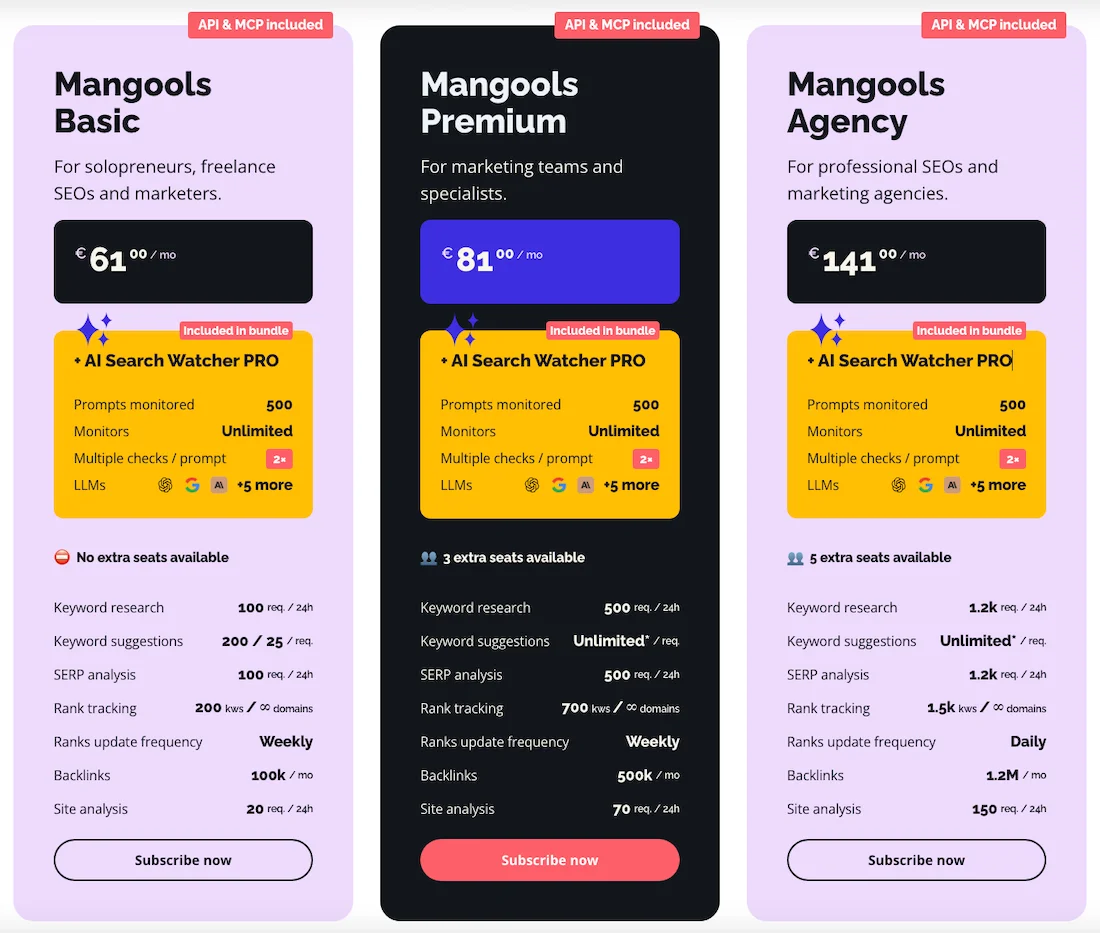
The cost of using the Mangools service is €61 per month. There is a 35% discount when purchasing an annual plan.
Functionality
KWFinder displays a table with a list of keywords and metrics such as volume, CPC, trend, and a SERP Overview dashboard.
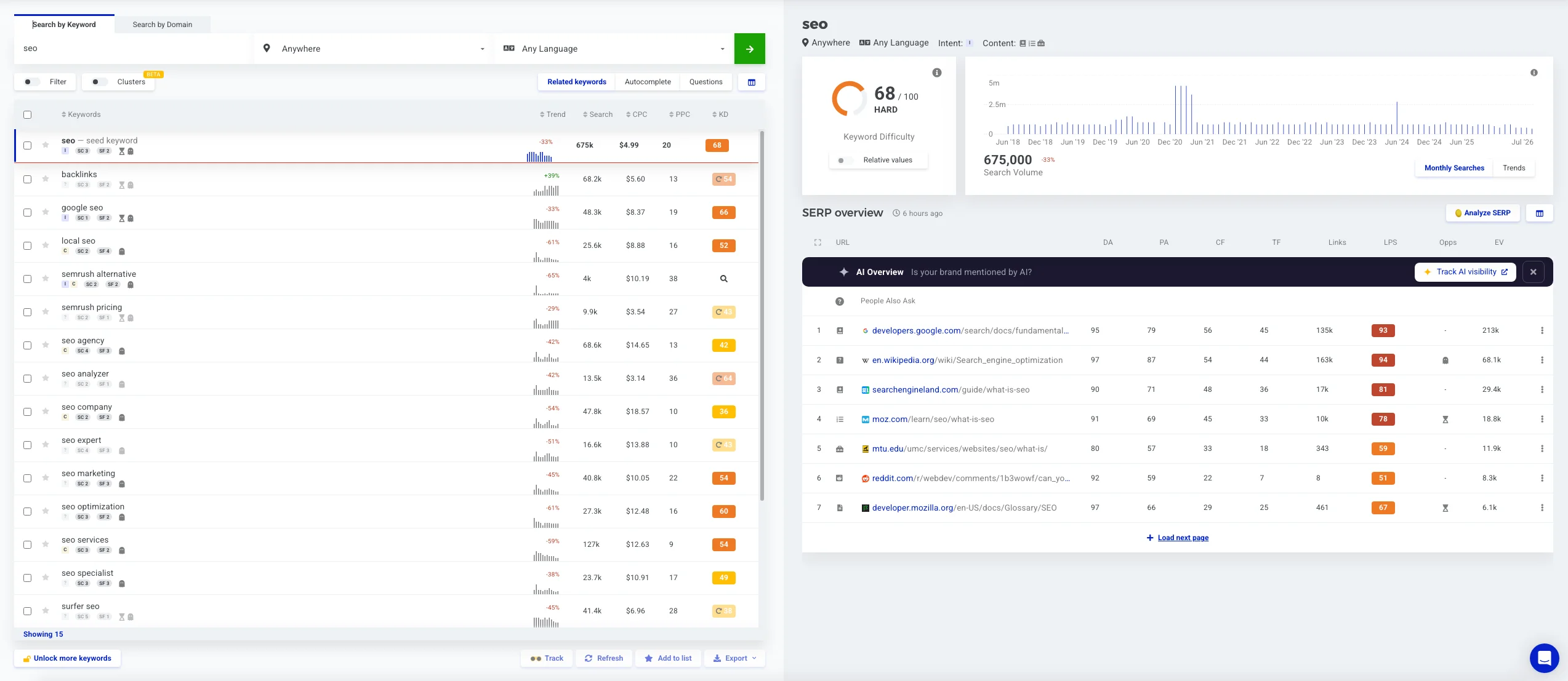
When you click on any keyword, the right panel expands to show the top 10 sites from the search results with authority metrics: Domain Authority, Page Authority, and Majestic Trust Flow and Citation Flow.
Navigation is simple: you switch between the Suggestions, Autocomplete, and Questions tabs.
The main advantage of the service is its Keyword Difficulty calculation algorithm, which is valued by SEO specialists in the market.
The availability of a mini-SERP directly on the main screen eliminates the need to open new tabs for evaluation, specifically for the top results.
Local search allows you to select a specific city from the database, which is also convenient.
List filtering is not implemented conveniently here; you cannot set complex conditions such as excluding phrases, which is available in Ahrefs.
The database is updated less frequently than those of major competitors, so KWFinder may not correctly display search volume for certain trends.
But we have already discussed that exact search volume is no longer as important as it was before, and intent and entities are now more important.
The tool is well suited for local search. For large-scale keyword collection, it may not be suitable for you because of strict limits on the number of rows in a single report.
However, when using the API or higher-tier plans, large keyword datasets are processed correctly.
KeywordTool.io
KeywordTool.io is a specialized parser focused on collecting data from search suggestions.
KeywordTool pricing
The cost of using KeywordTool Pro is $88/month. There is a 20% discount when purchasing an annual plan.
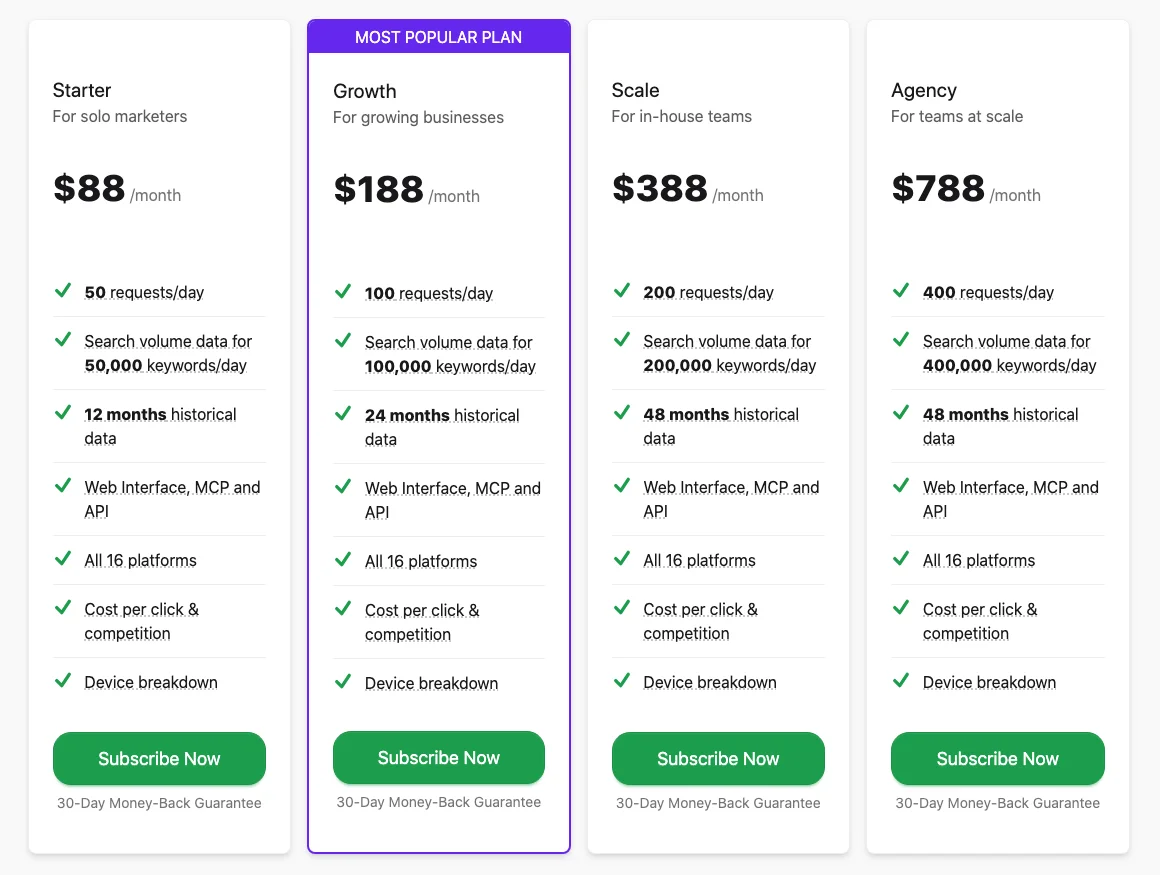
Functionality
A horizontal row of tabs with various platforms: Google, YouTube, Amazon, eBay, App Store, Play Store, Instagram, TikTok, Reddit, Pinterest, and others.
You need to select a platform and perform an analysis for a keyword. You can choose either a global search or enter a location, and select a language.
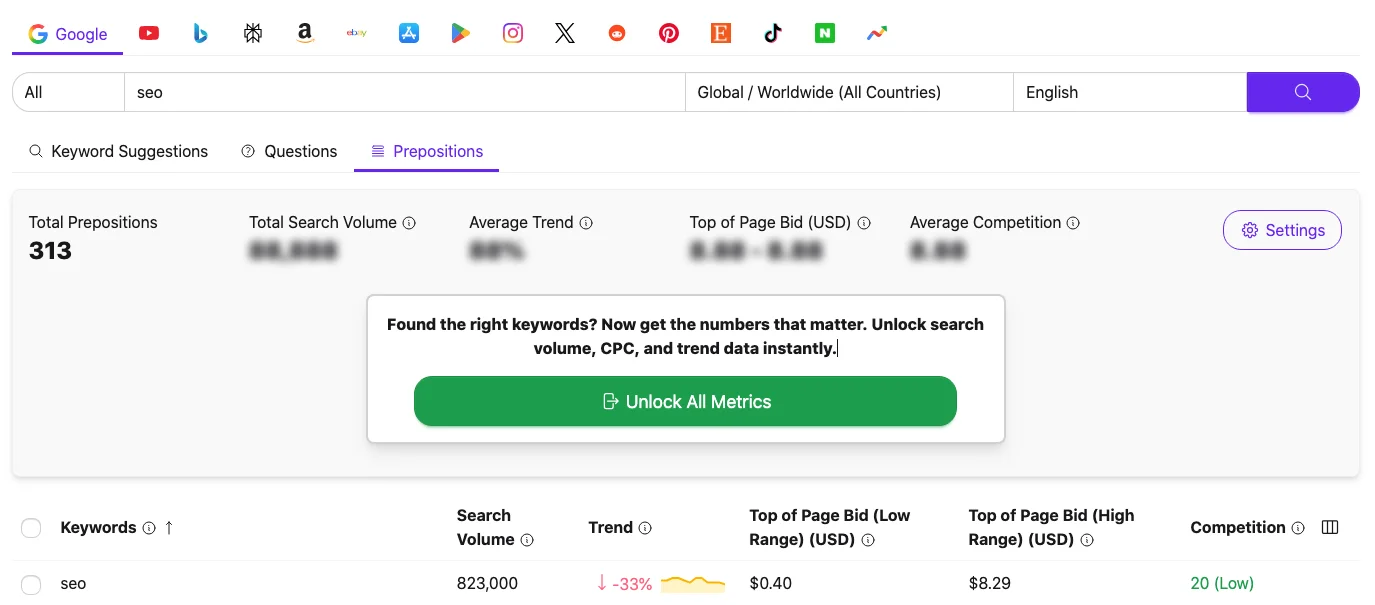
After selecting a platform, you get a vertical list of phrases divided into three tabs: Keyword Suggestions, Questions, and Prepositions (queries with prepositions such as “for,” “without,” and “with”).
As a result of the analysis, you get data on keyword, search volume, trend, top of page bid, low range and high range, and competitors.
In the free version, you can only see keywords; in the paid version, you can see all the metrics.
This is a convenient tool for quickly collecting long-tail keywords for e-commerce, with the Amazon and eBay tabs, as well as for content creators, with the YouTube and TikTok tabs.
The service is good at finding long, low-volume phrases that have not yet been added to the databases of major services.
Among the disadvantages, it can be noted that the service does not have its own historical data database. Search volume and CPC metrics are pulled directly from Keyword Planner, so for very specific low-volume queries you will see empty cells or generalized ranges instead of exact figures.
The tool does not provide in-depth analysis of competitors’ domains and does not have built-in clustering tools.
Universal Platforms with Keyword Research Modules
Semrush
Semrush is one of Ahrefs’ main competitors in almost every category because it is also an all-in-one platform.
Semrush pricing
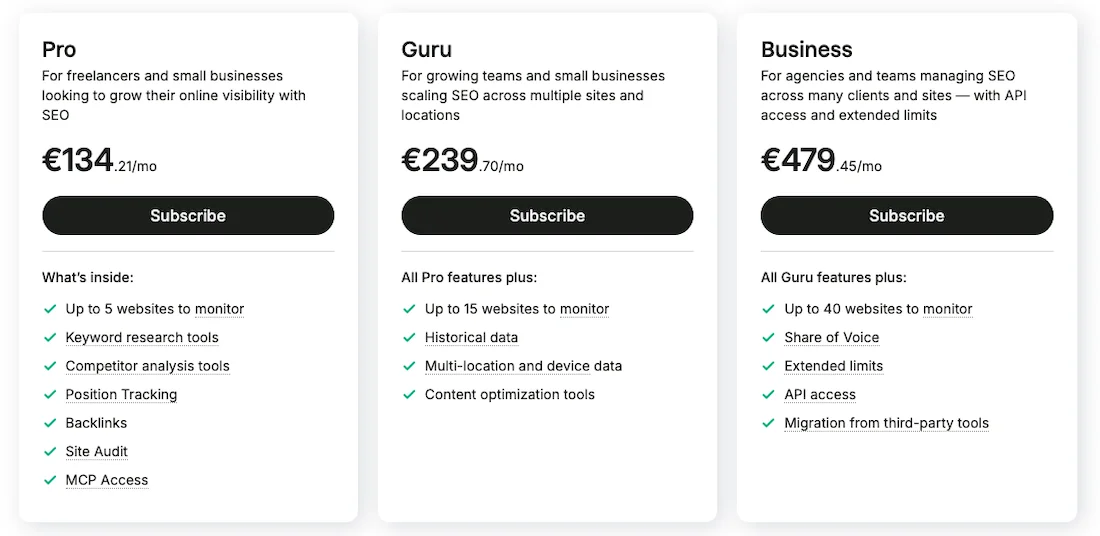
The cost of using the service is €134 per month. There is a 17% discount when purchasing an annual plan.
Functionality
Keyword analysis takes place in the Keyword Overview tab. Here you have a convenient dashboard with volume, keyword difficulty, global volume, intent, CPC, trend, competitive density, and PLA ads.
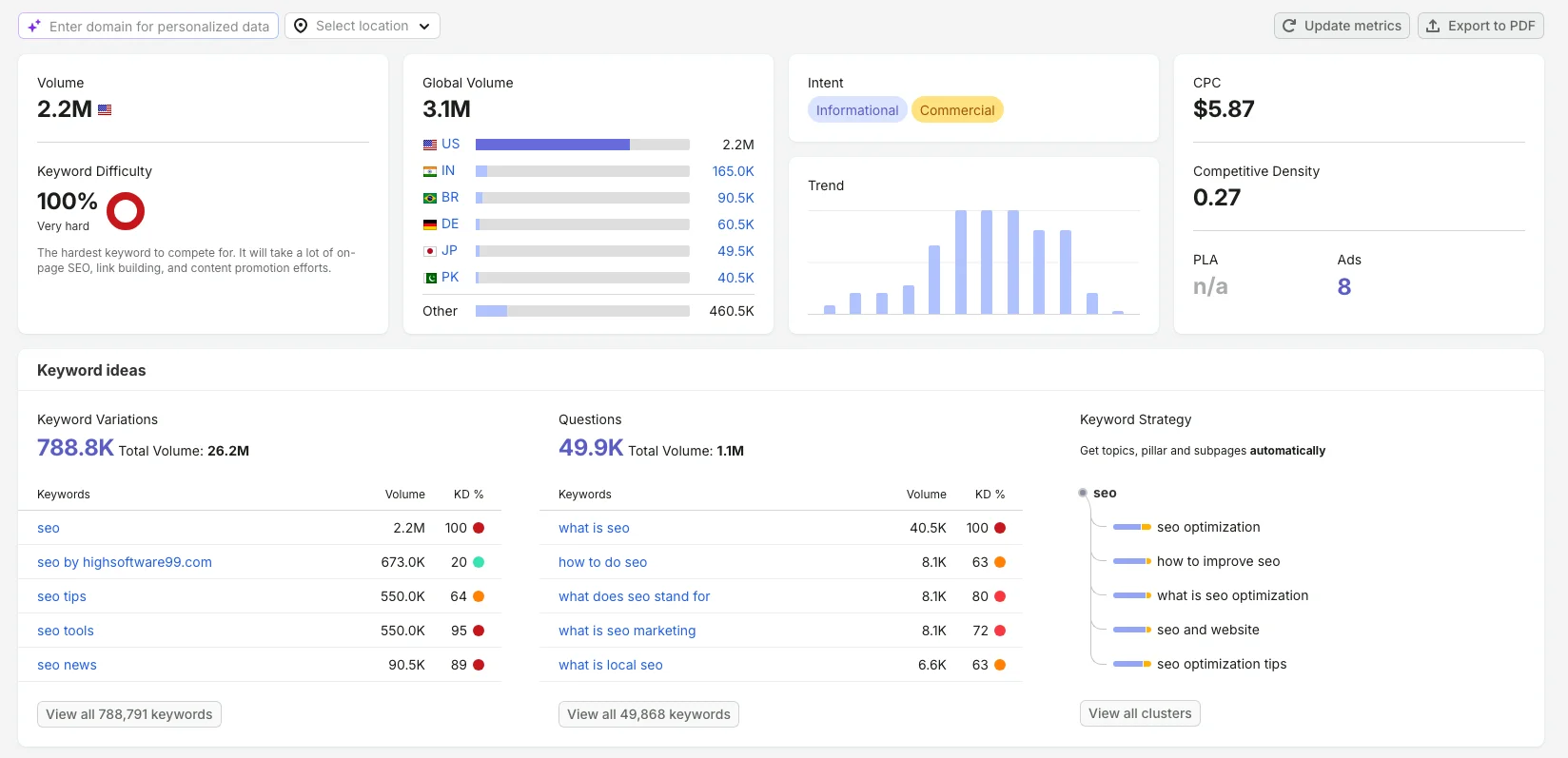
You have Keyword Ideas. It is divided into three blocks: Keyword Variation, Questions, and Keyword Strategy, which allows you to cluster keywords and create a site map.
Just below, you have Outranking Competitors SEO and SERP Analysis by domain or URL.
Keyword Magic Tool is a table where thematic folders and groups are automatically created in the left sidebar for quick filtering.
The main feature of the table is the SERP Feature column, which shows the presence of special elements in the search results: FAQ, videos, recipes for each keyword.
Semrush contains one of the largest databases and offers a good level of filtering and sorting.
You can filter by intent, which allows you to remove in one click keywords where the table is filled with Google special elements that the site will not receive clicks from anyway.
In addition to the high cost, the main inconvenience of Semrush is considered by many to be the excessive complexity of the interface. The platform tries to sell the user built-in modules for SM, brand management, social media advertising analysis, permmonitoring, and so on.
You cannot disable some unnecessary tabs, which means keyword research takes place in a cumbersome environment where most of the tabs will simply never be needed.
SE Ranking
SE Ranking is an affordable universal platform with a keyword analysis module that is tightly connected to SERP history.
SE Ranking pricing
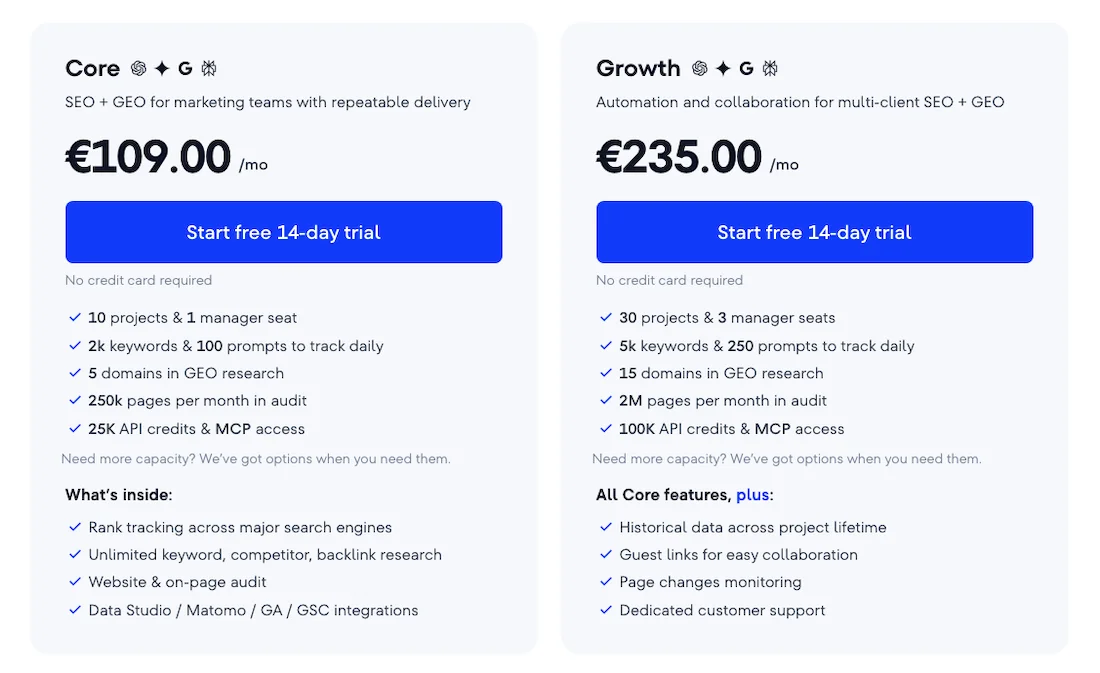
The cost of using the service is €109.00 per month. There is a 20% discount when purchasing an annual plan.
Functionality
The dashboard consists of query difficulty, search volume, CPC, and global volume. In Keyword Ideas, you have similar keywords, related keywords, and questions. You can see SERP overview and ranking dynamics.
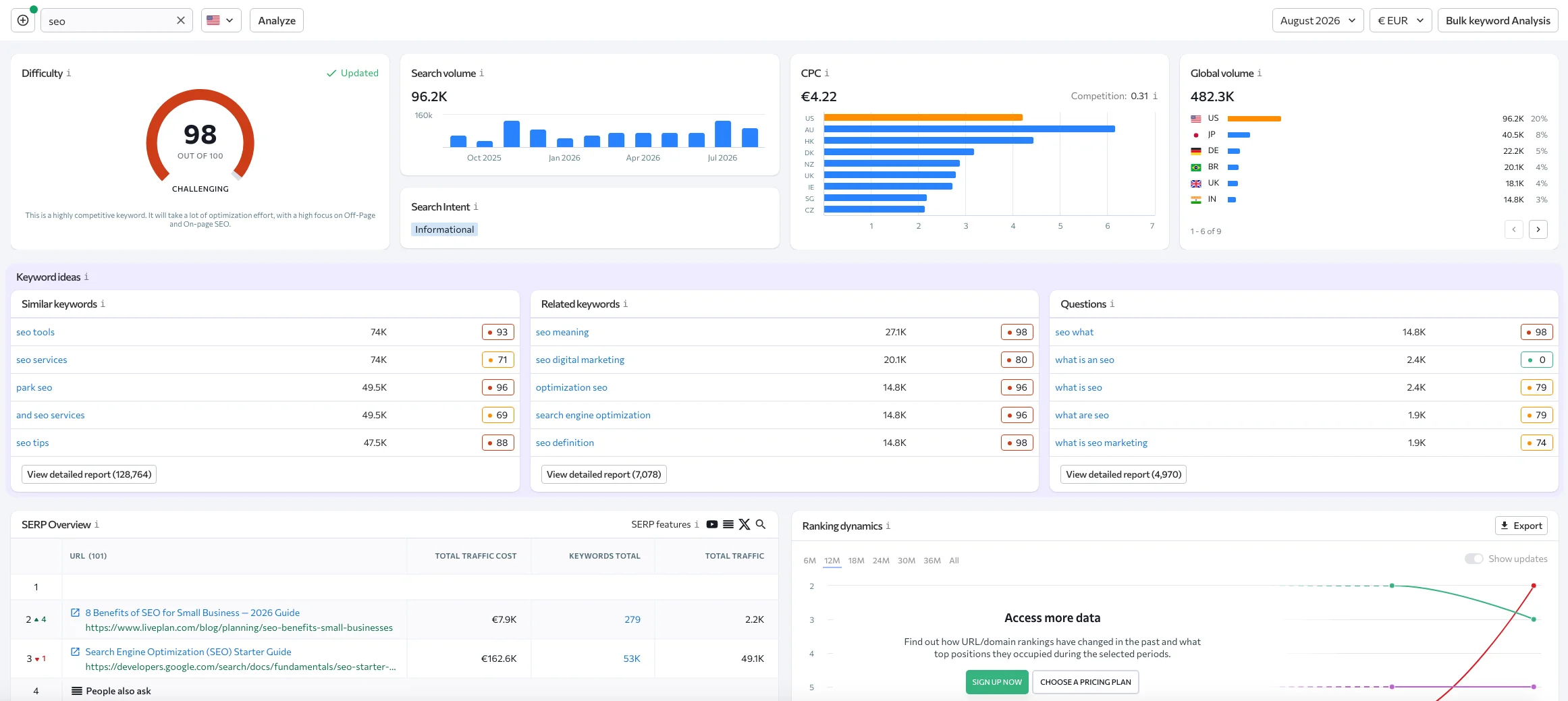
There is a separate Keyword Grouper tool that is used for clustering.
The convenient SERP History report allows you to immediately see how fragmented the search results are, understand whether the top results change every month or remain unchanged and occupied by major brands.
The database is adapted to local markets and rare locations, and this is probably its main advantage: it shows good search volume data and a large database for rare geographies.
The main inconvenience is the modularity of the interface, which breaks the unified workflow, so you have to switch between different tools.
The clustering tool works well based on the classic soft and hard clustering methods, but it is billed separately and charges additional fees for grouped keywords, even if you have an expensive paid subscription.
Serpstat
Serpstat is a multifunctional platform with an interface built according to the principle of classic heavy SEO suites, with a massive left-hand menu containing many nested tabs. This makes navigation more complicated because there are so many tabs.
Serpstat pricing
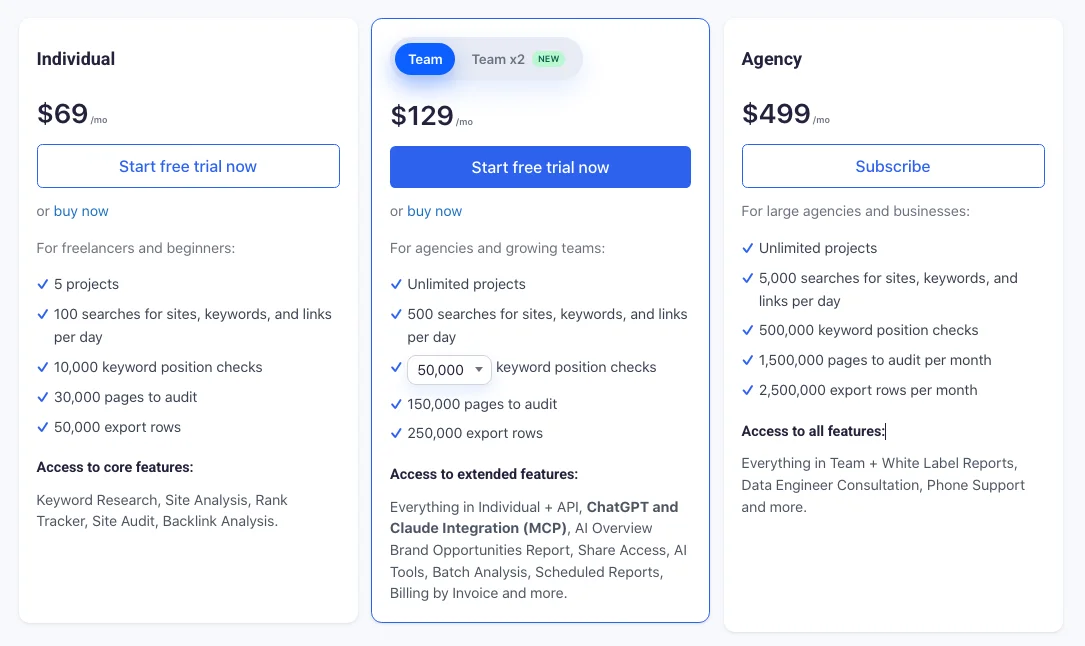
The cost of using Serpstat is $69/mo. There is a 27% discount when purchasing an annual plan.
Functionality
For keyword research, you need the Keyword Research tab.
The main semantic dashboard displays keywords. The main semantic dashboard shows overview, volumes, PPC competitors, CPC, and KW difficulty.
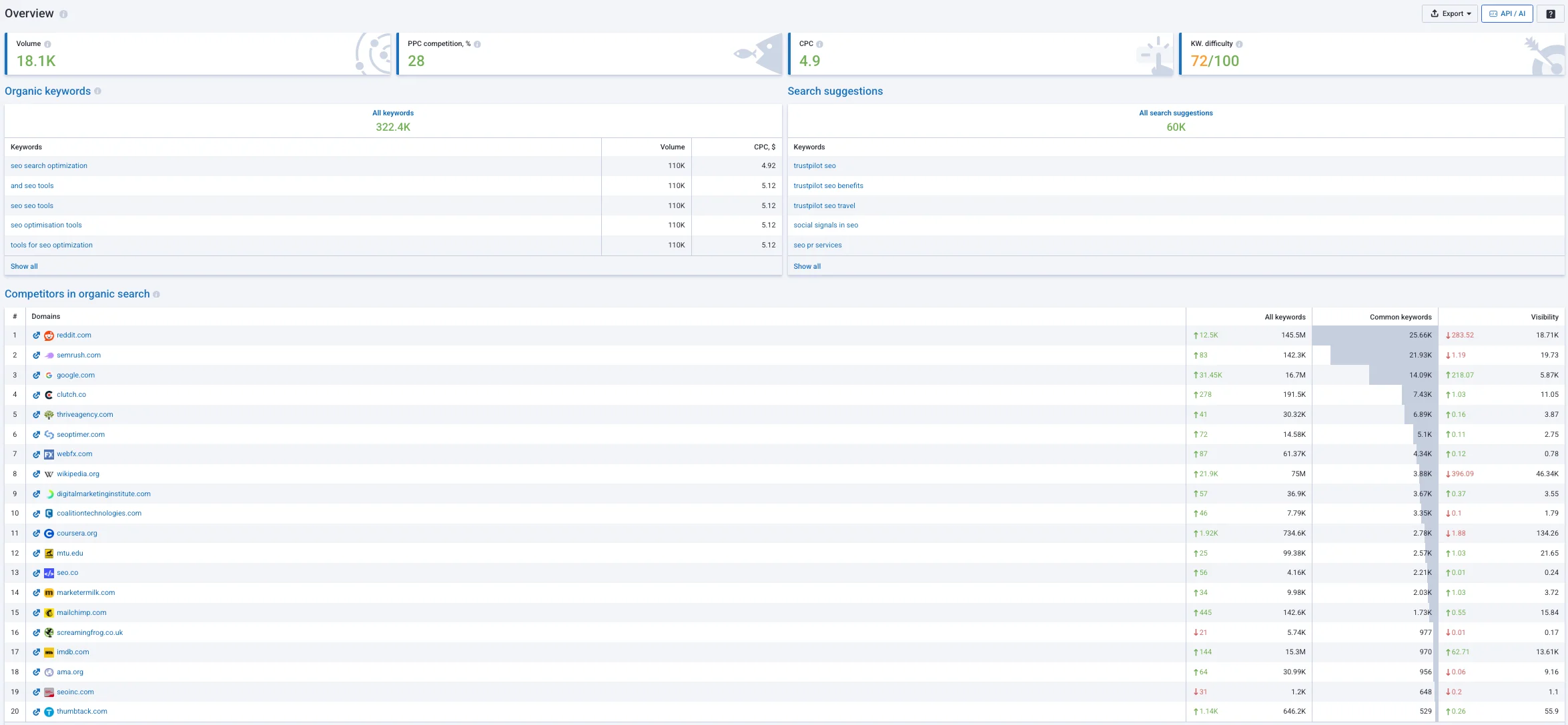
Serpstat shows all keywords and search suggestions, as well as competitors in organic search, competitor graphs, similar competitors, and competitors in ads. It also shows paid keywords.
Deep analytical reports are hidden inside, such as batch analysis and site tree. The batch analysis module allows you to upload a list of competitor domains and export all overlaps in their keyword semantics.
Contextual advertising reports show the level of competition in percentages and approximate competitor ads in detail, which helps you find commercial topics.
It offers a flexible and stable API solution, which is probably the main advantage of Serpstat, allowing you to export data and integrate metrics into internal corporate dashboards.
The disadvantage is the overloaded interface, which is somewhat outdated, with tables and graphs overloaded with text, and it is difficult for a beginner to navigate without studying the documentation.
The database for some geographies, such as Latin America or Asia, may have gaps. The keyword difficulty calculation algorithm is often unstable and can change its value after the database is updated.
Ubersuggest (Neilpatel)
Ubersuggest is a multifunctional platform that currently focuses on an AI assistant, with an interface adapted for beginners and bloggers.
Ubersuggest pricing
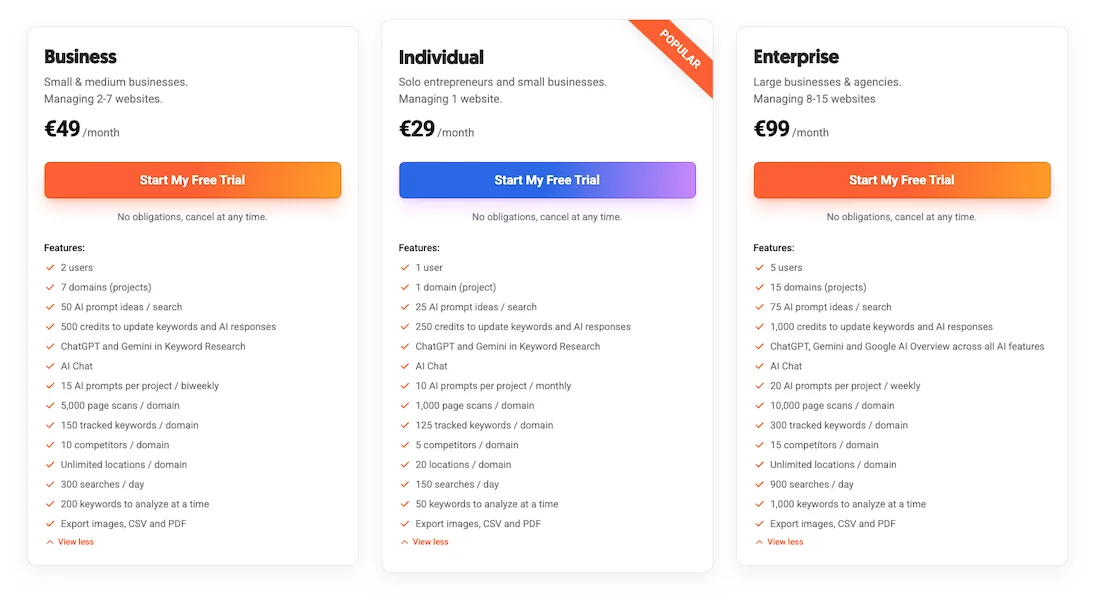
The cost of using Ubersuggest is €29/month. There is a discount when purchasing an annual plan. There are also several Lifetime version options, with the entry-level version starting at €290 and the maximum costing €990.
Functionality
There are large AI prompts with content ideas, and the sidebar is divided into Keyword Overview, Keyword Ideas, and Content Ideas.
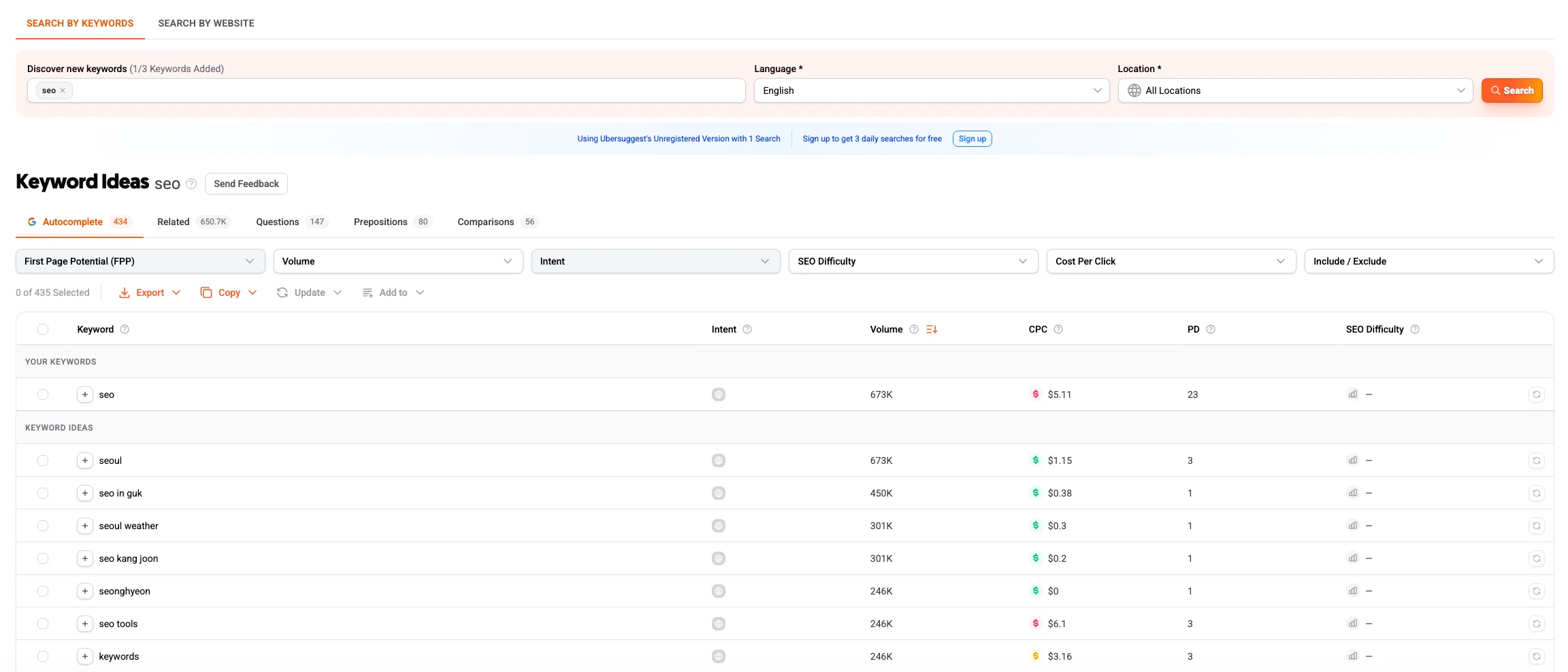
The platform has a minimal learning curve. Integration with generative AI allows you to create structures for future articles on the go, add headings, H2, and H3 based on topics that are already bringing traffic to competitors in the top results.
The interface has interesting features that allow you to redirect selected keywords to the AI Writer with one click to generate a draft.
Professional SEO specialists often criticize the tool for the low accuracy of search volume data in regions outside the US because the algorithm tends to heavily round or inflate these figures, simply copying outdated cached data.
SpyFu
SpyFu was originally a paid advertising tool. It has now become a multifunctional tool with SEO Research, PPC Research, Keyword Research, AI Tools, and a list of additional tools.
SpyFu pricing
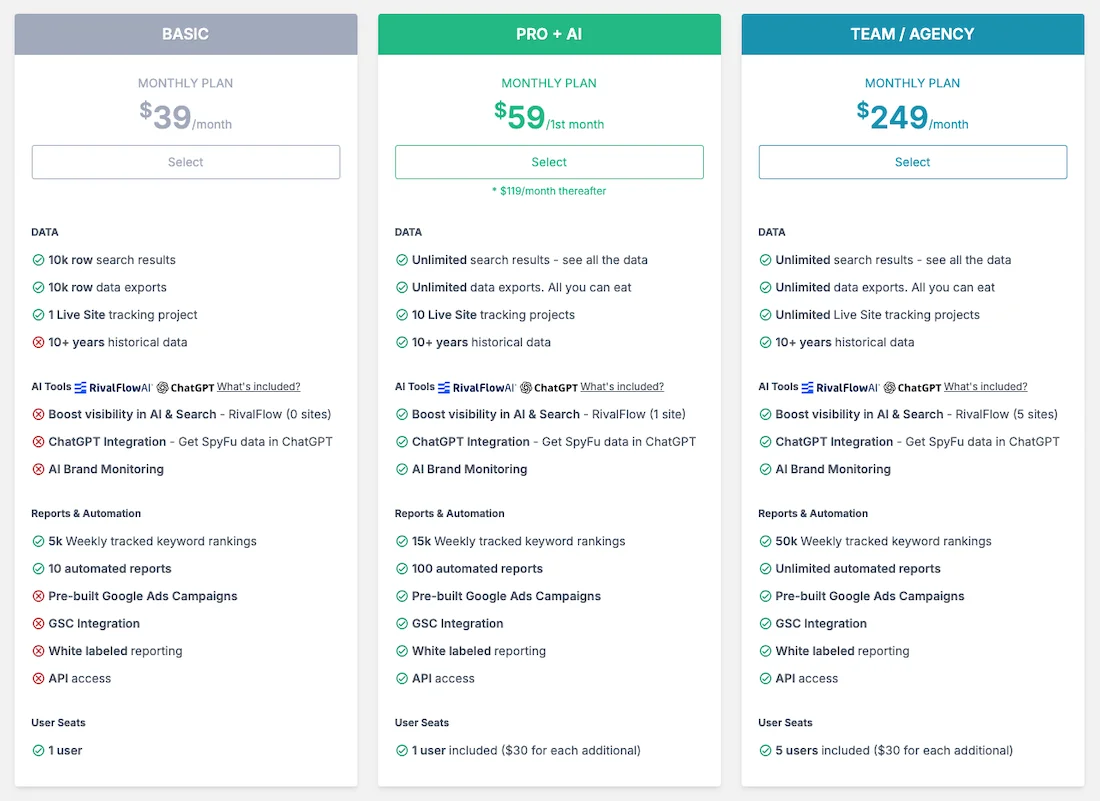
The cost of using SpyFu starts at $39/month. There is a 25% discount when purchasing the service for a year.
Functionality
You can analyze a domain to see which keywords it ranks for, or simply conduct keyword research. You have data such as keyword volume, rank, SEO clicks, KD, CPC, and desktop searches.
The main limitation of SpyFu is its strong geographical focus. The service has historically been oriented toward competitive markets such as the US, UK, Canada, Australia, and others.
When trying to collect keyword semantics for a local website in European countries or other rare geographies, you will encounter a complete lack of data or critical gaps, which makes the tool practically useless for local SEO outside the English-speaking segment.
Comparison Table: Keyword Research Tools
| Comparison parameter | Ahrefs | KeywordStat | KWFinder | Semrush | SE Ranking |
|---|---|---|---|---|---|
| Database completeness | Maximum (global leader, huge databases for US/EU/Global) | High (focused on popular and cleaned keyword data) | High (limits on the number of rows in reports) | Maximum (one of the largest databases on the market) | High (well adapted to local geos) |
| Data accuracy | High (but may underestimate traffic in rare/local geos) | Medium (focuses on intent and ready-made assessment rather than dry figures) | Medium (database is updated less frequently than those of major competitors) | High (accurate algorithms for calculating search volume and difficulty) | High (good accuracy for local regions) |
| Ease of collection | Medium (requires switching between different reports and tabs) | High (all key data and AI insights on one screen) | High (convenient split screen with list and SERP) | Below average (interface is overloaded with related modules) | Medium (requires navigation between tools) |
| Filters and sorting | Advanced (flexible inclusion/exclusion conditions, special elements) | Advanced (quick filters by intent, KD, Volume, and keyword types) | Limited (cannot set complex phrase exclusions) | Advanced (deep filtering system in Keyword Magic Tool) | Good (standard SEO filters by parameters) |
| Clustering | Basic (grouping by Parent Topic and Terms) | Available (built-in automatic AI clustering) | Available | Available (Keyword Manager / Keyword Strategy module) | Available (quality algorithm, but paid separately) |
| Learning curve | High (requires time to learn the logic of the reports) | Low (minimal learning curve, intuitive dashboard) | Low (simple and clear interface) | High (large number of tabs and marketing options) | Medium (classic SEO platform interface) |
| Price segment | High / Premium (strict credit deduction for every action) | Affordable (transparent pricing without hidden extra charges) | Affordable (but with limitations on export volume) | High / Premium (high starting price) | Balanced (flexible pricing structure) |
Backlink Analysis
The backlink analysis module in Ahrefs has historically been considered the main technological advantage of the platform. Its backlink database collects large volumes of information from across the web.
In practice, link builders and specialists encounter the fact that Ahrefs collects too much data, recording absolutely all mentions, including automated search sites and scraper sites.
There is a filter that allows you to remove spam links, but overall, they distort the picture in the charts. You might think that a site is actively engaged in link building, when in fact spam links have simply appeared.
How the Ahrefs internal panel works?
The service is divided into several key sections:
- Backlinks — a complete list of backlinks with numerous filters by type, dofollow, nofollow, languages, and donor traffic.
- Broken Backlinks — a report on internal links that lead to non-existent 404 pages on your site, which can serve as the basis for a Broken Link Building tactic.
- Referring Domains — a list of unique referring domains that influence the overall authority of the resource.
- Anchors — the anchor texts of links, allowing you to track the anchor profile.
- Referring IP — shows links from unique IP addresses and hosting subnets of referring sites, which are used to identify hidden networks of competitors’ sites.
- Linking Authors — a feature available on higher-tier plans that shows backlinks from specific authors and journalists across different resources.
And if you do not require a large volume of link data, but speed of link discovery or automation of the link purchasing process is important to you, there are various alternatives with different interfaces and capabilities.
Semrush
Semrush is one of Ahrefs’ closest competitors, and recently it has significantly modernized its search crawler and increased the speed of discovering links and backlinks.
The main dashboard allows you to see metrics such as Authority Score and clearly distributes backlinks by type: text, image, form, frame.
A convenient feature is the Backlink Gap tool, which allows you to compare your site with competitors and export a list of referring domains that link to them but are missing from your site.
The Network Graph module is integrated to visualize site networks, and the built-in Link Building Tool CRM allows you to launch cold outreach to referring domain owners directly from the analytics panel.
The Backlink Audit tool calculates the Toxic Score metric to protect against spam.
The interface is somewhat overloaded because it contains a large amount of functionality.
The Toxic Score metric often marks high-quality, legitimate referring domains as dangerous, so it requires manual verification.
The cost is comparable to Ahrefs plans.
Majestic SEO
Majestic SEO is a professional-grade utility tool that is completely focused on the mathematical analysis of the link graph.
The service has a somewhat outdated design because it is deliberately focused on data rather than modern design or marketing modules. As a result, it maintains an affordable subscription cost.
Majestic pricing
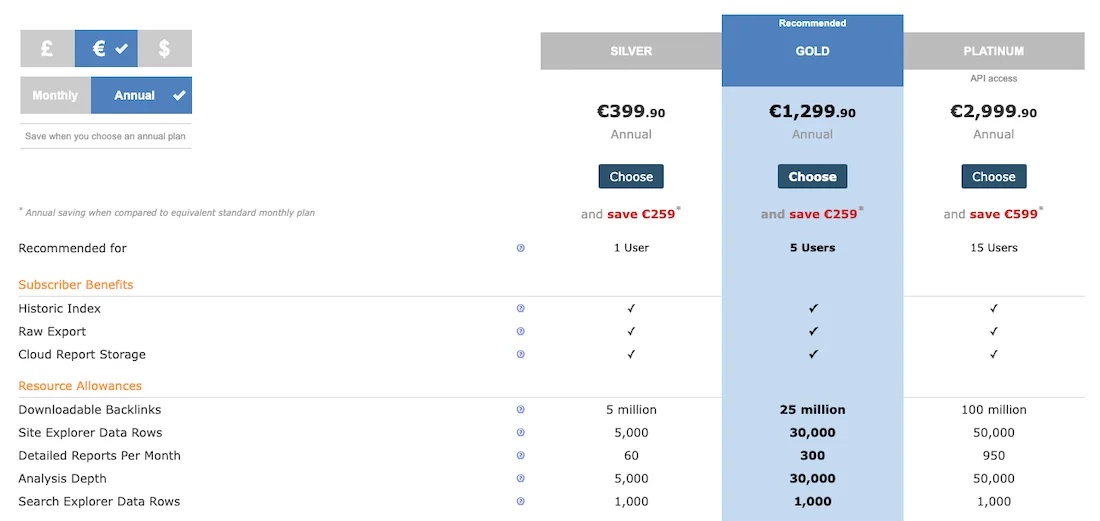
The cost of using Majestic starts at €39.99 per month. When purchasing the service for a year, it starts at €399.90.
Functionality
The panel is divided into the Summary, Ref Domains, and Topics tabs, with Topics showing the subject areas of referring sites.
Instead of standard ratings, Majestic uses the legendary Trust Flow metrics: TF, which reflects the quality and reliability of sources (trustworthiness), and Citation Flow, CF, which represents the quantity and volume of links, directly on the main screen.
The main screen displays a Link Profile graph in the form of a visual scatter plot, the shape of which can be used to determine whether a site is spammed or not.
If CF is high and TF is low, the domain is low quality.
For agencies, the Bulk Backlink Checker tool is available, allowing you to upload a large number of sites for an instant check of their backlink profiles.
This makes Majestic an important tool when purchasing expired domains, for example.
The interface has long been outdated, and navigation takes some time to get used to, but the most important thing here is the data, not the interface.
SE Ranking
SE Ranking is a balanced and cost-effective solution adapted to the needs of small businesses, independent webmasters, and content teams.
Workspace: Backlink Checker for quick competitor reverse engineering, Backlink Monitor for monitoring your own links.
The platform calculates its own authority metric, Domain Trust (DT).
The most convenient and interesting feature is hidden in the Monitor module: users can upload all purchased and acquired links there, and the system will automatically check whether they are indexed in Google, whether the webmaster has removed them, and whether the pages have been closed with noindex or nofollow tags.
This is a useful feature that provides transparent control over a link-building contractor.
The overall depth of the historical backlink database in major markets is, of course, inferior to Ahrefs and Semrush, although for local SEO this will be more than sufficient.
Serpstat
Serpstat is a universal platform with a classic backlink interface that serves as a reliable tool for mass data processing.
The interface menu includes the Summary, Referring Domains, and Core sections, with top pages showing the competitor’s pages that have collected the most links.
The platform calculates its own authority metric, Serpstat Domain Rank (SDR), and evaluates the quality of the backlink profile and page trust.
And the main convenience for professionals lies in the API. Serpstat allows you to export large volumes of backlink data directly into internal corporate scripts or custom dashboards without being subject to the large per-click limits of the interface.
This tool is well suited for batch analysis when you need to quickly compare the parameters of a large number of sites.
The backlink database is updated slowly and is limited in volume when compared with Ahrefs or Semrush, which can cause backlink profile dynamics charts to look uneven or show sudden jumps. This is related to the specifics of how the platform operates rather than the actual rate of competitors’ backlink growth.
Comparison Table: Backlink Analysis Tools
| Comparison parameter | Ahrefs | Majestic SEO | SEMrush | SE Ranking |
|---|---|---|---|---|
| Backlink database depth | Maximum (detects hidden PBN networks) | Deep historical archive (years of history) | High (fast discovery of new backlinks) | Medium (suitable for local SEO) |
| Control of purchased links | General crawling only, Alerts tool for new or lost links | No | Yes (within the Backlink Audit module) | Yes, built into the basic plan |
| Learning curve | Medium (requires filtering spam scrapers) | High (outdated text-based interface) | Medium (clear visual graphs) | Low (simple intuitive interface) |
| Price segment | Premium (credit system with deductions for clicks) | Affordable (strictly focused on link building) | Premium (part of a comprehensive heavy all-in-one platform) | Medium (fixed pricing) |
Traffic Analysis
Monitoring competitor website traffic in Ahrefs is based on mathematical modeling. The service takes a resource’s keyword rankings from its database and multiplies them by the average CTR.
In the US or UK, this model works consistently, but in local geographies, inaccuracies can be significant because the algorithm misses hidden low-volume queries.
And the main thing to understand when working with any software in this category is that no platform on the market knows the exact traffic data of someone else’s website unless that website itself has shared this traffic data. We will discuss this further.
Therefore, all visible data is simply a simulation, but experienced analysts use these tools not for absolute figures, but for tracking trends and benchmarking proportions.
For a business, it is not important how many exact visits a service receives, but rather which traffic channels are involved and whether a competitor’s website is growing or declining.
But if your task is to conduct an in-depth analysis of competitors’ marketing strategies and the structure of traffic from other channels, you can consider other tools that collect information from alternative sources.
SimilarWeb
SimilarWeb is the undisputed leader in global macro-analysis of web traffic.
Unlike classic SEO software, SimilarWeb collects data through large-scale clickstream panels from internet service providers, which allows it to provide a more complete picture of a company.
The website owner can also add their website through Google Analytics, in which case the data will be as accurate as possible. But not all companies will do this.
The dashboard is divided into major blocks: Traffic Overview, Marketing Channels, Geography, Audience, Interests.
The Marketing Channels module is particularly important because it allows us to determine traffic percentages and traffic sources. These can include direct visits, direct traffic, referral links, referrals, search, social media, email newsletters, and display advertising.
This allows us to almost immediately understand a competitor’s business model and its traffic sources.
The main problem with this service is its high data-volume threshold. If the website being analyzed is young or has fewer than several thousand visits per month, SimilarWeb will either not show the data or will display it with a critical margin of error.
The platform also has a high cost for its enterprise subscription.
Semrush
Semrush is a universal traffic analysis tool that allows you to combine the capabilities of classic marketing analysis and classic search analysis.
Within the platform, there is a traffic estimate divided into interfaces that are fundamentally different in terms of their logic.
The Domain Overview section shows standard search traffic based on keyword rankings.
Traffic Analytics works based on independent panel data, displays total visits, unique users, average session duration, bounce rate, and includes the Bulk Analysis tool for checking a large number of domains simultaneously.
Traffic Analytics also includes a Top Pages report, which shows not simply a page’s visibility in Google search, but the URL that people actually visit from all hidden sources, such as internal email campaigns or paid traffic on third-party websites.
Semrush demonstrates good accuracy in the market.
SpyFu
The service is excellent for spying on the commercial strategies of English-speaking competitors.
However, due to its strong focus on competitive markets, it is not possible to analyze traffic for local projects in Europe.
The system will simply show you empty charts.
SE Ranking
SE Ranking shows overly abstract traffic figures.
The module dashboard is presented as the Organic Traffic and Paid Traffic tabs. Inside, there are keyword lists, traffic distribution by pages and leading pages, and a detailed block on search results.
This module works consistently and reliably in local European markets. It accurately predicts visits from low-volume queries, just as the regional SE Ranking parser updates local search results.
The service estimates only search traffic, SEO, and PPC, so you will not be able to find out how many people came to a competitor from alternative channels, as SimilarWeb does.
Comparison Table: Traffic Analysis Tools
| Comparison parameter | Similarweb | Semrush | SE Ranking |
|---|---|---|---|
| Data source | Global Clickstream panels (internet service providers) | Clickstream panel data + search | Local search modeling |
| Accuracy for small sites | Low (often shows “not enough data”) | Medium | Medium, thanks to local keyword parsing |
| Channel analysis (Direct/Social/Mail) | Maximum macro-level detail | High level of detail (Traffic Analytics module) | Not available (search traffic only) |
| Learning curve | Medium (there is a convenient free extension) | High (overloaded with marketing tabs) | Low (classic dashboards) |
| Price segment | High enterprise pricing | Premium | Medium |
Site Audits
The built-in Site Audit module in Ahrefs works in the cloud, which is convenient for receiving scheduled reports, but during large-scale technical optimization or website migration, cloud crawling becomes too slow.
In addition, running detailed custom checks quickly consumes the account’s internal limits.
Technical SEO is also divided into two different philosophies: collecting hidden log data for engineers and visualization with sub-crawls.
A cloud crawler is convenient because it works autonomously, but desktop programs are indispensable when a website is, for example, in development, on a local server, or in a closed test environment that cloud services simply cannot access.
If your task is a detailed site audit, setting up a custom parser, or calculating and distributing link weight, specialized software offers you a completely different level of analysis.
Screaming Frog SEO Spider
Screaming Frog SEO Spider is the global industry leader for deep technical optimization.
SEO Spider pricing
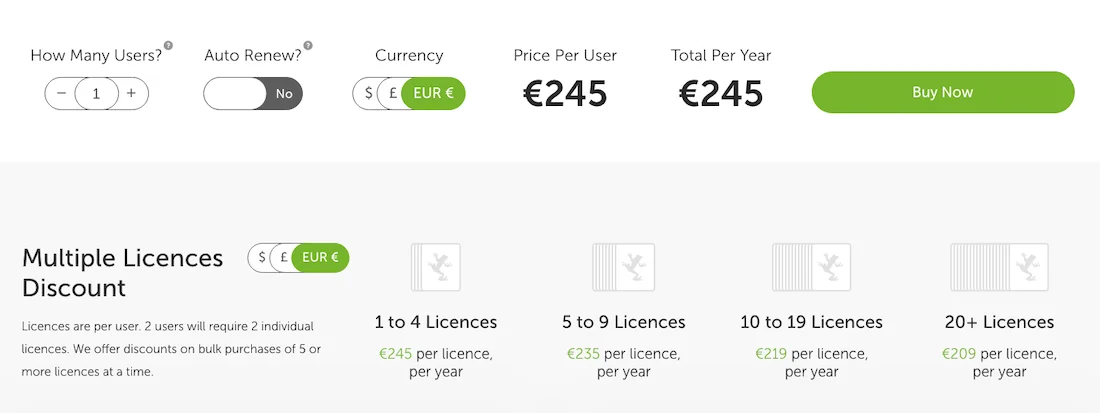
The cost of using Screaming Frog is 245 euros per user.
Functionality
The program runs locally, using your computer’s RAM to crawl the code. You can check various site parameters: internal, external links, response code, page title, meta description, H1, H2, images, canonical, href, and much more.
The interface is overloaded and looks classic. The learning curve for beginners is high because the program has a large number of settings.
When crawling a large number of pages, a huge amount of RAM is required, which means you need a powerful PC.
Netpeak Spider
Netpeak Spider is a direct competitor to Screaming Frog, created with a focus on fast filtering, data segmentation, and modern UX.
Netpeak Spider Pricing
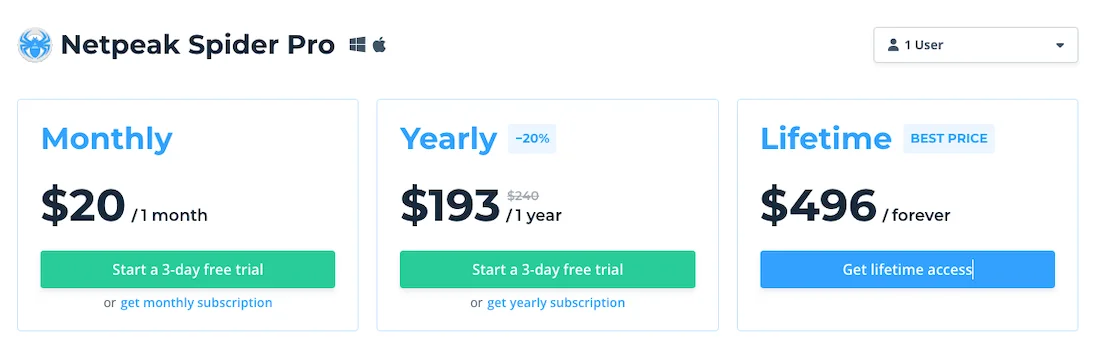
Netpeak Spider Pro starts at $20 per user per month. A lifetime license costs $496.
Functionality
A unique feature is the internal page rank module. The program has a built-in calculator that simulates the distribution of link weight through internal links and allows you to identify dead-end URLs that waste crawl budget.
The multi-domain crawling function allows you to upload a list of different domains and collect a consolidated audit for them with one click.
The program operates strictly on a subscription model, unlike Screaming Frog, where the license is purchased for a year at a fixed price.
In terms of the depth of custom crawling in complex scenarios, it sometimes falls behind competitors, but it is still a useful service.
Sitebulb
Sitebulb is an affordable crawler that works like a smart consultant, translating dry tabular figures into easy-to-understand graphical reports.
The graphical interface offers interactive charts, click distribution maps, and ready-made reports.
The Crawl Maps module creates radial maps of the site architecture, visually showing the depth at which important sections are located.
The tool automatically generates ready-made prioritized tasks and specifications for the developer, saving hours of analyst work.
The scanning and generation of complex reports takes more time than with classic table-based crawlers, and the program is highly demanding on the computer’s processor resources.
Sitechecker
Sitechecker is a cloud-based SaaS platform focused on automating technical monitoring processes and round-the-clock change monitoring.
Sitechecker pricing
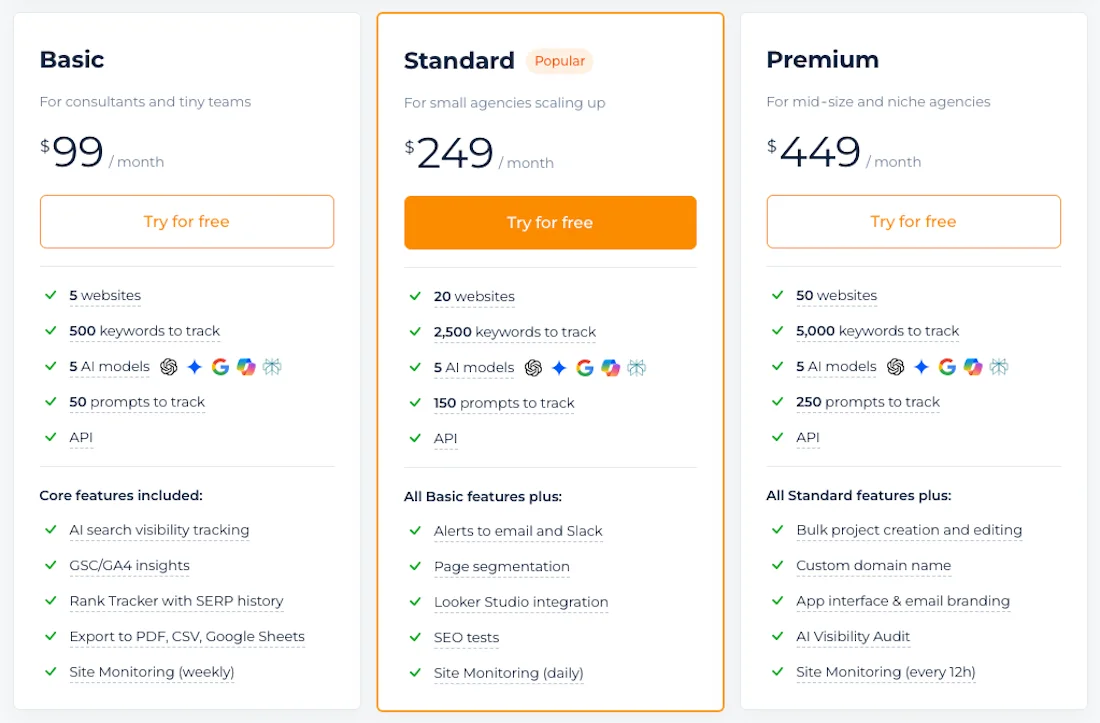
The cost of using Sitechecker starts at $99/month. There is a 17% discount when purchasing an annual plan.
Functionality
The interface has a dashboard with summary SEO Score metrics, representing the site’s health as a percentage from 0 to 100. If errors are found, they are clearly divided by severity: critical errors, warnings, and notices.
The main advantage of the platform is the real-time site monitoring feature, where the system monitors the site in the background 24/7 and sends notifications to Slack or email if an important page goes down, a canonical tag is removed, or you accidentally block something important in the robots.txt section.
The basic plan has strict limits on the number of pages that can be crawled per month, making the platform too expensive for large e-commerce projects.
Siteliner
Siteliner is a minimalist online service for a quick express check of a site’s textual content.
The interface is extremely simple and browser-based, with a single input field. After crawling, the site provides a summary table with the main pie charts: duplicate content, common content, and unique content.
The service is useful if you need to check a young website or a content section for internal duplication in 10 seconds, when pages are duplicated or links are broken, without registration.
When you click on the duplicate metric, the repeated pieces of text are highlighted directly in the page layout.
The free version is limited to 250 pages per domain. The tool ignores technical code errors, indexing issues, Schema.org markup, and Core Web Vitals loading speed.
Comparison Table: Technical Site Audits Tools
| Comparison parameter | Screaming Frog | Netpeak Spider | Sitebulb | Sitechecker |
|---|---|---|---|---|
| Custom code parsing | Flawless (Custom Extraction) | High level | Medium level | Not available |
| 24/7 monitoring mode | Scheduled 24/7 runs with data export to Data Studio / BigQuery | No | No | Automatic (instant alerts in Slack/Email) |
| Learning curve | High (engineering-oriented tabular interface) | Medium (tables with error explanations) | Medium (smart consultant with ready-made specifications) | Low (clear real-time error feed) |
| Price segment | Fixed annual license | Flexible license (monthly or annual) | Fixed license | Affordable (but with limits on pages crawled) |
Rank Tracking
To control the effectiveness of an SEO strategy, you need a rank tracker, and on standard plans, position updates and keyword tracking take place once a week.
In dynamic niches, you may need to do this much more frequently.
If you need a useful tool for rank tracking, several leaders with different specializations have already emerged on the market.
SE Ranking
This is one of the most detailed classic trackers on the market, offering an optimal balance of cost and data accuracy.
The main interface has a table with Detailed and Overall tabs. At the top of the panel, there is a quick switch between device types, desktop and mobile, and search databases.
The interface has an automatic target URL matching module. If a different page than the one you optimized starts appearing in the search results for the target keyword, indicating a cannibalization problem, the system immediately highlights the position with a red indicator.
The AI Result Tracker tool will show you whether your site appears in Google’s classic AI Overview blocks. The automatic Report Builder allows you to configure attractive weekly delivery of charts and reports.
SE Ranking stores position history for the entire lifetime of the project, starting from the moment keywords are added.
When adding a large number of regions, the table interface becomes overloaded and starts to slow down.
AccuRanker
AccuRanker is a high-speed, operational-level rank tracker designed for large consulting agencies and large-scale e-commerce projects.
The interface is clean and modern, and the dashboard displays the share of voice metric, representing the percentage of the market you control for a given keyword set.
The main advantage is the on-demand refresh feature, which means you do not have to wait for the scheduled overnight update. You can click the refresh button and make the system send queries to the SERP in real time and provide you with current positions within a few seconds.
The service is expensive, and its pricing structure is strictly tied to the number of tracked keywords. There are no additional built-in modules for keyword research or backlink auditing. But remember that this is a strictly isolated tracker.
Wincher
Wincher is an affordable tool for independent webmasters and small content projects, built around the principle of nothing unnecessary.
The main screen greets you with several large figures: average position, estimated traffic, and the number of first-place rankings in the top results. Below is a simple table with a list of keywords.
The Local Rank Tracker module for Google Maps allows you to visualize local SEO as a grid of pins on a city map. You can clearly see what position your local business occupies within a radius of one or five kilometers from the user.
The WordPress plugin allows you to enable site tracking directly from your site’s admin panel.
In the starter package, the system strictly links a keyword to the page it technically found on the site and does not allow you to manually assign a target URL for tracking.
The tool lacks advanced filters for SERP features.
Sitechecker
Sitechecker is a rank tracker integrated into a broader cloud ecosystem for monitoring the technical condition of a domain.
The graphical data panel is focused on quickly capturing daily dynamics. It shows the exact position on a scale from 1 to 100 while also displaying an overall site visibility metric.
The key feature is the connection between the tracker and the technical changes module. If a keyword’s position suddenly drops, the interface automatically compares this graph with the history of changes to the site’s code.
As a standalone Rank Tracker, this tool is simple. It does not allow you to track positions in alternative search engines such as Baidu or YouTube, only Google, Bing, and Yahoo.
In terms of grouping and tagging large keyword lists, it falls behind specialized solutions.
ProRankTracker
ProRankTracker is a specialized tracker that has completely rebuilt its logic around the modern realities of AI search and GEO.
The main interface consists of dense tables focused on displaying numerous parameters, and in addition to classic search engines, it features a large GEO and AI Visibility block.
The tool is excellent at tracking positions within the Amazon marketplace and the YouTube video platform, with precise GEO targeting down to the postal code.
It provides more than 50 custom report formats for clients.
The full-featured interface is convenient on desktop, and there is a MyPRT mobile app for checking positions on the go. The interface has a high learning curve for beginners.
Comparison Table: Rank Tracking Tools
| Comparison parameter | SE Ranking | AccuRanker | Wincher | ProRankTracker |
|---|---|---|---|---|
| Update frequency | Daily | Instant on demand (On-Demand) | Daily | Daily |
| Local tracking | Accurate (down to city / Maps) | High (enterprise level) | Convenient (visual pin grid on maps) | Accurate (down to ZIP/postal code) |
| AI SERP monitoring (GEO) | Basic (AI Overviews blocks) | Yes | AI Overviews and traditional SERP feature tracking | Monitoring mentions in AI Overviews and AI-powered search results |
| Learning curve | Medium (heavy tables with 1,000+ keywords) | Medium (clean interface without third-party modules) | Low (there is a WordPress plugin) | High (many specific AI metrics) |
| Price segment | Balanced | Expensive enterprise pricing | Budget | Medium |
Content & On-Page Optimization
If Ahrefs provides a high-level understanding of who is ranking in the top results and how many links they have, then On-Page & SERP analyzers answer the question: “What exactly and how should be written on the page to rank first?”
These tools parse the top search results in real time and analyze competitors’ content through NLP algorithms, providing clear requirements for text structure, length, and terminology.
Positive Surfer (Surfer SEO)
Surfer is a recognized tool in the On-Page optimization niche for English-language and global SEO.
Positive Surfer pricing
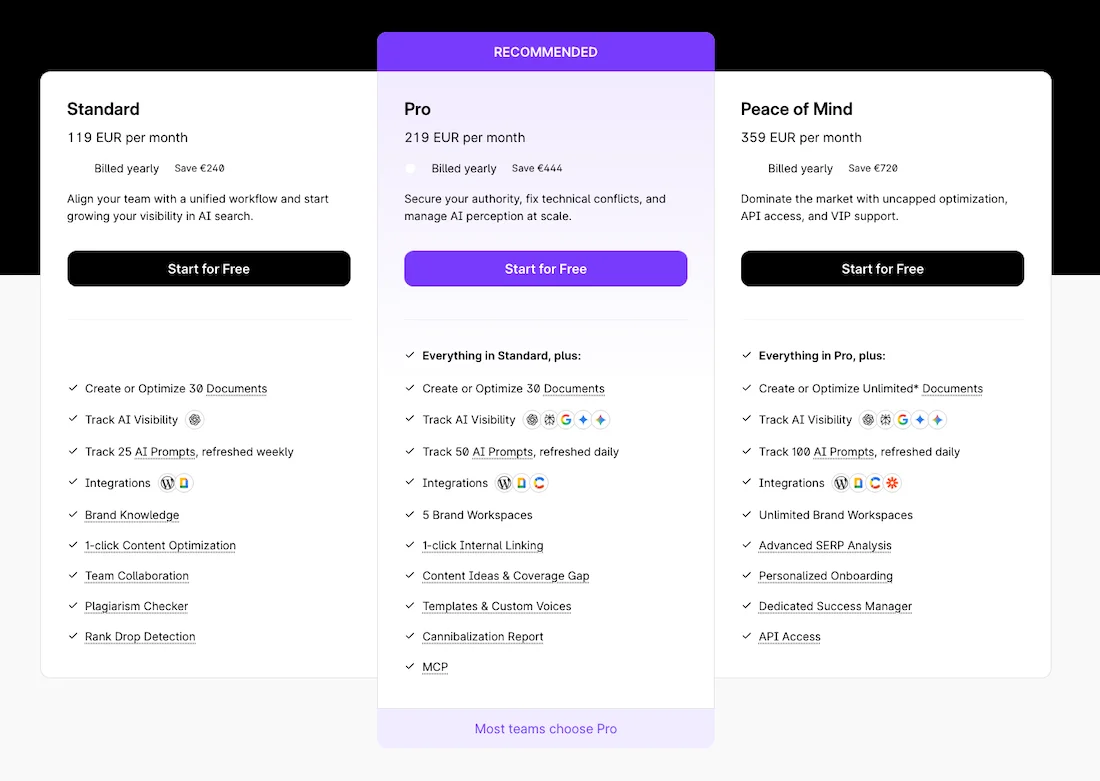
The cost of using Surfer is from 119 EUR per month. When purchasing for a year there is a 17% discount.
Functionality
The Content Editor module analyzes the current search results for a given keyword and creates an interactive editor.
Surfer calculates the optimal number of words, headings at different levels, and images, and also generates a list of keywords and topical phrases with recommendations for their usage frequency.
Among the module’s main capabilities is the Content Score metric, which evaluates text quality on a scale from 0 to 100. Surfer also has integrations with Google Docs and WordPress, a built-in AI structure generator, and the SERP Analyzer tool for finding correlations between ranking factors.
Among the disadvantages, it is worth noting the high subscription cost and the deduction of limits for each article draft created.
Wrytix
Wrytix is a specialized tool for working with content.
Wrytix Pricing
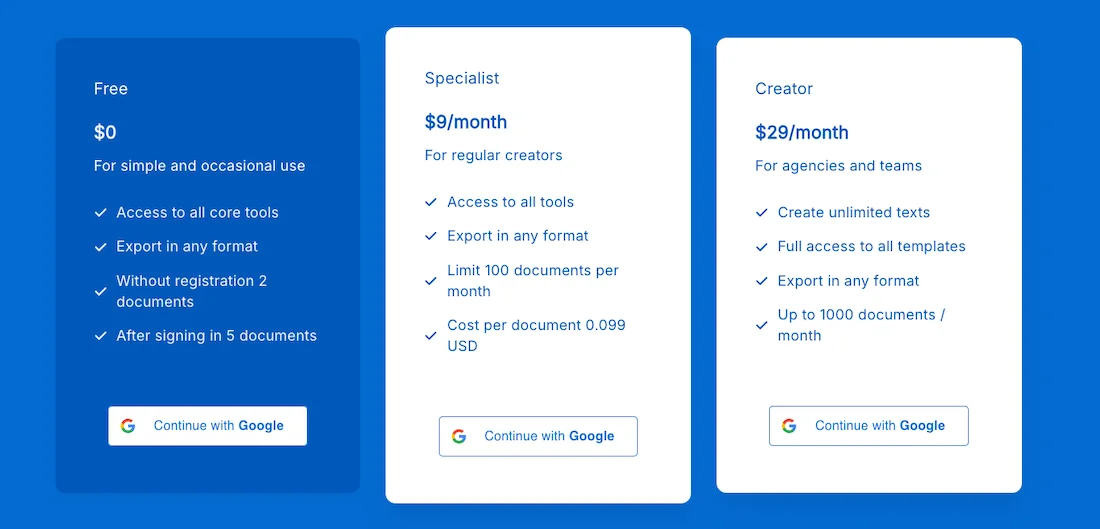
Wrytix starts at $9 per month, with a free plan also available.
Functionality
Wrytix will help you find keywords for your website and topics for articles in just a couple of clicks. It will generate site mapping, analyze competitors, and suggest an accurate heading structure. Wrytix identifies entities and informational gain, which is very important in the current landscape.
Wrytix allows you to analyze text on the fly, rewrite the necessary paragraphs, and further optimize the text directly while writing.
And, like all new tools, it is still in the development stage, with new features appearing and the interface changing.
How to Build an Effective Tool Ecosystem?
No professional team will limit itself to purchasing just one tool. And although the Ahrefs platform remains the recognized leader in the niche, there is no point in abandoning it completely. However, the optimal strategy for optimizing the budget and accelerating workflows is to build the right hybrid tool stack.
You can take the minimum or basic Ahrefs plan for its unique backlink database and historical data, while covering the relevant gaps or routine tasks with specialized services.
In my opinion, a smart and balanced hybrid stack ecosystem could look like this.
For Link Building
Ahrefs and Majestic SEO — this combination will give you complete control over competitors’ backlink profiles. You can use Ahrefs as the main analytical archive of the web for checking incoming links and monitoring DR, while Majestic serves as the ultimate validator of the quality of referring domains and dropped domains thanks to its proven Trust Flow and Citation Flow metrics.
Keyword Research Tools
You need KeywordStat so you do not burn expensive Ahrefs credits on clicks within reports, since KeywordStat instantly provides clean keyword semantics without branded clutter on a single screen and automatically groups keywords by actual intent. It saves you hours of manual work in Excel before creating a brief for the author.
Site and Traffic Analysis
Google Search Console is a free tool for checking your own site’s data. You need Screaming Frog or Netpeak Spider for an in-depth desktop code audit, and SimilarWeb or Semrush to track competitors’ traffic channels.
Rank Tracking
SE Ranking or ProRank Tracker will provide daily position updates in search with city-level accuracy, tracking local maps in Google Maps, and monitoring brand visibility within AI-generated reports (GEO).
Text Analysis and Optimization
I would like to briefly mention tools for working with texts. They are not direct competitors to Ahrefs, but they will be important for your work.
When working with texts and briefs, you will need Surfer or Wrytix. They help break down competitors’ texts from the top 10, automatically create a brief for the copywriter, and optimize LSI density based on AI and NLP algorithms before publication.
This is the overview of Ahrefs alternatives that we have prepared for you.
This list of tools will be useful when optimizing your website and building workflows within your team.