Navigational keywords are search queries that users enter into a search engine when they already know where they want to go.
So instead of looking for information or comparing options, a user may be searching for a specific website, brand, service, page, or a particular product. These can be queries such as Facebook login, YouTube Studio, KeywordStat pricing. Such queries belong to navigational intent.
You may think that such queries are less valuable than informational, commercial, or transactional queries because the user already knows what they are looking for. That is why we sometimes think: well, what is so difficult about SEO promotion here, and what additional role do these queries have.
But in practice, things happen differently, especially in competitive niches. Someone can simply take your branded traffic away from you, and you probably will not like that.
Navigational traffic is very often the main indicator of brand strength because if people are already searching for a company, it means they are familiar with it and intentionally want to get to the company’s website.
And this traffic is less dependent on Google algorithm updates because the user is already searching for a specific brand, not an answer to their question.
Such queries can distort SEO analytics because branded traffic hides the decline of non-branded organic traffic, and sometimes the picture may look better than it actually is.
- What Are Navigational Keywords?
- Other Types of Navigational Keywords
- Navigational Keywords and Branded Keywords. What Is the Difference?
- The Importance of Navigational Keywords for SEO
- What Should You Do If Competitors Rank for Your Branded Queries?
- How to Protect Your Navigational Keywords?
- Problems With Navigational Traffic
- Technical Optimization for Navigational Traffic
- Conclusion
What Are Navigational Keywords?
Navigational keywords are those queries that a user enters to navigate to a specific website or brand page, and Google is effectively used not as a search tool but as a navigation tool.
Examples:
- KeywordStat Pricing
- Gmail login
- YouTube Studio
- Canva pricing
- Spotify Premium
- Facebook login
In all of these cases, the user already knows the exact specific destination point, and therefore does not need to study the topic or compare options. They simply want to get to the page they need.
Other Types of Navigational Keywords
Not all navigational keywords will look the same. Depending on the user’s goal, they can be conditionally divided into several groups.
Pure Branded Query
This is when a user searches for a brand or company.
- Ahrefs
- Keywordstat
- Notion
- HubSpot
- SEMrush
Such queries will be used to navigate to homepages, and these queries will have the high search volume.
Brand Plus Action
When a user wants to perform a specific action inside a service, they will search for a separate page.
- Keywordstat My Account
- Notion Log-in
- HubSpot Account
- Facebook login
Such queries will lead to login pages, registration pages, personal account pages, and so on.
Brand Plus Website Section
When a user is searching for a specific page on your website.
For example:
- Keywordstat Contact
- Keywordstat API
- Keywordstat Blog
In this case, the person already knows the brand and is trying to get to a specific section or page of your website.
Brand Plus Commercial Intent
This is navigational and commercial intent at the intersection.
- Keywordstat Cost
- Ahrefs Plans
- HubSpot Free
The user already knows the product but at the same time is studying the terms of use or preparing to make a purchase.
Navigational Keywords and Branded Keywords. What Is the Difference?
You may think that navigational keywords and branded keywords are synonymous terms. But, let’s say, it would not be entirely correct to generalize them.
Let’s break it down in more detail.
A branded keyword is any search query that contains the name of a company, product, or brand.
Examples:
- Nike store
- Apple reviews
- Ahrefs alternatives
- SE Ranking Alternatives
- Semrush Alternatives
- Tesla stock
- Keywordstat review
In these cases, a brand is mentioned, but the goal can be completely different. For example, to get information, compare some solutions, read reviews, or maybe make a purchase.
Navigational keywords differ slightly from branded keywords because the user wants to get to a specific destination.
Facebook login. That is, the user wants to get specifically to the login page where they can sign in.
YouTube Studio. They need a specific page where they can view their YouTube statistics.
Keywordstat pricing. They need a page where the prices are listed. That is, not a review of the service where prices are mentioned, but the pricing page itself.
The user already knows which page they want to go to, and therefore the search engine provides the required page.
Why Is This Important?
Because not every branded keyword is navigational.
For example, the query Apple reviews contains a brand name, but the user is not trying to get to the Apple website. They may simply want to read reviews about the company in general, and it does not matter to them whether they read them on the product’s own page. Most likely, quite the opposite, they want to visit some independent website and read reviews about that product.
Therefore, if we formulate a rule for identifying keywords, then a branded keyword should answer the following question: is the brand itself mentioned in the query?
And a navigational keyword answers a different question: is the user trying to get to a specific place on a website, to a specific page?
Therefore, it is very important for all analysts to track and identify these types of keywords separately.
The Importance of Navigational Keywords for SEO
And now we have come to the most interesting part. Why can these navigational keywords play a strong role in brand promotion and the stability of organic traffic?
The user is already searching for the company by name, is already familiar with the brand, and has basically already chosen it. This means that a large part of the marketing work has already been done. The brand already occupies top-of-mind awareness in the user’s mind, and the user is searching for a specific page.
And here we can apply our logic and think: if we do not have such a page, for example, our brand name plus login, then our competitors or affiliate companies can take advantage of this and siphon off the traffic.
I worked at a company in the iGaming niche where we were involved in brand protection because many competitors were creating websites for such non-obvious pages: our brand name plus login, plus registration, plus bonus, plus promo, and so on.
The brand’s own website did not have such pages, so the company was losing those queries.
My primary strategy was to protect the brand for these queries. Therefore, first, we created such pages on our own website, and second, we created additional satellite websites that allowed us to capture this traffic and not give it away to competitors.
Therefore, this is a very important part of protecting your brand and preserving your legitimate traffic.
What Should You Do If Competitors Rank for Your Branded Queries?
As I already mentioned, even branded queries will not automatically belong to you. Search results work a little differently.
Users search for a specific brand, and alongside the official website there may be competitor ads, service comparison pages, review websites, Trustpilot pages, other review platforms, and articles with lists of alternatives.
This can happen for different queries. As a result, the user may go to competitors before even visiting your website.
How to Protect Your Navigational Keywords?
Many companies think that navigational keywords are their guaranteed source of traffic. The user knows the brand, and Google and other search engines will show the company’s official website. And website owners think that it is impossible to compete for such traffic.
In practice, this is completely untrue, and competitors may try to intercept your traffic through advertising, comparison websites, review websites, review pages, and so on.
For example, queries such as brand reviews, brand pricing, brand alternatives, brand vs competitor, and third-party websites may appear in search results in higher positions than the company’s official pages.
Therefore, working with navigational demand does not end with brand awareness alone.
Occupy as Much Search Space as Possible
Optimize your homepage, create additional sections on your website, and create company profiles so that for branded queries users see as many results controlled by you as possible.
This may include Trustpilot, YouTube, review websites, and so on.
Work With Reputation Platforms
Profiles on review websites, directories, and industry platforms very often rank for branded queries, and therefore it is better to manage this information yourself than to leave it completely unattended.
Therefore, register on all popular services and work on ORM.
This is called ORM, Online Reputation Management. It is the process of controlling a company’s reputation on the internet.
Create Comparison Pages
For example, if a user searches for a query such as Keywordstat vs Ahrefs or Keywordstat alternatives, you can publish comparison materials and participate in shaping the information landscape around the brand.
Advertising Campaigns
You can use branded advertising campaigns, and advertising on your own brand will help you additionally protect the top part of the search results and reduce the likelihood of users leaving for competitors.
What Helps Protect Branded Search Demand?
Advertising on your brand.
Many companies consider this an additional expense, but branded advertising campaigns allow you to occupy additional search result space. You can rank in top 1 for your company, and at the same time appear with your website, and also occupy the top advertising position.
You can control search results for reputation-related queries. These are brand name plus reviews, brand review, brand scam, brand problems, and so on. Think about what kinds of queries may exist in your niche.
Create pages for popular branded queries.
Users very often search for pricing, plans, login, contacts, reviews, affiliate program. Therefore, simply create separate high-quality pages that will help satisfy demand better, and Google and other search engines will direct users to a specific landing page instead of trying to find that part of the content on other pages of your website.
Work on brand awareness.
The more your users search for the company directly, the stronger branded demand becomes, and in this way you become less dependent on competition for general keywords.
And in general, the presence of branded traffic is highly encouraged by Google, and you can rank highly for other competitive queries because Google sees that you do not live on SEO alone. You have a very strong brand, users search for you through branded traffic, they come to you from advertising and other traffic sources, and therefore Google is comfortable giving you SEO traffic, and you are not simply vacuuming up queries and living only from SEO.
Problems With Navigational Traffic
One of the common mistakes in SEO analytics is evaluating organic traffic as a whole and not separating branded and non-branded queries, and because of this you may get a biased picture.
Organic traffic may appear stable or even growing, while in reality the picture turns out to be completely different.
Your non-branded traffic may be declining, after updates the website may lose part of its informational queries, while at the same time your brand may be actively developing, advertising campaigns may be launching, media mentions may be increasing, and you think that your SEO performance is working just as well as before.
Organic traffic may appear stable or even growing, but the reality is quite different. Your non-branded traffic may be declining, while demand for your brand masks this decline. To accurately understand how organic clicks vary by search intent using AI, you should analyze your overall traffic potential and closely monitor your baseline CTR.
How to Separate Branded Traffic From Non-Branded Traffic in Google Search Console?
If you are going to analyze SEO performance, then branded and non-branded queries should be considered separately.
How can this be done in Google Search Console?
Step 1. Open the “Search Results” Report.
Go to Google Search Console and open the “Performance” – “Search Results” section. Here you will see all the queries through which users came to your website from Google.
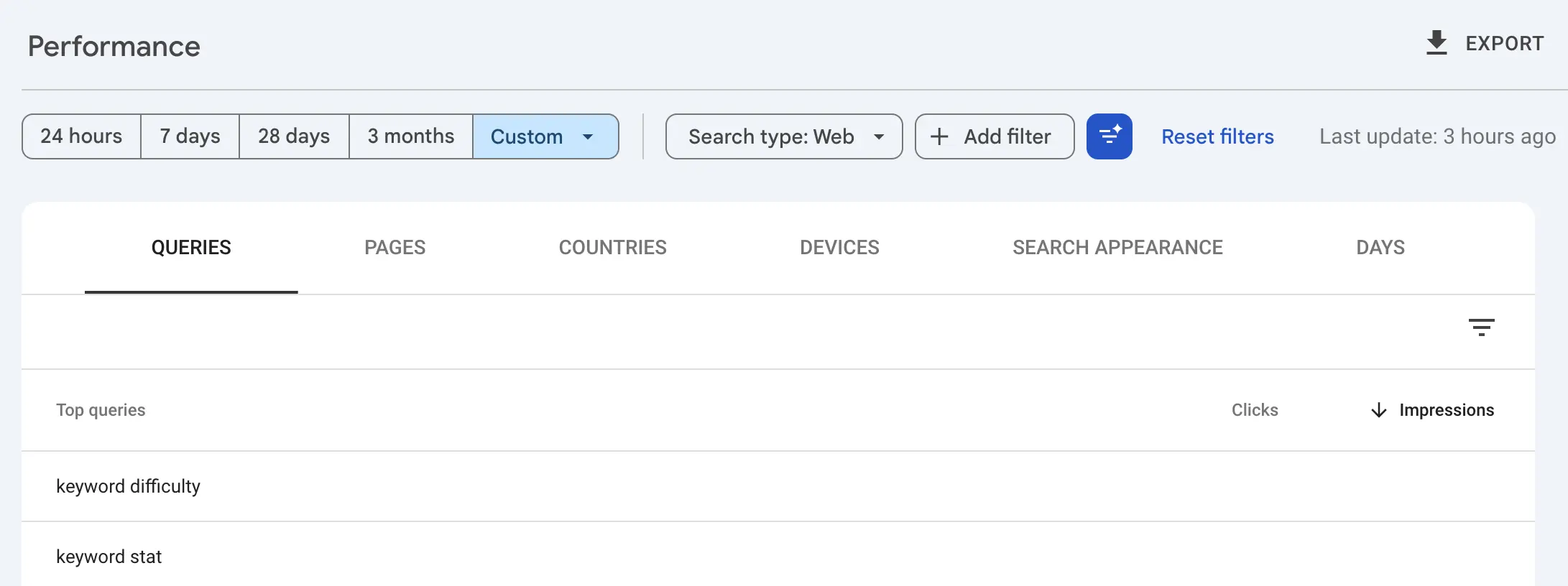
Step 2. Create a Brand Filter.
Click the “New” button and select “Query” in the filter.
Next, you need to select the condition “Query does not contain”. After that, you need to specify the brand name and its main spelling variations.
In my case these would be:
- KeywordStat
- Keyword Stat
- Keyword-Stat
Step 3. Analyze the Performance of Non-Branded Traffic.
After applying the filter, you will see only queries that are not directly related to your brand, therefore this segment best reflects your actual SEO performance.
This includes:
- content quality;
- your website’s visibility in the niche;
- the impact of Google updates on your website;
- page competitiveness.
Step 4. Compare Both Segments.
To conduct a complete analysis, you need to create two separate reports:
- branded traffic;
- non-branded traffic.
If the total amount of traffic is growing, but branded traffic is declining, this may indicate some problems that are being masked by the growth of your brand awareness.
And vice versa, growth in non-branded traffic may indicate that SEO is bringing in new users who are not yet familiar with your company, and you are getting an additional source of growth.
Technical Optimization for Navigational Traffic
When a user has already performed a navigational search, their task is as simple as possible. They need to get to the required landing page. The fewer steps the user takes before the target action, the better their user experience.
Therefore, for navigational queries it is very important not only to rank highly in search results but also to make the search results themselves as convenient as possible.
How Can This Be Achieved?
Using SiteLinks
For strong brands, Google will very often show additional links to the most important sections of your website. It does this automatically. Your task is to properly distribute authority between these pages so that Google can find them.
How can this be done?
If you go to Google Search Console and open the Links tab, then in the Internal Links section you will see the most popular pages of your website. There will be a section called Top Linked Pages. It will show the URL and the number of links.
You can click the More tab and open the full report, where the total number of links and statistics for each URL and each link will be displayed.
You can conveniently export this report into the format you need: Google Sheets, Excel, or CSV.
Create a Clear Site Architecture
In order for Google to generate site links, you need to have a logical section structure, clear navigation, proper internal linking, and unique page titles.
In this way, it will be easier for the search engine to understand the structure of your website, and the likelihood of enhanced search result elements appearing will increase significantly.
Using Structured Data
Schema.org markup helps search engines and AI assistants, LLM systems, better understand the content of your pages.
Therefore, you can mark up:
- Organization
- Website
- BreadcrumbList
- FAQ
- Product
Structured data does not guarantee the appearance of rich results. It simply helps the system interpret website content more accurately.
It should be noted that after 2026 the role of structured data changed dramatically. If previously it was implemented mainly for attractive search snippets, now Google has already fixed that story.
And in May 2026, Google officially discontinued support for FAQ rich snippets for most websites because many website owners were simply manipulating this.
But structured data is a very important language for communicating with AI algorithms, with Google AI Overview, ChatGPT, Claude, and so on.
Therefore, Schema.org is still necessary for a website. It is just that in the GEO era, Generative Engine Optimization, it solves new tasks.
It is food for search engines when neural networks are not simply reading text but looking for clear entities and relationships between them. And Organization or Product markup feeds AI ready-made data in JSON-LD format.
Protection Against AI Hallucinations
Without structured data, robots may confuse a product price with a discount, an author with the character of a publication, and so on.
Therefore, structured data guarantees more accurate interpretation.
Google Merchant Center for E-commerce
Product markup will influence inclusion in free product feeds in Google Shopping, which AI also actively uses for product comparisons.
Conclusion
It is already clear from this article that navigational keywords are much more than searches for brand names.
They show how well your audience knows the company, how strong its brand awareness is, and what exactly users are looking for in your product and on your website, because they are searching for a specific landing page.
For SEO, such queries play several roles. They create more stable sources of organic traffic that are less dependent on Google’s algorithms, and they can also hide problems with non-branded search traffic and distort the overall picture of performance.
Therefore, when analyzing organic traffic, you should consider branded and non-branded queries separately, and also take into account that real user intentions may not always fit into strict intent categories.
Navigational search is practically located at the intersection of branding, SEO, and user behavior, so the better you understand this connection, the more accurately you can interpret data and make decisions based on data rather than your impressions and generalized labels.
Therefore, when you work with semantics, analyze search demand, and build a content strategy, be sure to use a separate approach for navigational keywords.
They will help you understand not only what users are searching for and how well the market knows your brand and product, but also what exactly they are looking for on your website.
Therefore, use these queries correctly. That is all from me. I am grateful that you read this article. Send it to your friends if it may be useful to them, and read other articles on this website.